


TL;DR: Zendesk offers customer support features for ticketing, AI, automation, reporting, self-service, and customer engagement. However, many advanced capabilities require higher-tier plans, and users often cite setup complexity, feature gating, and AI costs as key limitations.
Zendesk includes far more than a traditional ticketing system. Alongside ticket management, it offers AI, live chat, voice, automation, reporting, self-service, workforce management, and dozens of integrations.
However, evaluating Zendesk is not just about understanding what features it offers. For many teams, the bigger question is which plan includes the functionality they need and how much those capabilities will cost as requirements grow.
Common concerns include setup complexity, customization requirements, reporting flexibility, feature gating, and additional AI-related costs.
Understanding what each Zendesk feature does, which plans include it, and where limitations may exist can provide a clearer picture of whether the platform aligns with your customer service goals.
Zendesk features at a glance
Zendesk combines ticketing with AI, self-service, omnichannel support, analytics, workforce management, and security tools.
The table shows the lowest availability stated on Zendesk’s public pricing page; where Zendesk does not identify a plan, this is marked accordingly.
| Zendesk feature | What it helps teams do | Lowest stated availability | Best suited for |
|---|---|---|---|
| Ticketing system and agent workspace | Centralize and track customer requests. | Support Team and higher | Teams managing high ticket volumes |
| SLA management | Set response and resolution targets. | Not specified on the public pricing page | Teams with formal service commitments |
| Automation, routing, and macros | Assign, prioritize, and standardize ticket workflows. | Basic routing, automations, triggers, and pre-written responses: Support Team. Omnichannel routing: Suite Team. Skills-based routing: Suite Professional | High-volume support operations |
| AI agents | Resolve customer requests automatically. | Included with every Support and Suite plan; usage is billed by automated resolution | Teams scaling support with AI |
| Copilot | Suggest responses, actions, and workflow improvements. | $50 per agent/month, billed annually; available on Professional and higher plans. Included in Suite Enterprise + Copilot | Teams needing advanced AI assistance |
| Knowledge base | Create self-service content for customers and agents. | Suite Team and higher | Teams reducing repetitive inquiries |
| Messaging and live chat | Support customers across websites, apps, and messaging channels. | Suite Team and higher | Omnichannel support teams |
| Voice and telephony | Handle calls, voicemail, numbers, and basic routing. | Suite Team and higher; usage charges may apply | Teams providing phone support |
| Zendesk Contact Center | Manage advanced voice and contact-center operations. | Add-on at $83 per agent/month, billed annually | High-volume contact centers |
| CSAT surveys | Collect customer feedback after interactions. | Not specified on the public pricing page | Teams monitoring service quality |
| Quality assurance | Review interactions and identify coaching needs. | Available through the Workforce Engagement Bundle add-on at $50 per agent/month, billed annually | Teams with formal QA programs |
| Reporting and analytics | Track support volume and team performance. | Prebuilt dashboards: Support Team. Quick Reports: Suite Professional | Data-driven support teams |
| Workforce management | Forecast demand and manage agent performance. | Workforce Engagement Bundle add-on at $50 per agent/month, billed annually | Larger teams and contact centers |
| Data privacy and protection | Strengthen access control, governance, and data security. | Suite Enterprise + Copilot includes advanced security and governance; separate privacy add-on availability is not specified | Enterprise and regulated organizations |
| Mobile apps | Manage tickets away from the desk. | Not specified on the public pricing page | Distributed and on-call teams |
| Integrations, APIs, and webhooks | Connect Zendesk with other business systems. | Available, but plan-specific access and limits are not stated | Businesses with complex technology stacks |
Plan and feature availability verified against Zendesk’s pricing page on August 6, 2026.
When billed annually, Zendesk starts at $19 per agent per month for core ticketing, $55 for omnichannel support, and $115 for advanced workflows. Copilot, the Workforce Engagement Bundle, Contact Center, and usage-based charges can raise the final cost.
See our Zendesk pricing breakdown to estimate costs for different team sizes.
What are Zendesk’s main features?
Zendesk features extend beyond basic ticket management and support a wide range of customer support operations.
Evaluating each capability can provide a clearer view of Zendesk’s strengths, limitations, and suitability for different support requirements.
1. Ticketing system and agent workspace
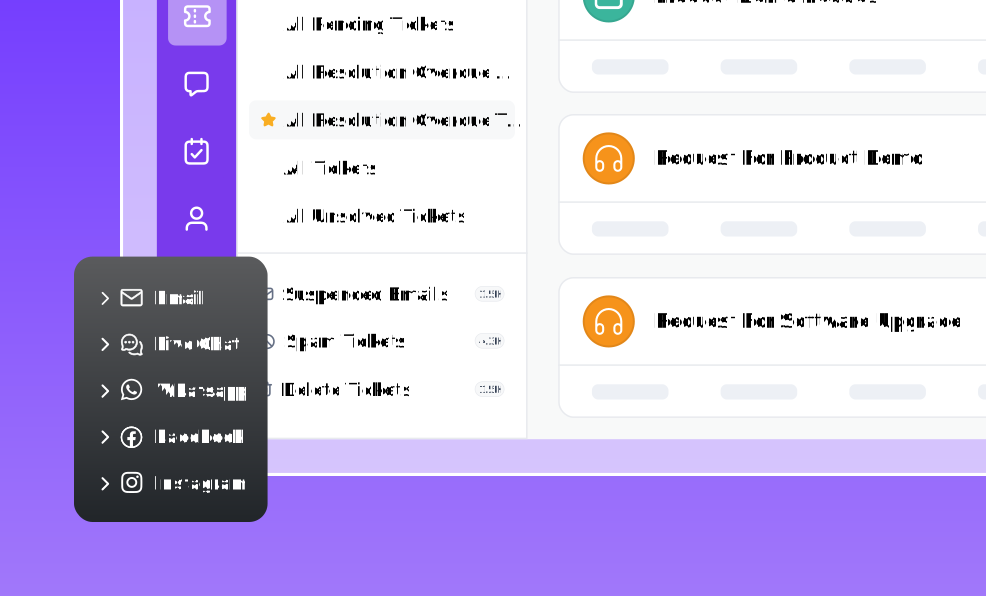
Zendesk brings customer requests from email, messaging, web forms, supported social channels, and voice into a shared ticketing workspace.
From the Agent Workspace, support teams can view conversations, customer details, ticket properties, and previous interactions in one place.
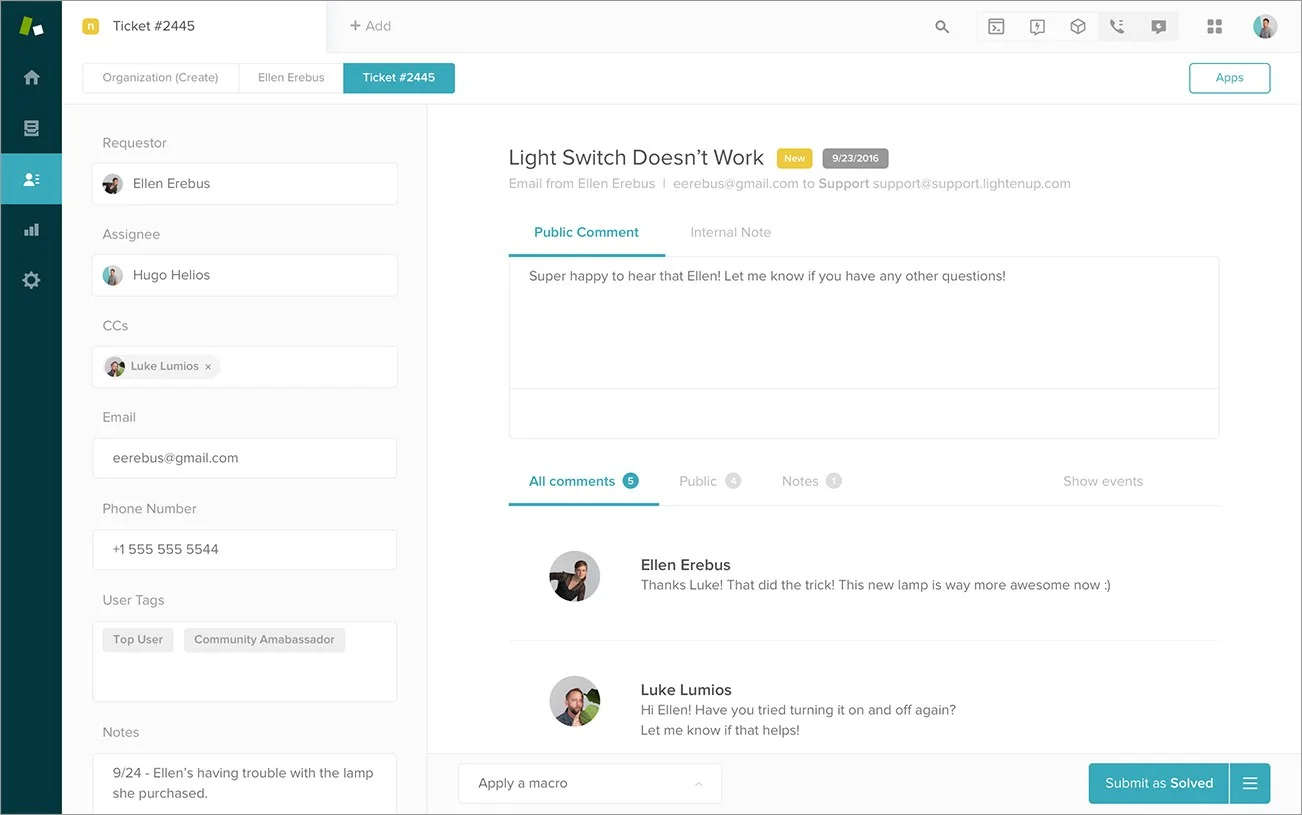
Teams can also use ticket forms, fields, tags, groups, views, priorities, and statuses to organize, route, and track requests more efficiently.
Pros
- Centralizes customer conversations and ticket history.
- Supports detailed ticket categorization, routing, and assignment.
- Supports multiple brands, products, departments, and customer segments within a single workspace.
Cons
- Extensive customization can increase setup and administration time.
- As the account grows, forms, views, fields, groups, and permissions can become difficult to manage consistently.
- Large ticket histories can create data sprawl, making search, reporting, and lifecycle management harder over time.
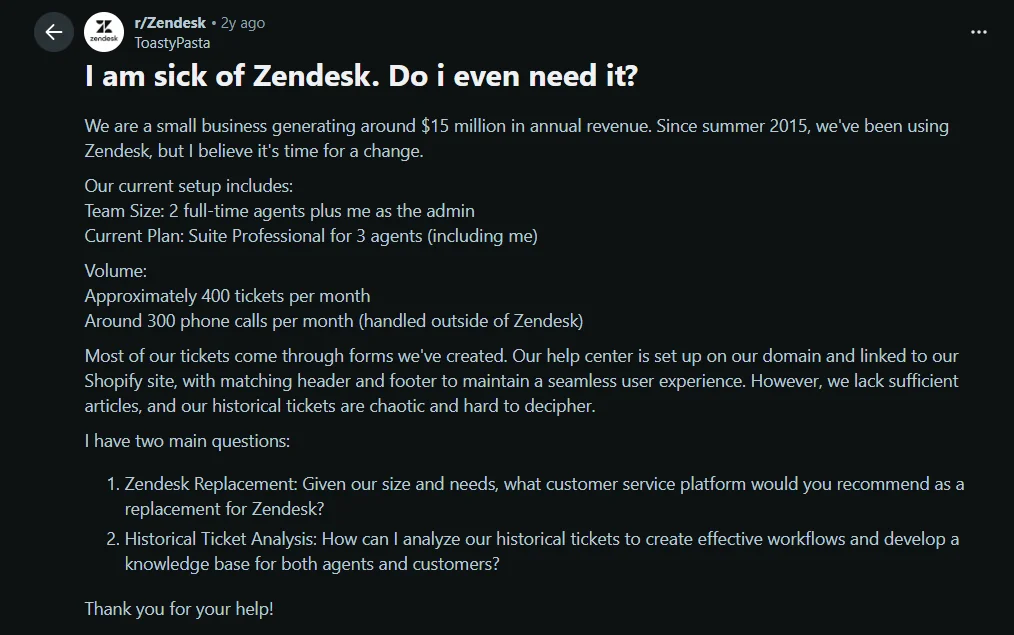
Here’s how one user described the experience on Reddit:
“Most of our tickets come through forms we’ve created. However, we lack sufficient articles, and our historical tickets are chaotic and hard to understand.”
2. SLA management
Zendesk SLA management helps support teams define response and resolution targets for different ticket priorities. Teams can create service level agreement policies that automatically track whether agents are meeting support commitments.
SLA targets can be configured for first response time, next response time, and ticket resolution, helping managers monitor performance and maintain service standards. Zendesk also provides SLA indicators that make it easier to identify tickets at risk of breaching targets.
Pros
- Tracks response and resolution commitments automatically.
- Supports different targets for different ticket priorities.
- Surfaces at-risk tickets before a target is breached.
Cons
- SLA configurations can become difficult to manage for organizations with multiple support teams and workflows.
- More advanced SLA requirements may require significant setup and ongoing maintenance.
- New users often face a learning curve when configuring policies and business rules.
3. Automation, routing, and macros
Triggers and automations handle repetitive actions, macros let agents apply predefined responses and updates, and routing directs tickets to the right agents or teams.
Triggers run immediately when a ticket is created or updated. Automations run on time-based conditions, such as escalating a ticket that has stayed unresolved for a set period.
Pros
- Helps teams standardize how common requests are handled.
- Supports routing based on availability, priority, capacity, or skills.
- Reduces repetitive assignment, tagging, notification, and escalation work.
Here’s feedback from a verified G2 reviewer:
“Automated ticket routing, triggers, and macros reduce repetitive work, helping support teams respond faster and maintain consistent service quality.”
Cons
- As rules grow, triggers and automations can become difficult to audit.
- Overlapping rules may cause unintended routing or updates.
- Effective routing requires upfront operational design and ongoing maintenance.
4. AI agents and Copilot
Zendesk offers AI capabilities for both customers and agents. AI agents respond to customer requests automatically, while Copilot assists agents by generating responses, summarizing conversations, surfacing knowledge, and recommending next actions.
Both sit outside the base plan price. Copilot is $50 per agent per month. AI agents are billed on an automated resolution model, where each plan includes a limited allowance and usage beyond it is charged per resolution.
Pros
- AI agents can handle repetitive customer requests and routine inquiries automatically.
- Copilot saves agent time by summarizing conversations and suggesting responses.
- Intelligent triage classifies requests by intent, language, and sentiment.
Cons
- Results depend heavily on knowledge base quality, tagging, and clean business data.
- Because AI agents are billed per resolution, monthly cost moves with ticket volume rather than headcount, which makes it the hardest line on the invoice to forecast.
- Automation still requires clear escalation, approvals, and guardrails for complex, sensitive, or regulated issues.
5. Knowledge base and help center
Zendesk’s knowledge base software lets businesses create and manage self-service content for both customers and support teams.
Articles can be arranged into categories and sections, published in multiple languages, and delivered through a branded help center.
The knowledge base can also improve agent productivity by surfacing relevant articles during conversations and providing information that helps power AI-assisted responses.
Pros
- Allows businesses to organize articles into categories and sections within a branded Help Center.
- Creates a shared source of information for customers, agents, and AI tools.
- Makes self-service easier to scale across products, brands, and languages.
Cons
- Businesses may need to upgrade to a higher Zendesk plan to access knowledge base capabilities.
- Self-service performance depends on keeping Help Center content accurate and up to date.
- Advanced Help Center customization may require HTML, CSS, or development resources.
6. Messaging and live chat
Zendesk offers both live chat and messaging capabilities for digital customer conversations.
While live chat focuses on immediate support, messaging allows customers to leave and return to a conversation without losing previous context.
Businesses can add messaging to their website, help center, mobile app, and supported third-party channels.
When a bot cannot resolve the request, the conversation can be transferred to a human agent along with the existing conversation context.
Pros
- Preserves conversation history across messaging sessions so customers can resume conversations without starting over.
- Allows agents to handle several digital channels in one workspace.
- Supports seamless bot-to-agent handoffs.
Cons
- Live chat, messaging, and social channels often require separate setup and ongoing channel-by-channel tuning.
- Routing, notifications, bots, and business hours may become complex to maintain across channels.
- Channel availability and controls are plan-dependent, which can limit standardization across teams.
7. Voice and contact center support
Zendesk Voice combines phone conversations with other customer interactions in a single platform.
Support teams can track inbound and outbound calls, route callers through interactive voice response (IVR) menus, record conversations, offer callbacks, and monitor call queues.
Zendesk has also expanded its voice offering with AI-assisted capabilities that help improve efficiency throughout the call journey.
Pros
- Keeps phone interactions connected to customer records and ticket history.
- Gives support teams the tools to manage high call volumes more efficiently.
- Provides supervisors with tools for monitoring contact center performance.
Cons
- Voice can add variable telephony costs beyond agent subscriptions.
- IVR, routing, and compliance configuration can be time-intensive to implement and maintain.
- For primarily digital teams, voice can introduce operational overhead without proportional value.
8. CSAT surveys
Zendesk includes customer satisfaction surveys that collect feedback after support interactions. Administrators can customize survey settings, manage survey channels, and configure business rules that control when surveys are sent.
CSAT responses help teams measure customer experience, identify service gaps, and track satisfaction trends over time.
Pros
- Collects structured feedback automatically after interactions.
- Supports customizable survey timing and channels.
- Feeds satisfaction data into reporting alongside performance metrics.
Cons
- Survey management typically requires administrator access.
- Organizations may need additional configuration to align surveys with internal processes.
- Feedback quality depends heavily on response rates.
9. Quality assurance
Zendesk QA uses automated reviews and scorecards to evaluate a larger share of conversations than manual sampling allows, and to identify coaching opportunities.
It can analyze both agent and AI interactions, helping teams maintain consistent service standards across support channels. QA is sold as an add-on rather than included in a Suite plan.
Pros
- Enables managers to review a larger percentage of customer conversations.
- Identifies coaching opportunities across agent and AI interactions.
- Supports AI-powered conversation reviews and scorecards.
Cons
- Automated scoring still needs regular calibration and human oversight.
- Quality criteria must reflect the organization’s own policies and service standards.
- Teams need well-defined evaluation criteria to get consistent results.
10. Reporting and Zendesk Explore
Zendesk Explore is the platform’s reporting and analytics solution. It helps support teams track customer service performance through prebuilt dashboards and custom reports.
Teams can monitor key customer service metrics, such as ticket volume, response and resolution times, SLA performance, agent productivity, customer satisfaction, and channel performance.
Pros
- Consolidates performance data from multiple support channels.
- Supports custom metrics, dashboards, and calculated fields through Zendesk Explore.
- Allows scheduled delivery and sharing of reports across teams.
Cons
- Advanced reports and calculations may require additional setup and validation.
- Some organizations may still rely on external business intelligence tools for broader business reporting.
- Custom reporting can have a learning curve for new users.
This challenge is reflected in feedback from a verified G2 reviewer:
“Trying to find specific tickets or filter them in existing views can be a pain. Having to create queries for reports as opposed to just selecting the fields you want on the report is a little confusing.”
11. Workforce management
Zendesk Workforce Management (WFM) helps service leaders forecast demand, plan staffing, create schedules, and monitor adherence.
It is designed to help organizations align agent availability with expected customer support workloads.
Pros
- Uses historical trends to support staffing forecasts.
- Centralizes agent scheduling and workforce planning.
- Helps managers compare planned schedules with actual adherence.
Cons
- May provide limited value for smaller teams with predictable workloads.
- Forecast accuracy depends on reliable historical data.
- Schedules, staffing rules, and workforce policies require ongoing management.
12. Data privacy and protection
Zendesk provides advanced data privacy and protection (ADPP) controls that help organizations protect customer information and restrict access to sensitive data.
These capabilities include role-based permissions, authentication controls, encryption, audit logs, and data management features.
Organizations with more demanding requirements can add capabilities for advanced data privacy and protection.
Pros
- Helps administrators restrict access based on user roles and responsibilities.
- Supports single sign-on and stronger authentication controls.
- Provides audit trails that support governance and accountability.
Cons
- Advanced Data Privacy and Protection capabilities are not included in all Zendesk plans.
- Some privacy controls require separate add-ons or higher-tier packages.
- Administrators must configure retention, access, and redaction policies manually
13. Mobile applications
Zendesk offers mobile applications that allow support agents and administrators to manage tickets, respond to customers, and monitor support activity from smartphones and tablets.
The mobile experience is designed to help teams remain productive while working remotely, handling urgent requests outside business hours, or supporting customers away from a desktop environment.
Pros
- Enables agents to manage tickets and respond to customers on the go.
- Supports remote and distributed support teams.
- Provides access to notifications, conversations, and customer information from mobile devices.
- Helps teams respond more quickly to urgent issues and escalations.
Cons
- Some advanced workflows are easier to manage from the desktop application.
- Screen size limitations can affect productivity when handling complex tickets.
- Certain administrative and reporting tasks may be less convenient on mobile devices
14. App integrations, REST APIs, and webhooks
Zendesk supports integrations through its Marketplace apps, prebuilt connectors, REST APIs, webhooks, and custom applications.
These capabilities allow businesses to connect Zendesk with CRM systems, ecommerce platforms, communication tools, and other business software.
Pros
- Integrates with CRM, ecommerce, communication, and productivity tools.
- APIs and webhooks enable custom workflows and automation.
- Includes hundreds of Marketplace apps and prebuilt integrations.
A verified G2 user described it this way:
“Integrates well with tools like Slack, Salesforce, Jira, Shopify, and hundreds of others.”
Cons
- Custom integrations often require technical expertise.
- Ongoing maintenance may be needed as systems and APIs evolve.
- Managing multiple integrations can increase operational complexity.
Zendesk limitations
While Zendesk offers a comprehensive set of customer service tools, buyers should also consider the platform-level challenges that often emerge as support operations grow.
Rather than focusing on individual feature limitations, the table below highlights the broader factors that can influence implementation complexity, scalability, and total cost of ownership.
| Limitation area | Why it matters |
|---|---|
| Cost and plan gating | Many capabilities are distributed across different plans, and several, including Voice, QA, Workforce Management, Advanced Data Privacy and Protection, Copilot, and AI Agents, require additional purchases. Teams must often combine plans and add-ons to access their desired feature set. |
| Setup complexity | Zendesk’s flexibility supports extensive customization, but managing workflows, permissions, integrations, and business rules can require significant administrative effort. |
| Support responsiveness | Some users report challenges escalating issues or accessing higher levels of support, which becomes more important when Zendesk serves as the organization’s primary support platform. |
| AI billing predictability | AI Agents are billed per automated resolution rather than per agent. As ticket volume increases, AI costs can become more difficult to forecast and control. |
Bottom line: Zendesk remains a powerful customer service platform, particularly for organizations that need advanced customization, omnichannel support, and a large integration ecosystem.
However, evaluating the platform requires looking beyond individual features and considering the long-term impact of pricing, add-ons, administration, and operational complexity.
Explore BoldDesk: A more streamlined alternative to Zendesk
Zendesk offers a broad range of customer service features but managing them can become more complex as teams add channels, workflows, AI, and integrations.
For teams looking for a simpler approach, BoldDesk brings ticketing, live chat, omnichannel support, automation, knowledge management, reporting, and AI tools together in one easy-to-manage platform.
“BoldDesk is easily configurable, highly intuitive, and has many features one would only expect to have in higher priced products. Their customer support is prompt and helpful.”– Harsha R, LTIMindtree
Here’s a quick feature comparison:
|
Features
|
 |
 |
|
Ticketing system |
||
|
Knowledge base tools |
(Available only on Suite plans) |
|
|
Ticket linking |
Configuration or apps may be needed |
|
|
Messaging and live chat |
(Available only on Suite plans) |
|
|
Workflow automation |
||
|
AI Copilot |
||
|
AI Agents |
||
|
Task management |
||
|
Omnichannel customer service |
(Available only on Suite plans) |
|
|
Integrations |
||
|
Parent-child tickets |
(Configuration or apps may be needed) |
|
|
Ticket approval workflows |
(Custom workflow or app may be needed) |
|
|
Private tickets |
(Availability depends on the product) |
|
|
SLA management |
||
|
Core feature access |
Included across BoldDesk plans | Varies by Zendesk plan and product |
|
Free migration |
BoldDesk starts at $99 per month for five agents on annual billing, with every core capability included rather than tiered.
Zendesk Support Team starts at $19 per agent per month and the Zendesk Suite at $55 (Suite Team) and $115 (Suite Professional), before Copilot, voice, QA, workforce management or per-resolution AI usage.
BoldDesk also offers free Zendesk migration of tickets, contacts, and knowledge base content with zero downtime, with dedicated account managers throughout the transition.
One verified G2 reviewer who switched from Zendesk shared:
“We were able to migrate from Zendesk very easily. The migration team was great to work with and helped move everything over while meeting our regulatory requirements.”
Look beyond Zendesk’s features list
Zendesk offers one of the broadest customer service feature sets available today.
Whether it is the right platform depends on which capabilities your team will actually use, which plan those capabilities sit on, how much configuration you are prepared to manage, and how the AI billing model fits your ticket volume.
For teams exploring options, comparing best Zendesk alternative on feature availability rather than headline price is usually the faster route to an answer.
Related articles
- Intercom vs Zendesk: Find the Best Solution for Your Customer Support
- Freshdesk vs Zendesk: A Comparison Guide for 2026
- Why Zendesk Becomes Expensive for Growing Teams
FAQs on Zendesk Features
Zendesk’s core features are its ticketing system and agent workspace, SLA management, automation and routing, AI agents and Copilot, knowledge base and help center, messaging and live chat, voice, CSAT surveys, quality assurance, reporting through Zendesk Explore, workforce management, data privacy controls, mobile apps, and integrations.
Availability varies; some are included in base plans, others are restricted to Suite tiers, and several are separate add-ons.
Zendesk is primarily used to manage customer service conversations across multiple channels, including email, chat, phone, messaging apps, and self-service portals.
It helps teams organize tickets, automate workflows, provide self-service resources, assist agents, and monitor customer service performance.
Ticketing, SLA management, and basic automation are available from the entry Support Team plan. Messaging, live chat, omnichannel support, and the knowledge base require a Suite plan. Voice, quality assurance, workforce management, advanced data privacy controls, and Copilot are purchased separately on top of a plan. See the plan availability table above for the full mapping.
Not as part of a Suite plan. Zendesk Contact Center is purchased separately on a per-agent basis and includes an allowance of call minutes, with additional minute blocks available when teams need more capacity.
Telephony usage is billed on top of the per-agent fee, so phone-heavy teams should budget voice as its own line.
Zendesk Copilot is $50 per agent per month. Zendesk AI agents are billed on an automated resolution model, where each plan includes a limited allowance per agent per month and usage beyond that allowance is charged per resolution. Because resolutions track ticket volume rather than headcount, the AI line is the least predictable part of a Zendesk invoice.
Yes. The Support Team plan at $19 per agent per month provides ticketing without the Suite. It does not include live chat, omnichannel support, or AI agents, so teams that need conversational channels or automation generally end up on Suite Team at $55 or Suite Professional at $115.
Triggers are workflow rules that run immediately when a ticket is created or updated. Automations run on time-based conditions, such as escalating a ticket that has remained unresolved for a specified period.
Zendesk Explore provides prebuilt dashboards, custom reports, SLA tracking, ticket-volume analysis, agent-performance reporting, channel reporting, CSAT reports, scheduled reports, and data exports. Advanced custom reporting requires building queries, which reviewers commonly cite as a learning curve.
The most commonly reported limitations are plan gating, where expected capabilities sit on higher tiers or behind add-ons; setup and administration complexity as workflows, permissions and integrations grow; reporting customization difficulty; and AI costs that are hard to forecast because they are billed per resolution.
No. Availability depends on the plan, product, add-on, and usage limits selected. Advanced AI tools, workforce management, quality assurance, enhanced privacy controls, and contact center features all require specific plans or additional purchases.