TL;DR: Well-designed customer service chatbot templates help customers get faster answers while reducing repetitive work for support teams. They make support more consistent by handling common requests, guiding customers to the right next step, and ensuring smooth escalation when human assistance is needed.
Customer service chatbots are handling an increasing share of support interactions.
Salesforce’s State of Service research reports that AI is expected to handle 50% of customer service cases by 2027, up from 30% today. The goal is not to replace agents, but to help them focus on higher-value work.
As more organizations adopt chatbots for customer service, creating effective conversation flows becomes a challenge. Teams need workflows that collect the right information, guide customers toward resolution, and seamlessly transfer complex issues to human agents when needed.
Ready-to-use chatbot templates provide a practical starting point for common customer interactions, helping teams launch workflows faster and maintain consistency across support conversations.
In this guide, you’ll find practical chatbot templates and conversation flow examples designed to help businesses automate common support interactions, improve response consistency, and deliver better customer experiences.
What is a customer service chatbot template?
A customer service chatbot template is a pre-built conversation flow that helps chatbots handle common customer support requests consistently.
It defines how a chatbot collects information, responds to customer questions, guides users through specific tasks, and escalates conversations when human assistance is needed.
These templates are commonly used for scenarios such as order tracking, billing inquiries, account access, troubleshooting, and feedback collection.
By providing a ready-made framework for common interactions, they help support teams launch chatbot workflows faster without designing every conversation from scratch.
Benefits of customer service chatbot templates
Effective AI chatbot templates don’t just standardize conversations; they improve how quickly and consistently customer issues are resolved.
Key benefits include:
- Faster response times: Pre-built conversation flows help customers get answers quickly and reduce the time spent handling repetitive requests.
- Consistent support across every interaction: Standardized messaging ensures customers receive accurate, on-brand responses across channels and support teams.
- Capture the right information upfront: Structured workflows collect important details early, helping teams understand customer needs and reduce unnecessary back-and-forth.
- Personalized conversations at scale: Dynamic fields such as names, order numbers, account details, and product information make automated conversations feel more relevant and contextual.
- Seamless handoffs to live agents: Clear escalation paths transfer conversations with the necessary context, reducing repetition and helping agents resolve issues faster.
- Guide customers to faster resolutions: Well-designed templates direct customers toward the next best action, whether that’s self-service, troubleshooting, scheduling assistance, or connecting with a live agent.
In short, effective chatbot templates don’t just answer questions, they help customers reach a resolution faster and more efficiently.
40+ Ready-to-use chatbot templates for common support requests
Support conversations often follow predictable patterns, from greetings and routing requests to handling orders, billing, and technical issues.
Having ready-to-use chatbot templates for these common scenarios helps teams respond faster, maintain consistency, and provide a better experience without building every customer interaction from scratch.
Here’s a quick overview of how these chatbot templates are commonly used:
1. Welcome and greeting template
First impressions matter in customer support. A welcome message helps customers feel acknowledged while guiding them toward the help they need.
Hello and welcome to [Company name]!
I’m here to help with any questions or issues you may have. Whether you need assistance with your account, an order, billing, or technical support, I’ll do my best to point you in the right direction.
How can I assist you today?
2. Department routing template
Customers don’t always know which team can solve their issue. A routing workflow reduces confusion and ensures requests reach the right destination faster.
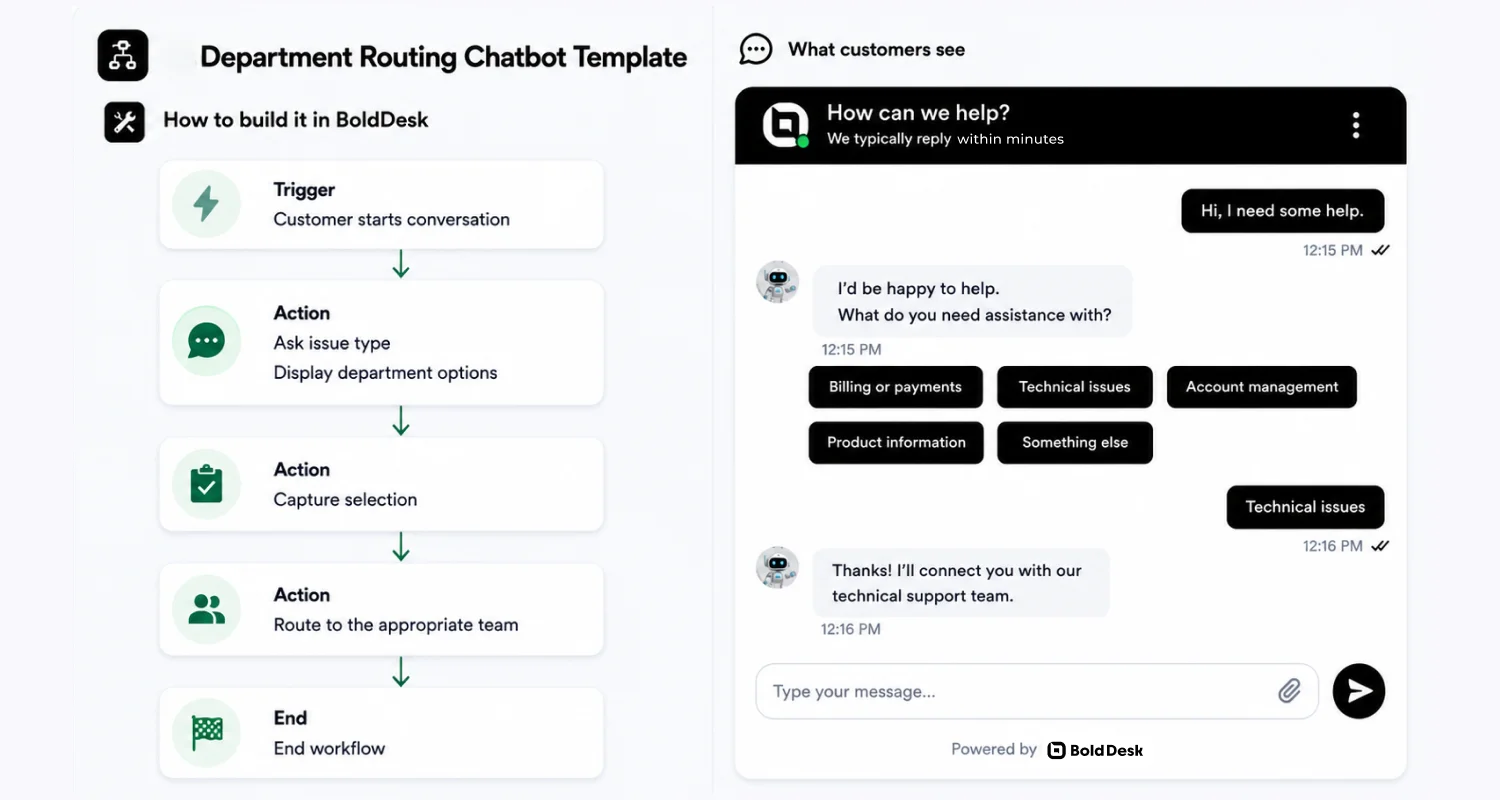
I’d be happy to help.
To make sure your request reaches the right team, could you tell me what you need assistance with?
For example:
- Billing or payments
- Technical issues
- Account management
- Product information
- Something else
Once I know a little more about your request, I’ll connect you with the appropriate department or provide the information you need.
3. Business hours inquiry template
Support availability is often one of the first things customers want to know. Keep customer expectations clear by sharing business hours and response timelines upfront.
Our support team is available during the following hours:
- [Business hours]
- [Time zone]
If you contact us outside these hours, we’ll respond as soon as our team becomes available.
If your question is urgent, feel free to leave a message and I’ll make sure it’s routed to the appropriate team.
4. Offline support form template
When agents are unavailable, customers shouldn’t hit a dead end. This response captures essential details so conversations can continue when support returns.
It looks like our support team is currently unavailable.
I’d still be happy to collect your information so we can follow up with you as soon as possible.
Could you please provide:
- Your name
- Email address
- A brief description of your issue
Once your request has been submitted, a member of our team will review it and get back to you within [Response time].
5. Chatbot-to-live-agent transfer template
Some situations require more than automated assistance. A smooth handoff reassures customers that their issue is receiving the attention it deserves.
Thank you for providing those details.
Based on the information you’ve shared, this issue requires assistance from one of our support specialists.
I’m forwarding your request to a member of our team who can investigate further and provide personalized assistance.
I’ve included the details from our conversation, so you won’t need to repeat the information you’ve already provided.
A support representative will be with you as soon as possible. Thank you for your patience.
6. AI chatbot fallback response template
Even advanced AI assistants encounter requests they can’t confidently interpret. A fallback response keeps the conversation flowing instead of leaving customers stranded.
I’m sorry, but I couldn’t fully understand your request.
Could you please:
Rephrase your question, or select one of the following options:
- Orders
- Billing
- Technical Support
- Account Management
- Speak with an Agent
I’ll do my best to help.
7. Account registration assistance template
The signup experience can shape a customer’s perception of your business. A clear registration workflow helps new users get started without unnecessary friction.
Welcome to [Company name]! Let’s create your account.
Please provide the following information:
- Full name: [Name]
- Email address: [Email]
- Preferred username (optional): [Username]
Once your registration is complete, we’ll send a confirmation email to [Email address] with instructions to activate your account.
Need help during the sign-up process? Contact us at [Support contact].
8. Account verification template
Before discussing sensitive account information, support teams often need to confirm a customer’s identity. This process adds a layer of security while maintaining a seamless customer experience.
For your security, we need to verify your identity before proceeding.
Please confirm the email address associated with your account: [Email address]
A verification code will be sent to your registered contact method. Enter the code below to continue:
Verification code: [Code]
If you’re unable to access your registered email or phone number, please contact [Support team] for assistance.
9. Password reset template
Forgotten passwords are one of the most common reasons customers contact support. This recovery workflow helps users regain access to their accounts quickly while keeping the process secure.
Forgot your password? No problem.
Enter the email address associated with your account: [Email address]
We’ll send a password reset link to your inbox.
If you don’t receive the email within [X minutes], check your spam folder or contact [Support contact] for further assistance.
10. Login troubleshooting template
Sign-in problems can stem from a variety of causes, from browser settings to authentication errors. Gathering the right information early can significantly shorten resolution times.
We’re sorry you’re having trouble signing in. To help us identify the issue, please provide the following details:
- Email address: [Email address]
- Device: [Desktop/Mobile/Tablet]
- Browser or app version: [Browser/App]
- Error message (if any): [Error message]
Additional details: [Describe the issue]
We’ll review the information and help you get back into your account as quickly as possible.
11. Account update request template
Contact details, preferences, and billing information change over time. A dedicated update request makes it easier to keep customer records accurate and up to date.
I can help you update your account information. Please tell us what you’d like to change:
- Email address: [New email]
- Phone number: [New phone number]
- Billing information: [Updated details]
For security purposes, we may ask you to verify your identity before certain changes can be completed.
12. Order status inquiry template
After placing an order, customers naturally want reassurance that everything is progressing as expected. This workflow provides quick visibility into purchase and shipping updates.
I’d be happy to check your order status.
Please provide one of the following:
- Order number: [Order number]
- Email address: [Email address]
Once I locate your order, I’ll share the latest update, including its current status and any available shipping information.
13. Order tracking template
Customers appreciate being able to track deliveries without searching through emails or order confirmations. Bringing tracking information directly into the conversation creates a smoother experience.
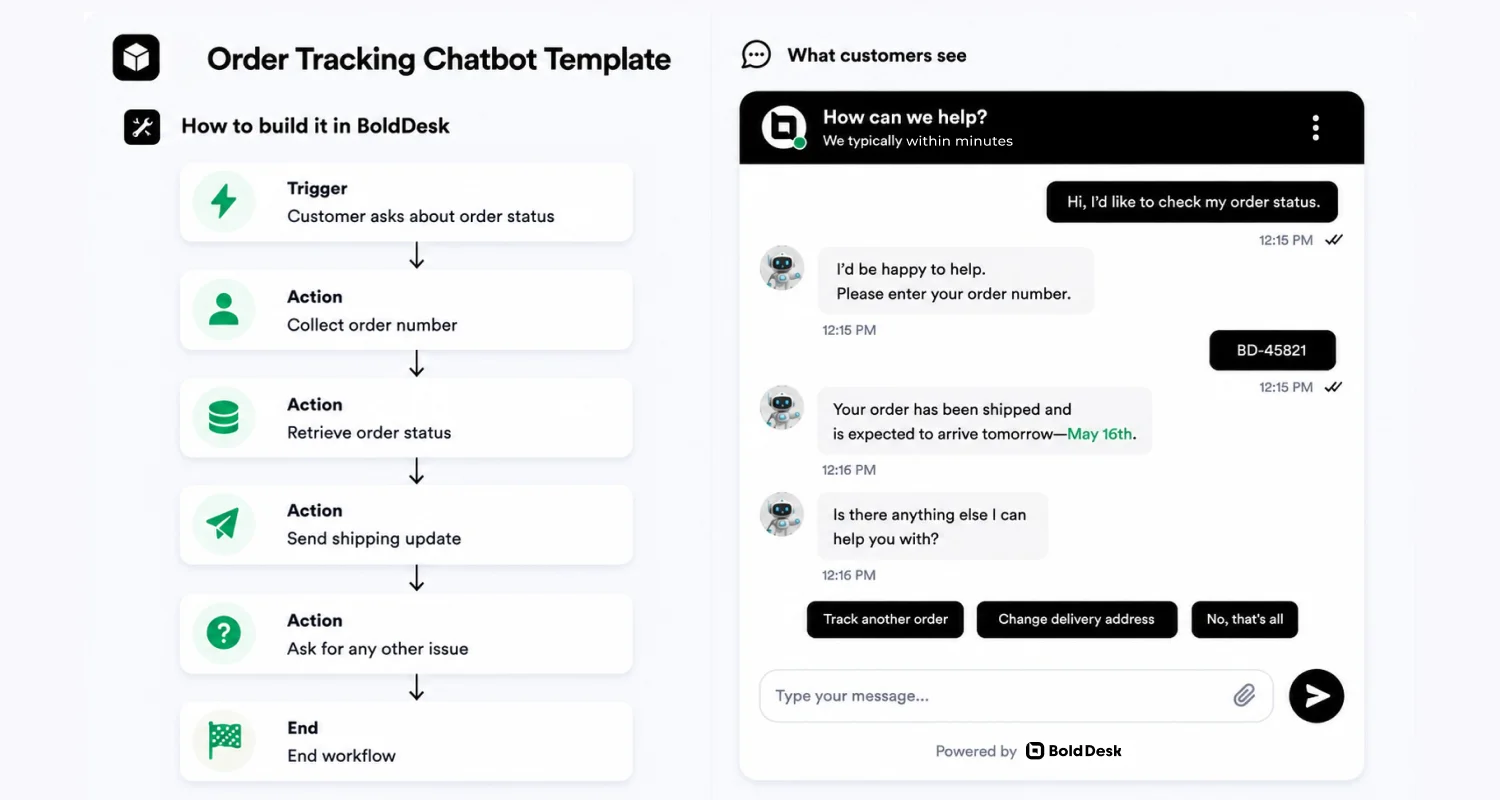
Let’s track your package. Please provide:
- Current shipment status: [Current status]
- Tracking updates: [Tracking updates]
- Estimated delivery date: [Estimated delivery date]
If you need additional information about your shipment, please let us know and we’ll be happy to assist.
14. Order cancellation request
Circumstances change, and customers may need to cancel an order before it ships. A clear cancellation process helps manage expectations while reducing support effort.
I can help you request an order cancellation. Please provide:
- Order number: [Order number]
- Reason for cancellation: [Reason for cancellation]
We’ll review your request and confirm whether the order can still be canceled.
An update will be sent to [Email address] once your request has been reviewed.
15. Return request template
A hassle-free return experience can strengthen customer trust, even when a purchase doesn’t work out. This response gathers the information needed to start the process efficiently.
I’d be happy to help you start a return. Please provide:
- Order number: [Order number]
- Item(s) to return: [Product name(s)]
- Reason for return: [Reason for return]
Once we receive your request, we’ll provide the next steps for returning your item, including any shipping instructions if applicable.
16. Refund request template
Refund requests are sensitive because customers want clarity on eligibility, timelines, and next steps. A structured chatbot flow helps collect the required details and set clear expectations before the request is reviewed.
I can help you submit a refund request. Please provide:
- Order number: [Order number]
- Product or service: [Product or service name]
- Reason for refund: [Reason for refund]
We’ll review your request and send an update to [Email address] once a decision has been made.
If approved, refunds are typically processed within [X business days].
17. Billing inquiry template
Unexpected charges and invoice questions can quickly become frustrating. Providing a dedicated path for billing inquiries helps customers find answers faster.
We’ll need a few details to review your billing inquiry. Please provide:
- Account email: [Email address]
- Invoice number (if available): [Invoice number]
- Description of the issue: [Billing question]
Once we receive this information, we’ll review your account and provide clarification on any charges, invoices, or payment-related questions.
18. Payment failure assistance template
A failed payment doesn’t always mean a lost customer. Addressing payment issues promptly can help recover transactions and prevent unnecessary churn.
We noticed there was an issue processing your payment. To help us identify the cause, please provide:
- Account email: [Email address]
- Payment date: [Payment date]
- Error message (if displayed): [Error message]
We’ll review the details and recommend the next steps to complete your payment successfully.
19. Subscription upgrade template
As customer needs grow, their subscription plans often need to evolve as well. This workflow simplifies upgrades while keeping customers informed about pricing and plan changes.
You’re requesting a subscription upgrade. Please provide:
- Current plan: [Current plan]
- Desired plan: [New plan]
We’ll review the available upgrade options and confirm any pricing changes before updating your subscription.
The effective date of the new plan will be shared during the upgrade process.
20. Subscription cancellation template
Customers should be able to manage their subscriptions without unnecessary obstacles. A transparent cancellation process helps create a better overall experience, even when someone chooses to leave.
We’re sorry to hear you’re considering canceling your subscription. To process your request, please provide:
- Account email: [Email address]
- Subscription plan: [Plan name]
- Reason for cancellation (optional): [Reason]
We’ll review your request and confirm your cancellation details, including any remaining access and billing information.
21. Invoice request template
Invoices play an important role in accounting, compliance, and reimbursement workflows. Making them easy to access saves time for both customers and support teams.
To locate the correct invoice, please provide:
- Account email: [Email address]
- Invoice number (if available): [Invoice number]
- Billing period: [Month/Date range]
Once the request is verified, a copy of the invoice will be sent to [Email address].
22. Issue acknowledgment template
Customers want reassurance that their problem has been received and understood. An acknowledgment message sets the stage for a productive support interaction.
Thank you for reporting this issue. To help us understand what’s happening, please provide the following details:
- Product or service: [Product name]
- Description of the issue: [Issue description]
- When the issue started: [Date/Time]
We’ll review the information and guide you through the next steps.
23. Technical troubleshooting template
Successful troubleshooting starts with accurate information. Collecting device, browser, and error details upfront can dramatically speed up diagnosis.
To help us troubleshoot the issue, please provide:
- Device: [Desktop/Mobile/Tablet]
- Operating system: [Operating system]
- Browser or app version: [Browser/App version]
- Error message (if any): [Error message]
- Additional details: [Describe what happened]
24. Service outage notification template
When services are disrupted, communication becomes just as important as the fix itself. Regular updates help reduce uncertainty and maintain customer trust.
We’re currently aware of an issue affecting [Product/Service name].
Status: [Investigating / Identified / Monitoring]
Our team is actively working to restore normal service as quickly as possible.
We’ll continue to share updates as new information becomes available.
Latest update: [Status update]
25. Bug report submission template
The quality of a bug report often determines how quickly an issue can be resolved. Encouraging customers to provide detailed information makes investigations more effective.
Thank you for bringing this to our attention.
Please provide the following information:
- Product or feature: [Product/Feature name]
- Description of the bug: [Bug description]
- Steps to reproduce: [Steps]
- Expected result: [Expected behavior]
- Actual result: [Actual behavior]
Any screenshots, recordings, or error messages you can share may help us investigate the issue more quickly.
26. Ticket creation template
Not every issue can be resolved in a single conversation. Creating a support ticket ensures requests are tracked, prioritized, and followed through to completion.
Your request is ready to be submitted.
Please confirm the following details:
- Subject: [Issue summary]
- Category: [Support category]
- Description: [Issue description]
- Priority: [Low / Medium / High]
Once submitted, your support ticket will be assigned to the appropriate team. Estimated response time: [Response time]
27. Resolution confirmation template
Closing a case too early can lead to repeat contacts and frustrated customers. Confirming that the issue is truly resolved helps prevent unnecessary follow-ups.
Our records show that your request has been resolved.
Before we close this conversation, please let us know whether the issue has been fully resolved.
Resolution status: [Resolved / Still need help]
Additional Comments: [Comments]
If you’re still experiencing the issue, our support team will continue working with you until it’s resolved.
28. Customer satisfaction (CSAT) survey template
Every support interaction offers an opportunity to gather actionable feedback. Use these CSAT surveys to measure satisfaction and continuously improve your support processes.
Thank you for contacting [Company name].
We’d appreciate your feedback on your recent support experience.
How satisfied were you with the assistance you received?
- ⭐ ⭐⭐⭐⭐Very Satisfied
- ⭐ ⭐⭐⭐Satisfied
- ⭐ ⭐⭐Neutral
- ⭐ ⭐Dissatisfied
- ⭐ Very Dissatisfied
Additional feedback: [Comments]
Your feedback helps us improve our products and customer service.
29. Net promoter score (NPS) survey template
While CSAT focuses on a specific support interaction, Net Promoter Score measures long-term customer loyalty. This survey helps businesses understand how likely customers are to recommend their product or service to others.
Thank you for using [Company name]. On a scale of 0 to 10, how likely are you to recommend our product or service to a friend or colleague?
Rating: [0-10]
What was the primary reason for your score?
[Feedback]
Your response helps us better understand what’s working well and where we can improve.
30. Follow-up check-in template
Support doesn’t always end when a ticket is marked resolved. A proactive check-in demonstrates ongoing commitment to customer success and satisfaction.
It’s been a few days since we helped resolve your request, and we’d like to check in.
Are things working as expected now?
Response: [Everything is working / I still need help]
Additional Feedback:
[Comments]
If you need further assistance, simply reply with more details and we’ll be happy to take another look.
These chatbot templates cover common customer service scenarios and can be easily customized to fit your workflows.
Want to adapt these examples faster? Download the full collection below to start building more structured and effective customer conversations.
Download free chatbot templates
Industry-specific customer service chatbot templates
Different industries handle different customer support requests. The chatbot templates below are tailored to common scenarios across various sectors, helping support teams collect the right information and resolve issues more efficiently.
SaaS
SaaS teams handle a wide range of account, billing, and product-related requests.
These chatbot templates complement SaaS customer support workflows by collecting the right details and guiding customers toward a faster resolution.
31. Subscription usage limit template
Customers may reach their plan or usage limits and need help understanding the message. This template collects the key details needed to troubleshoot the issue.
Are you seeing a plan or usage limit message?
Please share:
- Workspace or account name: [Workspace name]
- The message you’re seeing: [Message]
- What you were trying to do: [Action]
I’ll explain what the message means and what you can do next.
32. Feature request submission template
Customers often have ideas for improving your product or service. This template collects the information your team needs to review and prioritize feature requests.
Thanks for sharing your idea! We’d love to hear it.
Please tell us:
- What feature would you like to see? [Feature]
- What problem would it solve for you? [Reason]
- How important is it? [Nice to have / Important / Critical]
We’ll share your request with our product team and let you know if we need any additional information.
Ecommerce
Ecommerce support teams manage everything from order issues to post-purchase questions. These templates simplify common workflows while supporting a better ecommerce customer service experience.
33. Missing item or incomplete order template
Missing items need to be verified before a replacement or refund can be processed. This template collects the key details needed to review the request.
I’m sorry something is missing from your order.
Please share:
- Order number: [Order #]
- Missing item(s): [Item name]
- Photo of the items you received (optional): [Upload]
We’ll review the details and work to resolve the issue as quickly as possible.
34. Address change before shipment template
Address changes are time-sensitive and need to be handled quickly before an order is shipped. This template helps confirm whether an update is still possible and prevents delivery issues.
Need to change your shipping address? I will check if we can still update it before dispatch.
Please provide:
- Order number: [Order #]
- Correct shipping address: [New address]
- Phone number for delivery (optional): [Phone]
If the order has already shipped, I will share the best available options.
Healthcare
Healthcare organizations receive routine requests such as appointment scheduling, prescription refills, and portal access.
These templates support efficient customer service in healthcare while helping protect patient privacy.
35. Prescription refill assistance
This template helps route the request to the right team while protecting patient information.
I can help route this request to the appropriate team.
What do you need help with?
- Prescription refill request
- Change pharmacy
- Check refill status
Please provide:
- Patient name:
- Date of birth: [DOB]
- Pharmacy name and location:
Please do not share medical details here.
If this is urgent or an emergency, contact local emergency services right away.
36. Patient portal access help template
Portal access issues are common and usually solvable with the right category and contact method on file.
Having trouble accessing the patient portal?
Choose one:
- Password reset
- Verification code issue
- Account not found
To help, please share:
- Email or phone number on file: [Email/Phone]
- What you are seeing (error message, if any): [Error]
For your privacy, do not share medical information in chat.
Finance
Financial institutions regularly assist customers with account access, verification, and transaction issues.
These templates strengthen fintech customer service by collecting the right information securely from the start.
37. Verification code issues template
Verification code issues can prevent users from accessing their accounts. This template helps gather the details needed to troubleshoot the problem without asking for sensitive information.
Not receiving your verification code? I can help.
Which method are you using:
- SMS
- Authenticator app
Please confirm:
- The last 2 digits of the phone number on file (if SMS): [XX]
- Approximate time you tried to log in (include time zone): [Time]
- Any message you saw on screen (copy/paste): [Message]
For security, do not share passwords, full account numbers, or PINs here.
38. Unauthorized or suspicious charge template
This template helps customers report unexpected or suspicious charges and ensures the issue is reviewed quickly by the right team.
I’m sorry you’ve noticed a charge that doesn’t look right, let’s check this together.
To help us review it, please share:
- Account email: [Email address]
- Date of the charge: [Date]
- Amount charged: [Amount]
- What looks unusual: [Describe the issue]
If you can, please also let us know:
- I don’t recognize this charge
- I was charged the wrong amount
- I was charged more than once
Once we have these details, we’ll review the transaction and guide you on the next steps as quickly as possible.
HR
HR teams receive many routine employee requests that can be handled through self-service.
These templates help collect the information needed to process requests quickly and consistently.
39. Leave request template
Leave requests require a few key details before they can be reviewed. This template helps employees submit their request in one conversation.
I can help you submit a leave request.
Please provide:
- Leave type: [Vacation/Sick/Parental/Other]
- Start date: [Date]
- End date: [Date]
- Reason (optional): [Reason]
We’ll send your request to the HR team for review and notify you once it’s been processed.
40. Employee onboarding template
New hires need quick access to setup steps, documents, and company resources. his template helps guide employees through the first onboarding tasks.
Welcome! I can help you get started.
What do you need help with?
- New hire checklist
- Required documents
- IT setup
- Benefits information
I’ll share the right resources and next steps.
Telecom
Whether customers are activating a new SIM or troubleshooting slow data, collecting the right information upfront makes support more efficient.
These templates enhance telecom customer experience by speeding up issue resolution.
41. eSIM/SIM activation template
Activation troubleshooting depends on device and number transfer details.
Activating a SIM/eSIM? I can help.
Please provide:
- Device model: [Model]
- OS version: [iOS/Android version]
- Are you transferring an existing number or starting new service? [Transfer/New]
- Any activation error message (copy/paste): [Error]
If you’re transferring a number, share your preferred transfer time window (optional): [Time]
42. Data speed issue template
This template helps understand the speed issue so support can provide a clear and accurate response.
Seeing slow speeds after heavy usage? I can check your usage status.
Please provide:
- Plan name (if known): [Plan]
- Current billing cycle start date (or cycle date range): [Date range]
- Your general location (ZIP/postal code): [ZIP]
Once I have that, I’ll explain what’s happening (usage status or network conditions) and what you can do next.
Internal IT / Help Desk
Employee onboarding, access requests, and connectivity issues are common help desk tasks. These templates complement IT customer service by capturing the details needed to resolve requests with fewer follow-ups.
43. Employee onboarding request template
Onboarding requests need the right details such as role, access, and start date to ensure everything is set up on time. This template helps collect the information needed to avoid delays.
I can help set up access for a new team member.
Please share the following details:
- Employee name: [Name]
- Role or job title: [Role]
- Start date: [Date]
- Required tools or access: [Apps/Systems]
- Manager/team: [Team/Manager name]
If there’s anything specific this person needs on day one, please include that as well.
Once we have these details, we’ll start the setup and confirm when everything is ready.
44. VPN connection issue template
VPN issues can prevent employees from accessing internal systems and tools. This template helps collect the right details upfront so the issue can be resolved faster.
I can help you with your VPN connection issue.
Please share the following details:
- Device type: [Laptop/Desktop/Mobile]
- Operating system: [Windows/macOS/Linux]
- Network you’re using: [Office/Home/Public Wi-Fi]
- What happens when you try to connect: [Describe the issue]
- Error message (if any): [Error message]
If possible, let us know when the issue started. Once we have these details, we’ll review the problem and guide you on the next steps.
Download these industry-specific chatbot templates and customize them for your business.
Practical use cases of customer service chatbot templates
The templates above can be adapted to many support scenarios.
Here are some examples of how businesses use chatbot templates to deliver faster, more consistent customer support.
1. Speeding up billing and refund resolution
Billing questions and refund requests are among the most frequent support inquiries.
Chatbot templates collect essential information, such as the customer’s account email, invoice number, and reason for the request, at the start of the conversation.
They then answer common billing questions automatically or route more complex issues to the appropriate billing specialist with the necessary context.
Business value:
- Shorter response and resolution times for billing requests
- Fewer repetitive billing inquiries are reaching support agents
- More accurate routing with complete customer context
- Higher customer satisfaction through faster issue resolution
2. Reducing order tracking support volume
“Where is my order?” is one of the most common questions for e-commerce businesses.
Order tracking chatbot templates automatically collect the order number, provide real-time shipping updates, and escalate delayed or exceptional deliveries with all relevant order details already captured.
Business value:
- Lower volume of order tracking tickets
- Higher self-service resolution rates
- Reduced workload for customer support teams
- Faster responses and improved post-purchase customer experience
These examples show how chatbot templates go beyond scripted replies; helping teams handle high-volume requests, improve consistency, reduce manual triage, and deliver faster, more reliable support.
Best practices for implementing chatbot templates
Rolling out chatbot templates isn’t about launching everything at once. The teams that achieve the best results start small, tie templates to real support workflows, and continuously improve them using customer interaction data.
Here’s how to do it right:
- Start with high-volume support requests: Focus on common scenarios such as order status, billing questions, password resets, and account assistance where automation can deliver immediate value.
- Build from real customer conversations: Use existing support tickets and chat transcripts to create workflows that reflect how customers actually ask for help.
- Match your brand voice and support policies: Customize messaging, required information, escalation rules, and response options to align with your customer service standards.
- Use the right triggers and entry points: Decide when templates should appear based on customer intent, website pages, actions, or support scenarios.
- Test before deployment: Validate common conversation paths, unexpected inputs, and edge cases to ensure customers can complete tasks successfully.
- Measure performance and improve continuously: Monitor metrics such as containment rate, escalations, CSAT, and repeat contacts to identify opportunities for optimization.
Key takeaway: Start with a small set of high-impact templates, tie each one to a real workflow (data capture, next step, escalation), then refine them continuously using chat outcomes and customer feedback.
Common chatbot template mistakes to avoid
Even well-designed chatbot templates can fail if key usability and experience issues are overlooked. The most common mistakes include:
- Robotic responses: Templates that sound overly scripted can feel unnatural and reduce user trust.
- Too many questions upfront: Asking for too much information at once can overwhelm users and increase drop-offs.
- Missing escalation paths: Without a clear handoff to human support, complex issues remain unresolved.
- Outdated templates: Failing to update templates leads to inaccurate responses and poor customer experience.
These issues can lead to higher customer frustration, repeated interactions, and lower resolution rates, undermining the overall effectiveness of your chatbot.
How AI makes customer service chatbot templates easier to build and maintain
Writing chatbot templates from scratch can be time-consuming. Support teams need to identify common customer questions, create consistent responses, and keep conversations aligned with changing products and policies.
AI simplifies this process by helping teams build, refine, and maintain chatbot templates more efficiently.
Create templates faster
AI can analyze historical support conversations to identify recurring issues and generate draft chatbot responses for common scenarios such as greetings, order tracking, billing questions, troubleshooting, and escalations.
For example, BoldDesk AI Copilot can help teams turn real support conversations into reusable chatbot templates, reducing manual effort and accelerating deployment.
Improve response quality and consistency
AI helps standardize chatbot responses by suggesting language that aligns with your support documentation, brand voice, and company policies.
This creates a more consistent customer experience across channels while reducing outdated or inconsistent responses.
Keep templates up to date
As products, policies, and processes change, chatbot templates must evolve as well. AI can help identify outdated content, recommend updates, and simplify knowledge base maintenance so chatbot responses remain accurate over time.
The bottom line: AI doesn’t replace chatbot templates. It helps teams create them faster, keep them current, and scale customer support with less manual work.
Building better support experiences with chatbot templates
Well-designed chatbot templates help teams deliver faster, more consistent support across common customer interactions.
When combined with AI, workflow automation, and clear escalation paths, they become more than static scripts. They help customers get answers faster while giving agents the context they need to resolve complex issues efficiently.
Ready to move beyond static chatbot flows? With BoldDesk, you can combine chatbot templates, AI agents, and workflow automation to handle common requests, answer follow-up questions, and escalate complex issues when human support is needed. Start a free trial or book a demo to see BoldDesk in action.
Which customer service chatbot templates have made the biggest difference for your team, and where do they still fall short? Share your experience in the comments below.
Related articles
- Difference Between Chatbot vs Live Chat (2026 Guide)
- 66+ Best Live Chat Script Examples and Templates
- AI Agent vs Chatbot: What’s the Difference and Why it Matters in Support
Frequently Asked Questions
Yes, AI can generate chatbot templates by analyzing past customer conversations and identifying common support scenarios. It can suggest conversation flows, draft responses, and recommend improvements based on real usage patterns.
This helps teams create templates faster, maintain consistency, and continuously refine workflows without starting from scratch.
Effective chatbot messages should be clear, concise, and conversational. Focus on guiding the user, asking only necessary questions, and providing actionable responses.
Always include fallback options and escalation paths for complex issues.
No. Templates should guide common and repetitive interactions, not every conversation. Complex, sensitive, or highly personalized issues often require flexible workflows or human support.
A good chatbot template has a clear objective, simple conversation flow, relevant response options, and a defined escalation path for situations that require human assistance.
The best templates reduce customer effort while helping users reach a resolution quickly.
Measure metrics such as containment rate, escalation rate, customer satisfaction (CSAT), and repeat contacts.
High escalation rates or repeated customer questions often indicate that a template needs improvement.
When should you use chatbot templates in customer support?
Use chatbot templates for common and repetitive requests like order tracking, billing questions, and account access issues. They help provide quick, consistent responses and reduce manual effort for support teams.
For more complex or sensitive problems, templates should guide users toward a live agent to ensure proper resolution.