


TL;DR: The BoldDesk July 2026 release introduces AI-powered ticket handling, skill-based assignment, advanced dashboards, improved knowledge base customization, mobile app integrations, engaging chat workflows, and new integrations like AWS CloudWatch, helping teams work more effectively and deliver seamless customer support across every channel.
We’re excited to unveil the BoldDesk July 2026 release, packed with powerful new enhancements to help your team deliver faster, more efficient, and seamless customer support!
These product updates bring a comprehensive set of improvements across ticketing, automation, knowledge base, reporting, mobile support, chat, integrations, and administration.
Each update is designed to simplify daily support workflows and help your team stay responsive, whether at their desk or outside the office.
Here’s what’s new:
| Feature | Release highlights |
| BoldDesk AI 2.0 Agent |
|
| AI Agent |
|
| AI Copilot |
|
| MCP Server |
|
| Ticketing system |
|
| Workflow Automation |
|
| Omnichannel |
|
| Live Chat |
|
| Knowledge Base |
|
| Dashboard and Reports |
|
| Integrations |
|
| Mobile App |
|
Scale support with BoldDesk AI 2.0 Agent
BoldDesk AI 2.0 Agent is an advanced virtual assistant that manages customer interactions across channels and tickets in real time.
It brings together AI Agents, Ticket AI Agent, Email AI Agent, AI Copilot, knowledge sources, and AI tools in a unified AI platform.
It uses knowledge sources, APIs, and integrations to generate accurate responses, perform actions, and escalate complex issues to agents when needed.
Teams can configure how the AI behaves, define workflows, and control responses to match their support processes while maintaining consistency across interactions.
This enables teams to provide 24/7 support, reduce ticket volume, improve response times, and scale operations efficiently, while delivering a consistent customer experience.
AI Agent enhancements for faster resolutions
Support teams often struggle to balance urgent issues, routine follow-ups, and growing ticket volumes.
With this AI Agent release update, your team can manage workloads more effectively, stay focused on what matters, and resolve issues with greater speed and clarity.
Respond faster with the ticket AI agent
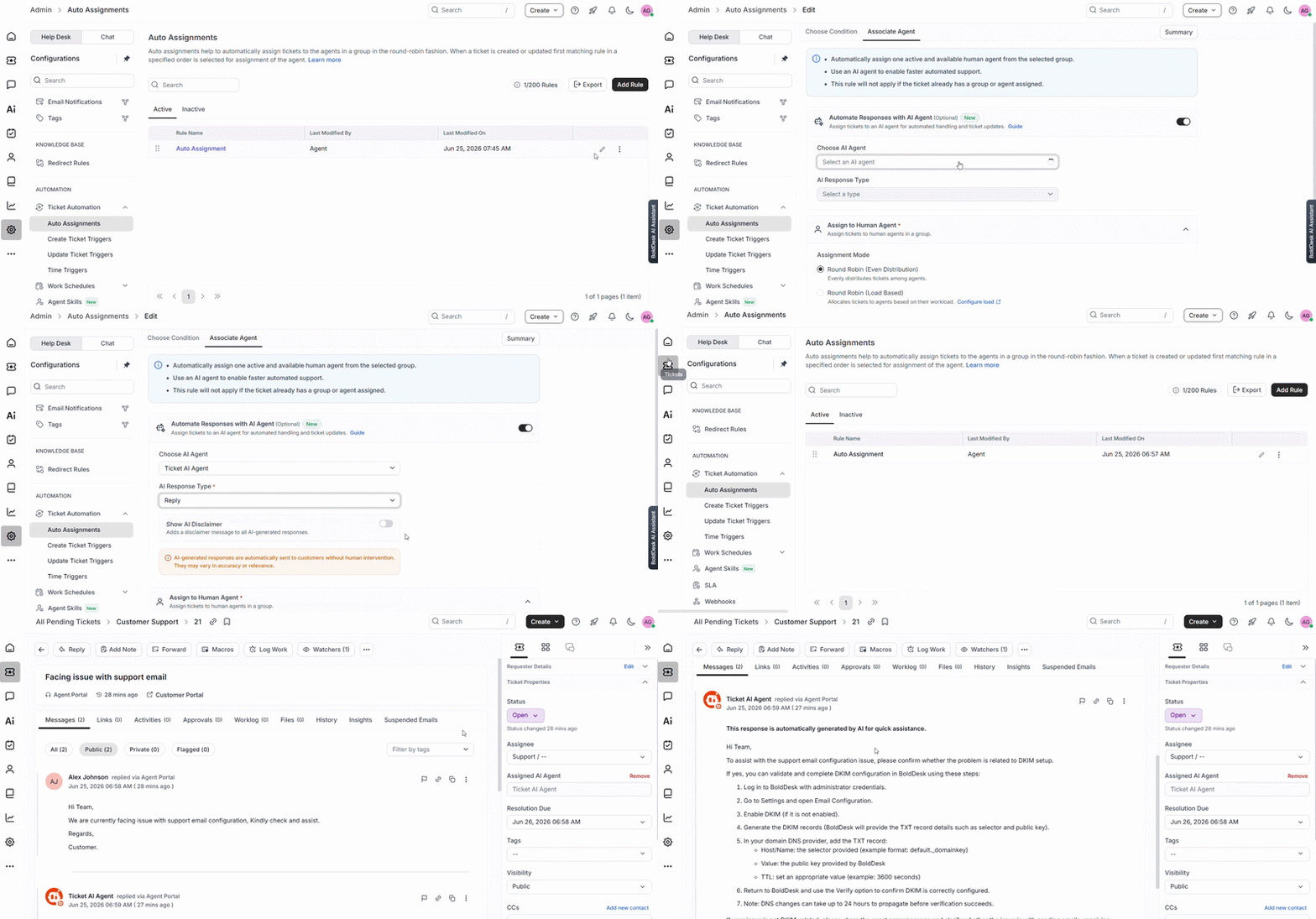
The Ticket AI Agent combines AI-powered auto-assignment with Smart Response capabilities to help teams handle tickets efficiently.
It generates contextual reply suggestions as drafts, public notes, or private notes, while keeping agents fully in control to review and refine responses.
This helps teams respond faster, maintain consistency, and handle higher volumes without compromising quality.
Real-world scenario: Product Launch Support Surge
Challenge: A sudden spike in tickets during a product launch overwhelms the support team, leading to slow responses and inconsistent communication.
BoldDesk solution: The Ticket AI Agent automatically routes tickets to the right agents and generates contextual Smart Response drafts (replies, public notes, or private notes), allowing agents to quickly review and respond.
Impact: Faster response times, improved consistency, reduced manual effort, and the ability to handle higher ticket volumes without compromising support quality.
AI Copilot enhancement for efficient ticket management
Managing tickets efficiently requires accuracy, context, and timely action across every interaction.
The latest AI Copilot enhancements introduce features that improve accuracy and provide better visibility into ticket activity.
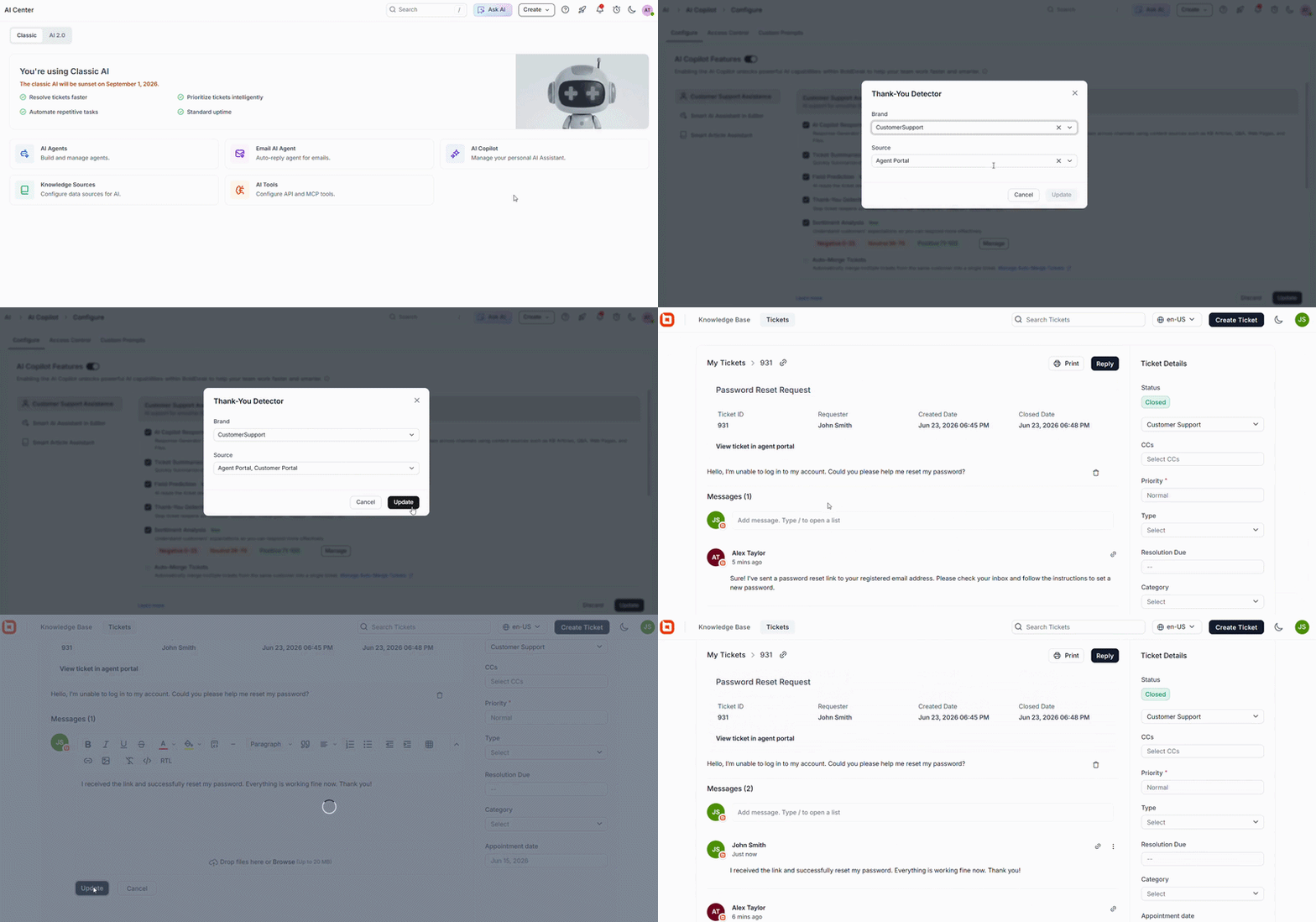
Close resolved tickets confidently with thank you detector
Customers often send appreciation messages such as “thank you” when their issue has been resolved, but these responses can still sit in queues waiting for agent review.
The Thank You Detector automatically identifies positive customer responses, helping agents quickly recognize when no further action is needed.
By surfacing these closing signals, teams can confidently close tickets, avoid unnecessary follow-ups, and keep queues focused on active customer issues.
Smarter field predictions with enhanced control and accuracy
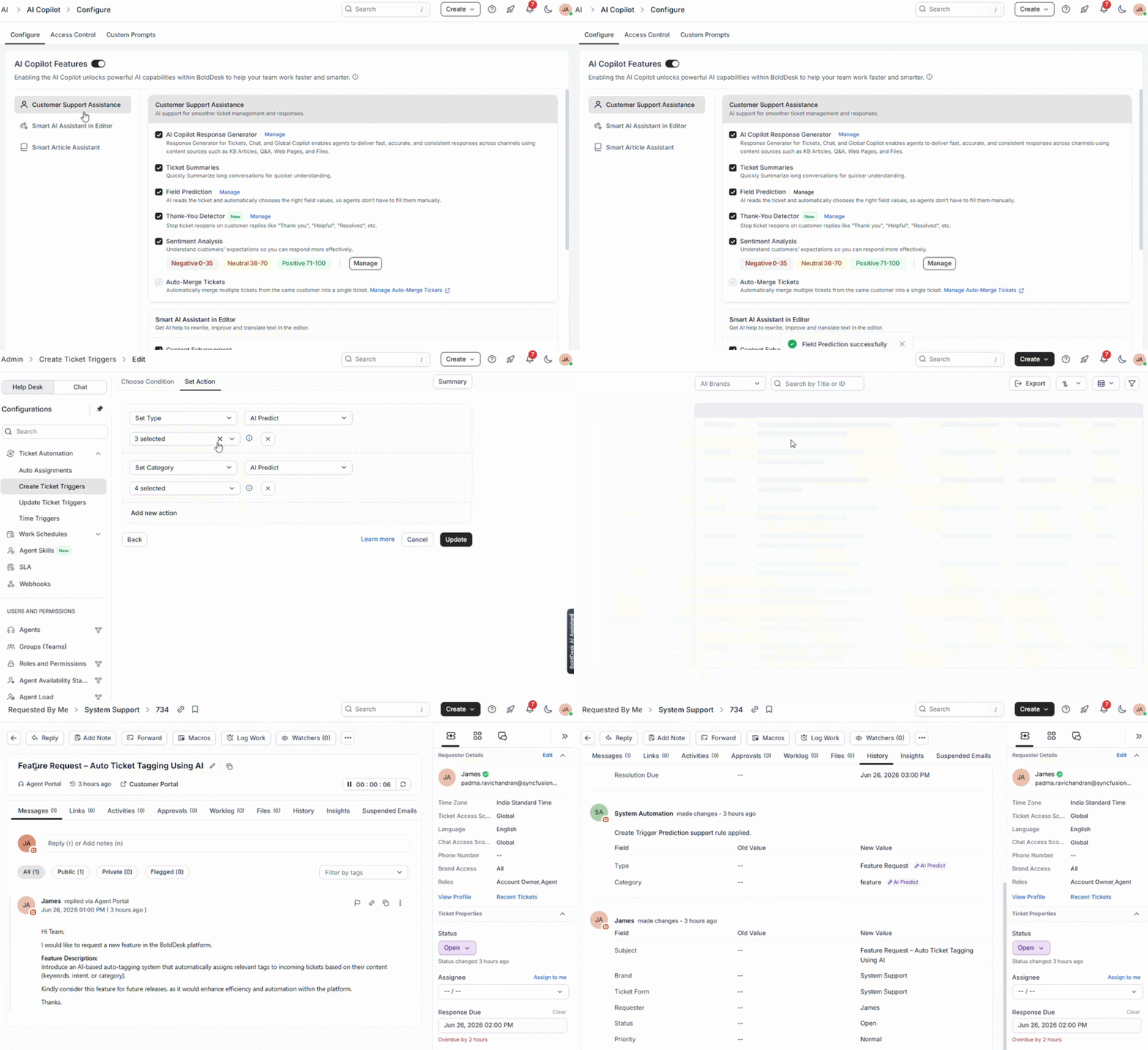
Predicting ticket fields accurately can be challenging, especially when dealing with multiple brands, sources, and workflows.
With the latest AI Copilot’s Field Prediction enhancements, you can now limit AI predictions by brand and source, such as email, agent portal, or API.
The new Select All option simplifies rule configuration, making it easier to manage multiple field values.
These improvements increase prediction accuracy, reduce irrelevant updates, and give teams more control, resulting in more consistent ticket data and smoother workflow management.
Understand customer sentiment with greater precision
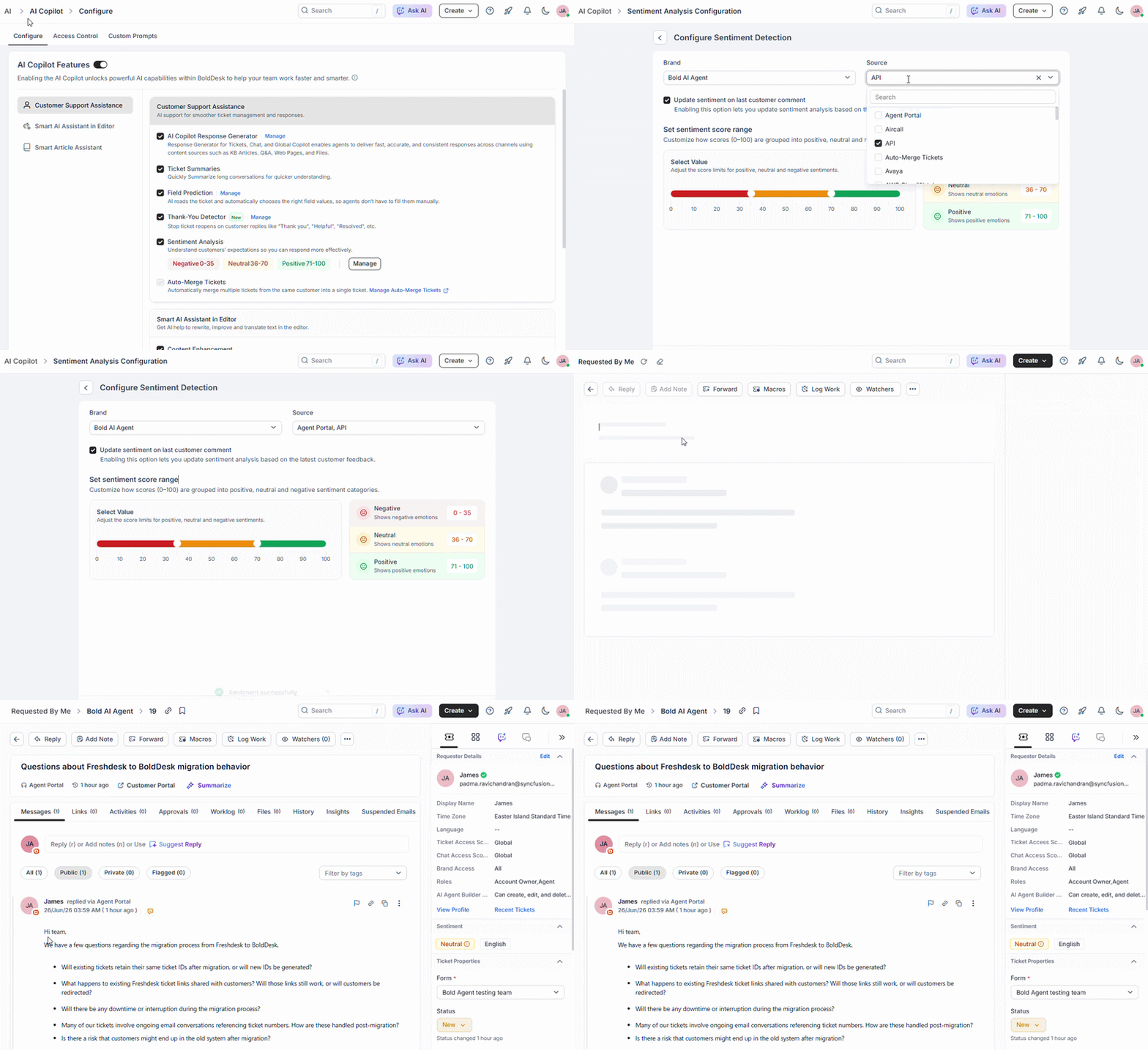
Customer sentiment can shift quickly during a conversation, making it harder to rely on static analysis.
The latest improvements bring more control to sentiment detection by allowing you to tailor it based on brand and source, such as email, agent portal, or voice interactions.
Sentiment is also refreshed with every new customer reply, ensuring it reflects the most recent context of the conversation.
With more reliable and up-to-date sentiment insights, teams can better prioritize tickets, adjust responses, and handle conversations with greater awareness and confidence.
Empower AI agents to perform real support actions with the MCP server
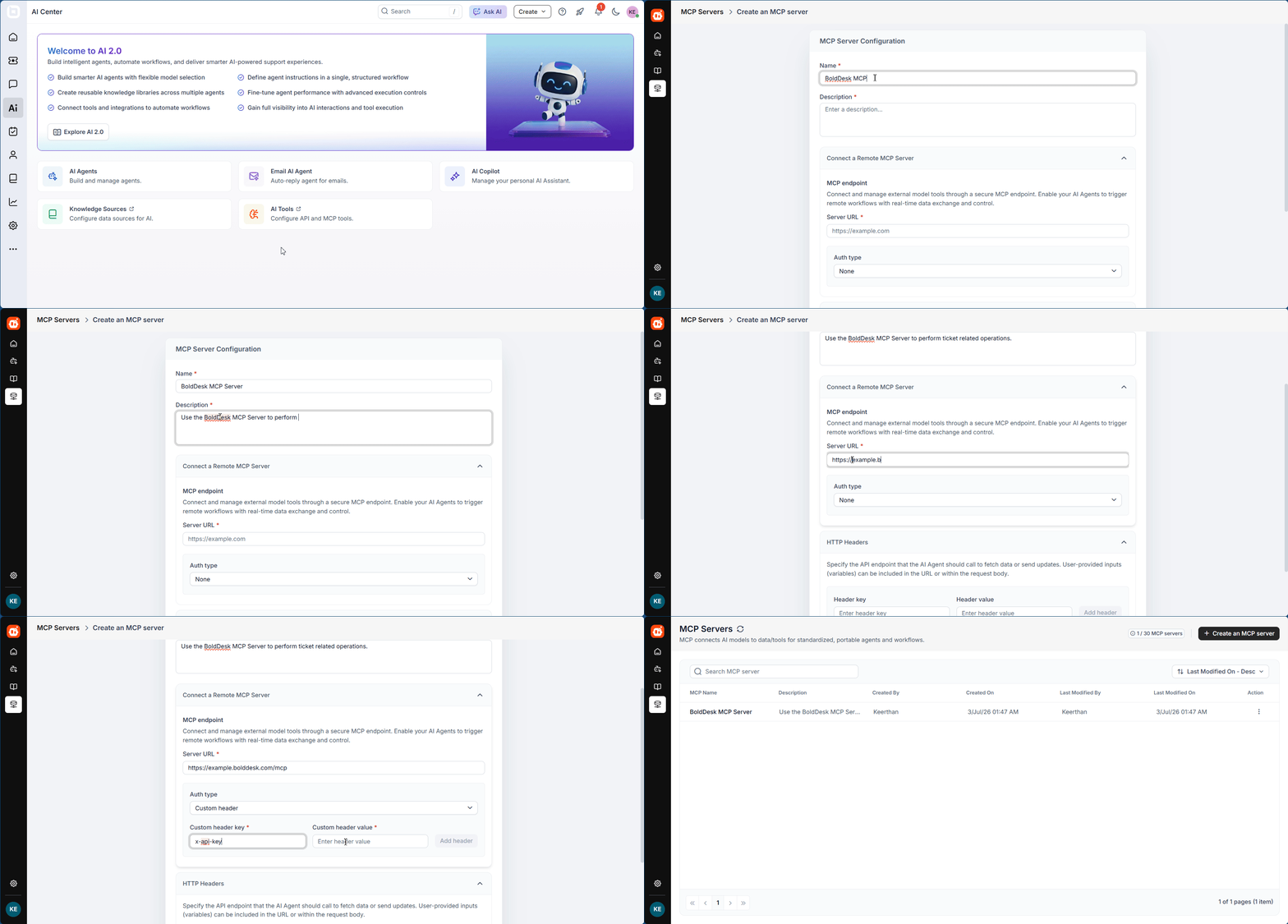
AI tools are becoming a valuable part of modern support operations, but they often lack the ability to perform actions directly within help desk systems.
The BoldDesk MCP Server, built on the Model Context Protocol (MCP), bridges that gap by enabling AI tools and agents to securely interact with BoldDesk using natural language.
Compatible with clients such as ChatGPT, Claude, GitHub Copilot, and other MCP-enabled solutions, it allows AI to move beyond assistance and take meaningful support actions.
With the MCP Server, AI agents can:
- Create, update, and manage support tickets
- Reply to ticket conversations
- Retrieve ticket details and conversation history
- Search contacts, groups, and agents
- Handle approval workflows
- Access real-time support information
By using standardized MCP tools, organizations can ensure consistent interactions across different AI platforms and workflows.
To simplify adoption, BoldDesk provides a hosted MCP Server, eliminating the need to deploy or maintain MCP infrastructure while enabling faster access to AI-powered support automation.
Real-world scenario: E-commerce Support Automation with AI Agents
Challenge: An e-commerce company receives hundreds of support requests daily related to orders, refunds, shipping delays, and account updates. Agents spend significant time switching between AI tools and the help desk to retrieve information, update tickets, and respond to customers.
BoldDesk solution: With the BoldDesk MCP Server, AI agents can securely interact with BoldDesk using natural language. They can create and update tickets, retrieve customer and ticket information, reply to conversations, and manage approval workflows without requiring manual intervention from agents.
Impact: Support teams reduce manual effort, resolve tickets faster, and improve agent productivity, while customers receive quicker and more consistent support experiences.
Security and compliance updates for stronger data protection
Protecting sensitive support information is essential for maintaining customer trust, meeting compliance requirements, and reducing security risks.
The following security enhancement gives teams greater control over sensitive data.
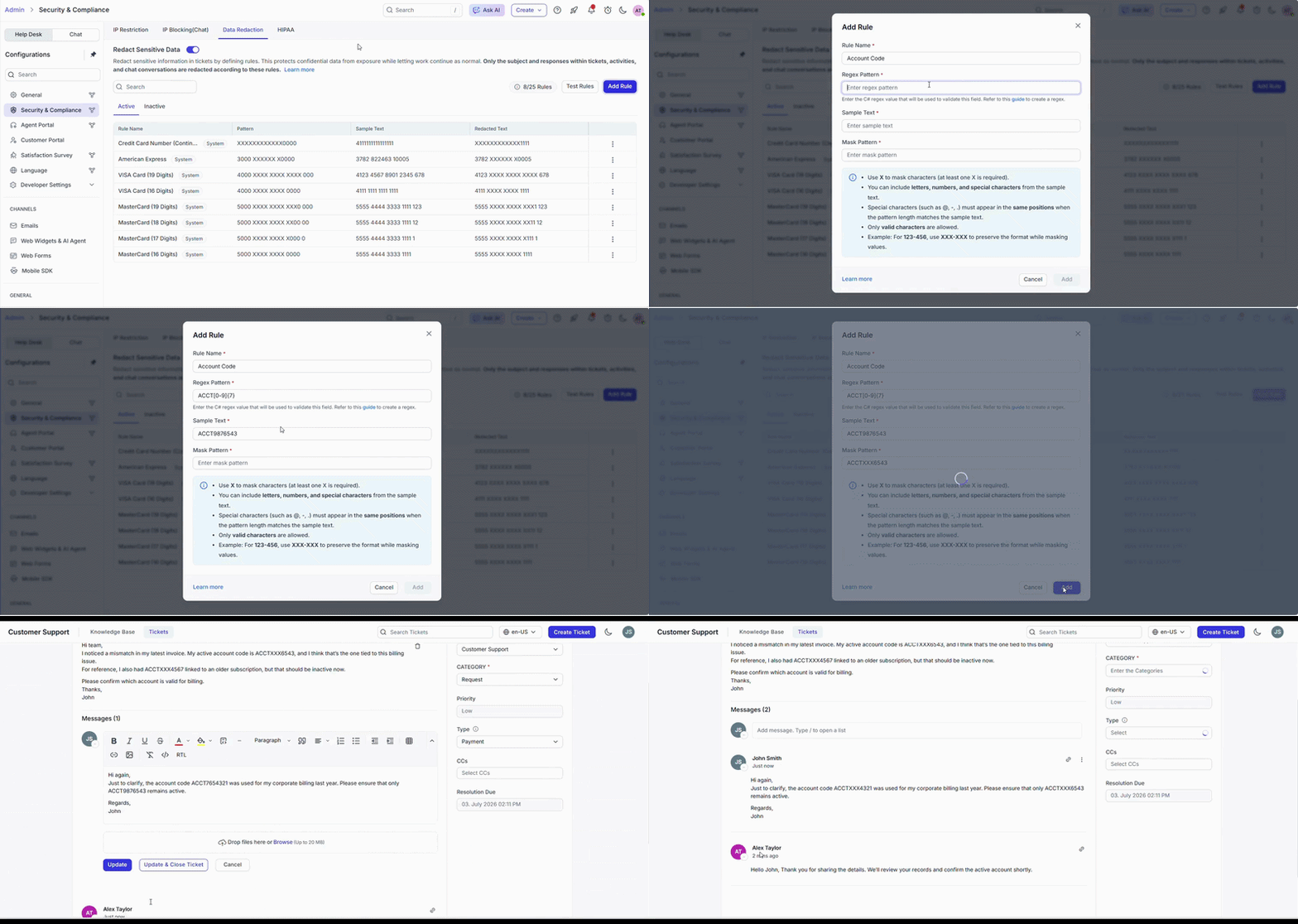
Automatically redact sensitive information with custom regex rules
Support teams often handle customer-specific information that shouldn’t be visible throughout support conversations.
Advanced data redaction now supports custom regex rules, allowing administrators to automatically detect and mask business-specific identifiers beyond the default protection settings across tickets, chats, and activities.
This gives organizations greater flexibility to safeguard sensitive information, strengthen compliance, and reduce the risk of accidental data exposure.
Ticketing system enhancements for better workload management
Managing tickets often involves balancing immediate issues with those that need attention later, without losing track of either.
BoldDesk’s ticketing system introduces a smarter way to manage follow-ups and keep your queue organized.
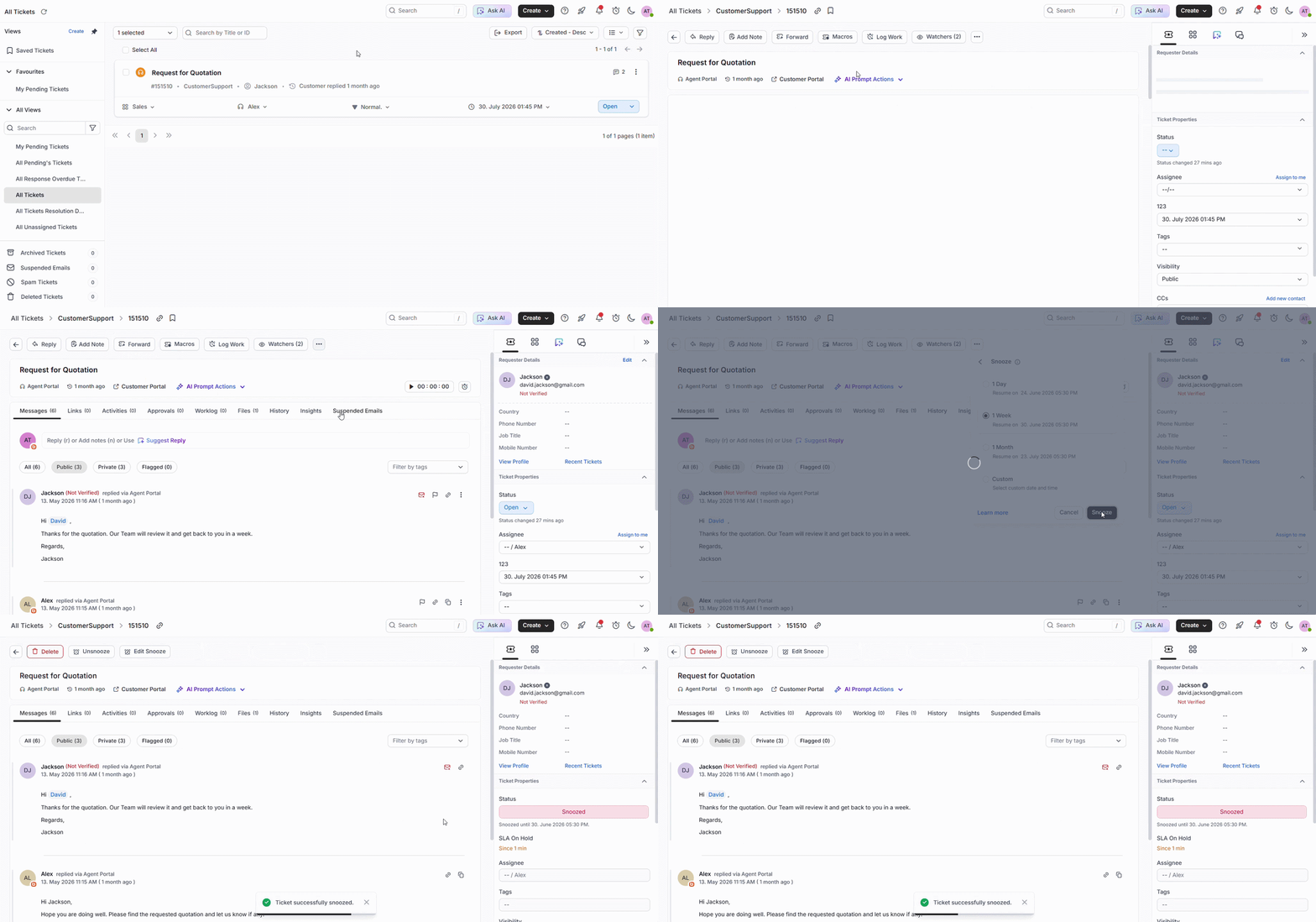
Snooze tickets without losing track of follow-ups
Agents frequently encounter tickets that need attention later rather than right away, whether they are waiting for a customer reply, a scheduled callback, or an internal review.
With the Snooze Tickets feature, agents can temporarily pause a ticket and remove it from active workflows until a specified date or time.
Once the snooze period ends, the ticket automatically reappears in the queue and SLA tracking resumes, ensuring nothing falls through the cracks.
This helps teams stay focused on high-priority issues, reduce queue clutter, and optimize workloads more effectively, without relying on manual follow-ups or reminders.
Workflow automation updates that streamline processes
Manual assignment slows teams down when ticket volume increases.
The July 2026 release updates add skill-based assignment to the help desk automation feature, helping teams route tickets to the right agents faster, reduce reassignment, and improve first-touch accuracy.
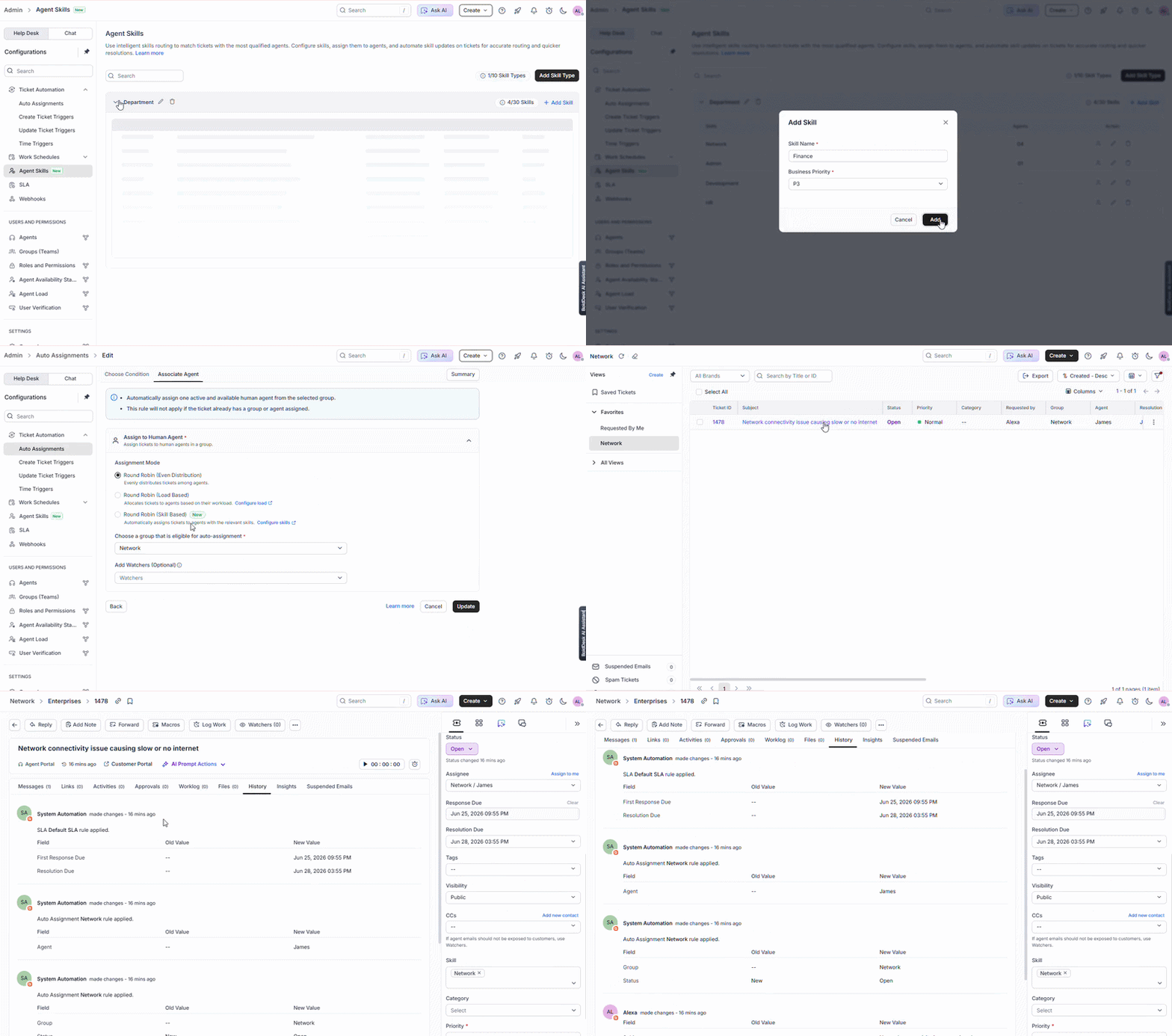
Assign tickets to the right agents with skill-based assignment
Manual ticket assignment can slow response times and lead to unnecessary reassignments.
Skill-based assignment intelligently routes tickets to the most qualified agents based on their skills and proficiency, ensuring more accurate resolutions from the start.
With built-in load balancing and seamless integration with SLAs and workflows, teams can reduce reassignment, improve efficiency, and give administrators greater flexibility in managing routing rules.
Omnichannel updates for engaging conversations
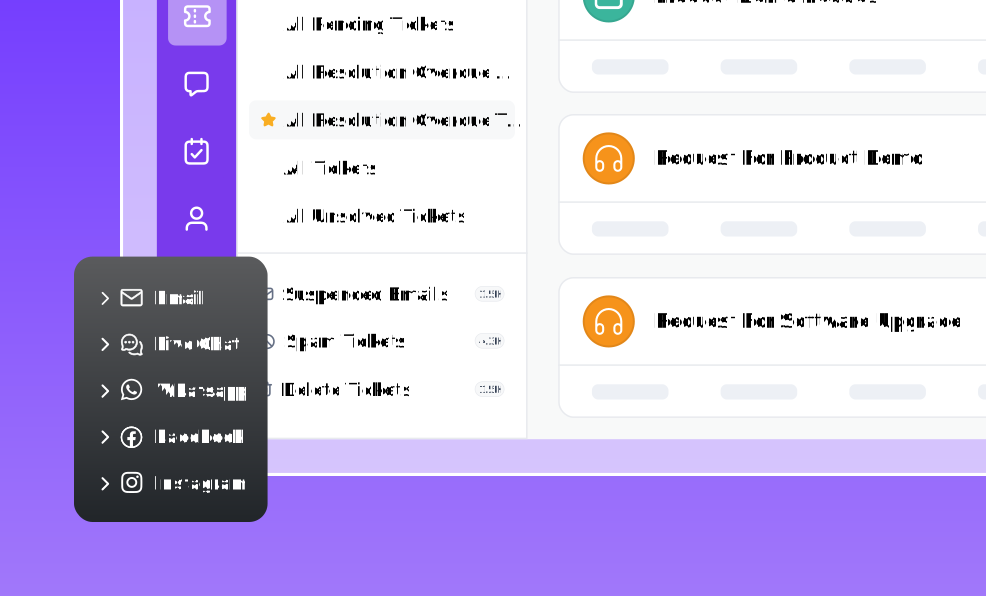
Customers expect fast, interactive conversations across channels like WhatsApp and Telegram.
These product release updates help teams create richer messaging experiences and collect feedback without disrupting conversations.
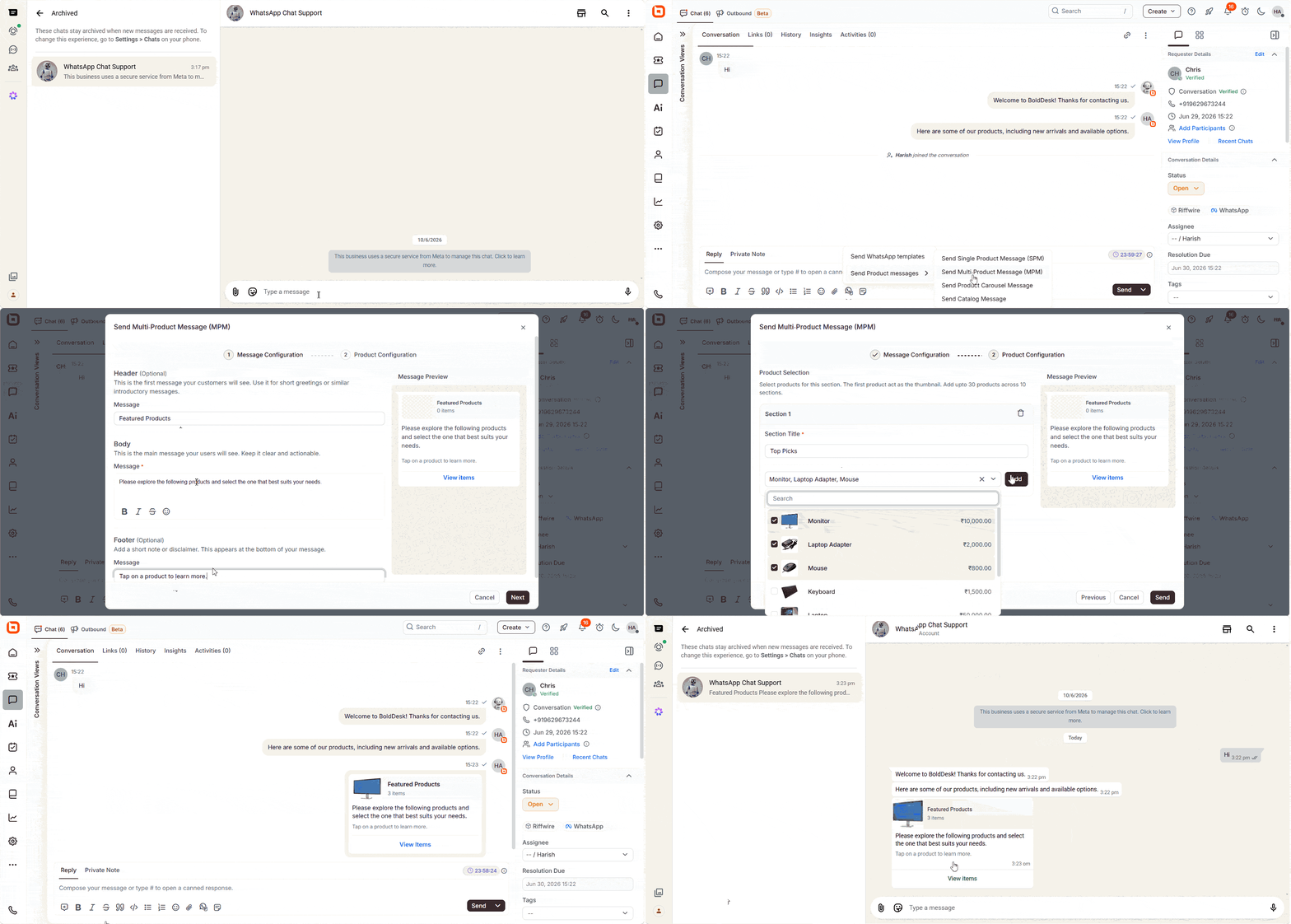
Deliver richer WhatsApp conversations with new message templates
Single Product Message (SPM), Multi Product Message (MPM), and Carousel templates allow teams to showcase products, services, and options directly within WhatsApp conversations.
Agents can use these formats, along with additional WhatsApp message types, to deliver structured and interactive content.
Richer message experiences improve customer engagement and support clearer, more interactive communication.
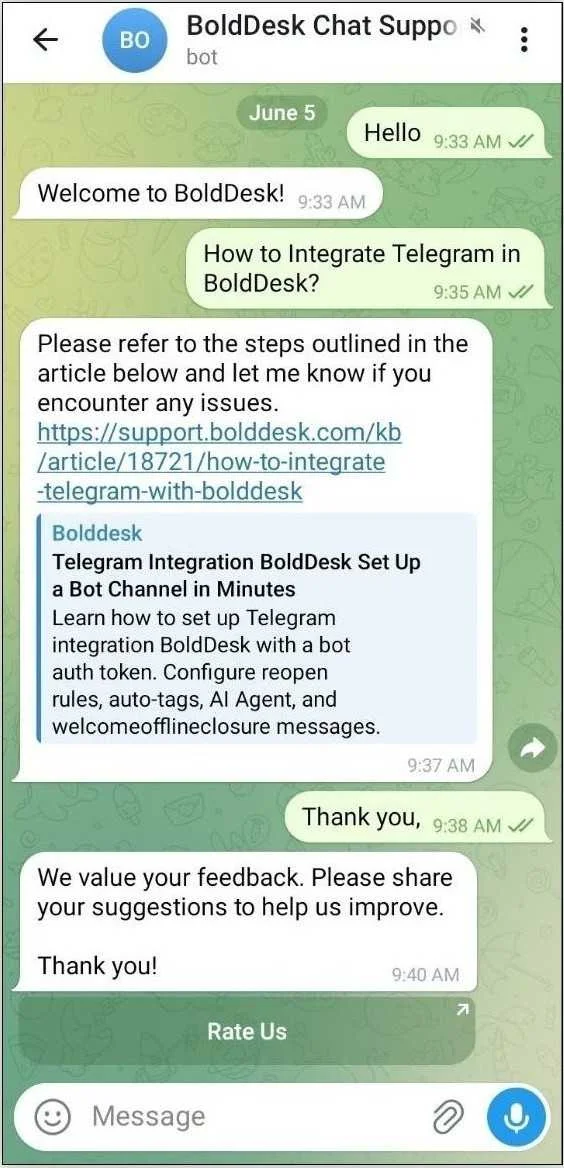
Collect feedback directly with interactive CSAT surveys on Telegram
Customer feedback can now be collected directly within conversations using Interactive CSAT surveys on Telegram.
Teams can send structured survey messages with built-in call-to-action buttons, enabling customers to respond easily within the chat itself, without leaving the conversation.
Collecting customer feedback through intuitive, interactive surveys leads to higher response rates and more meaningful insights.
Live chat updates that guide users faster
The first few moments of a support interaction often determine whether customers find answers themselves or create a ticket.
We’ve enhanced the live chat widget to create more engaging experiences right from the first interaction.
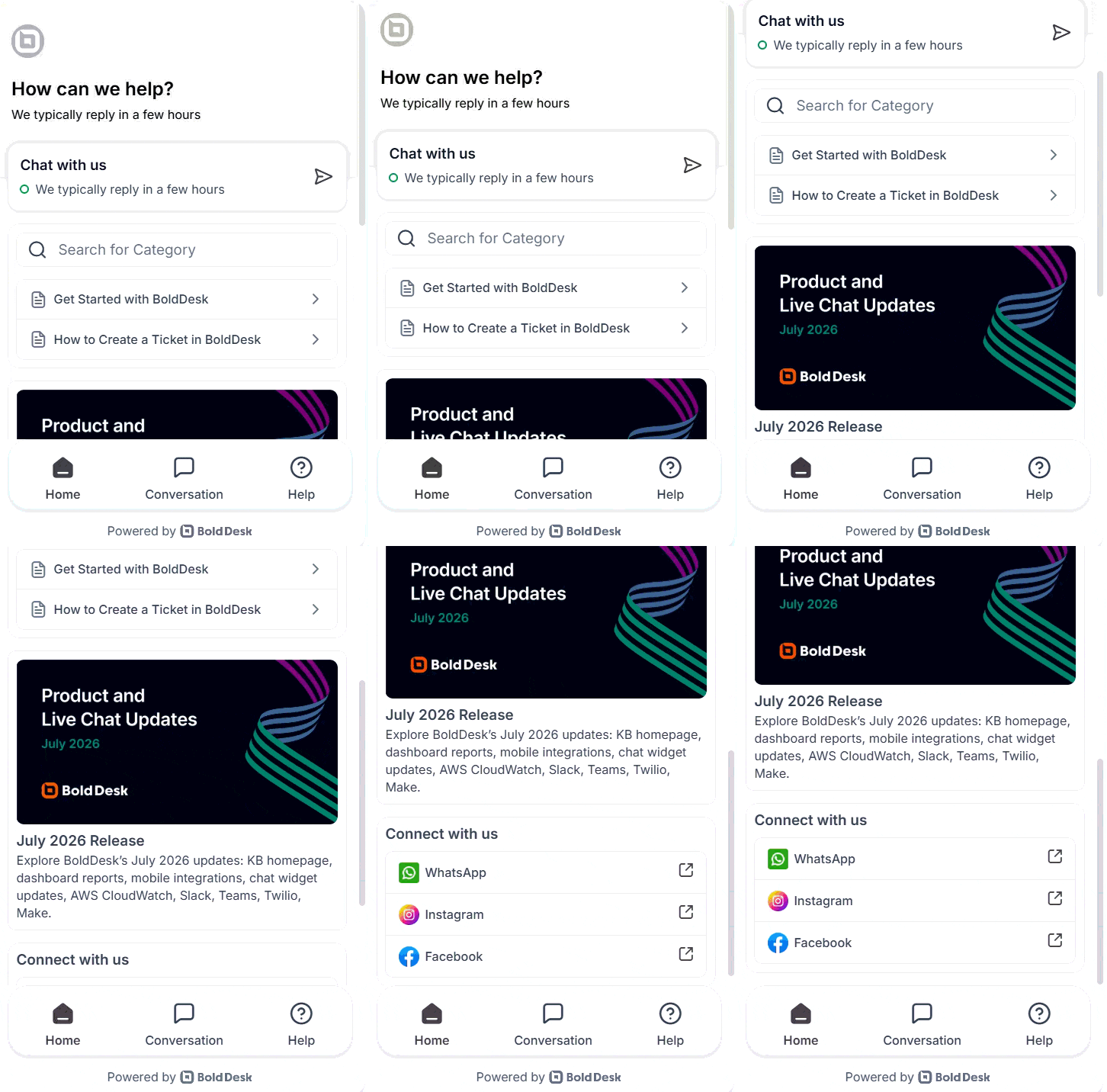
Guide users from the start with home view support
The new Home View helps teams guide customers before a conversation starts by surfacing knowledge base articles, announcements, and links while keeping chat access readily available from the widget home screen.
With simple drag-and-drop controls, it’s easy to organize content and guide users before they even start a conversation.
A well-structured first view improves self-service and reduces unnecessary chats, creating a more streamlined and engaging support experience.
Access conversations anytime with download transcripts
Customers can easily keep a record of their chat interactions for future reference.
With download transcripts, complete conversation histories can be saved directly from the chat widget, making it simple to revisit important details when needed.
Access to past conversations improves transparency and ensures users always have the information they need at their fingertips.
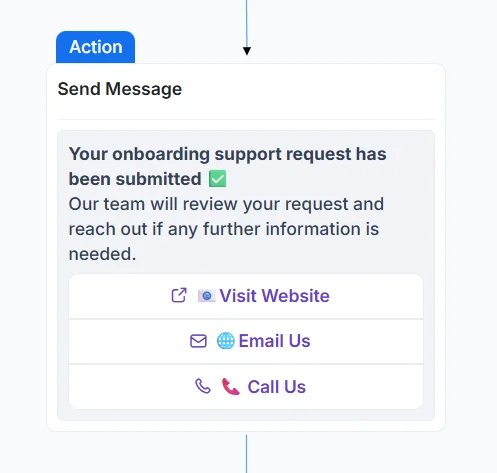
Trigger instant actions with a call-to-action support in live chat
Sometimes, the fastest way to help users is to let them act instantly.
You can now embed clickable action buttons directly within chat messages, enabling users to open links, make calls, send emails, or trigger SMS actions without typing.
Eliminating manual steps reduces friction, speeds up interactions, and creates more engaging conversations that guide users toward the right actions quickly.
Make selections easier with interactive input support
Guiding users to make the right choice becomes simpler with more intuitive input options.
You can now present options as visually rich cards or structured lists, allowing users to browse, compare, and select options directly within the chat experience.
These include:
- Card-based selection: Display options in a horizontal, scrollable card format to provide a visually rich and guided selection experience.
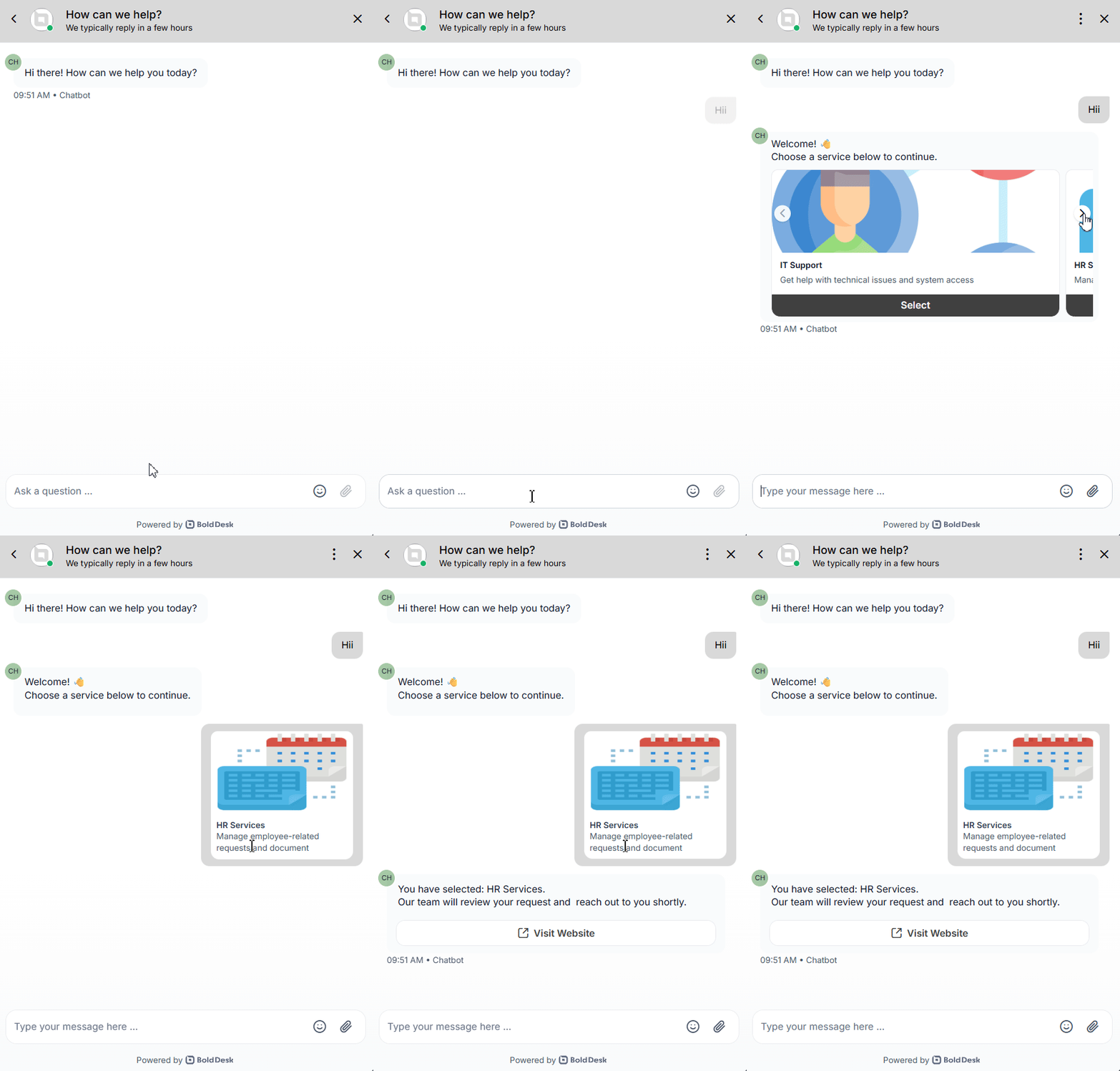
- List-based selection: Present options in a clean vertical list for quick and structured selection.
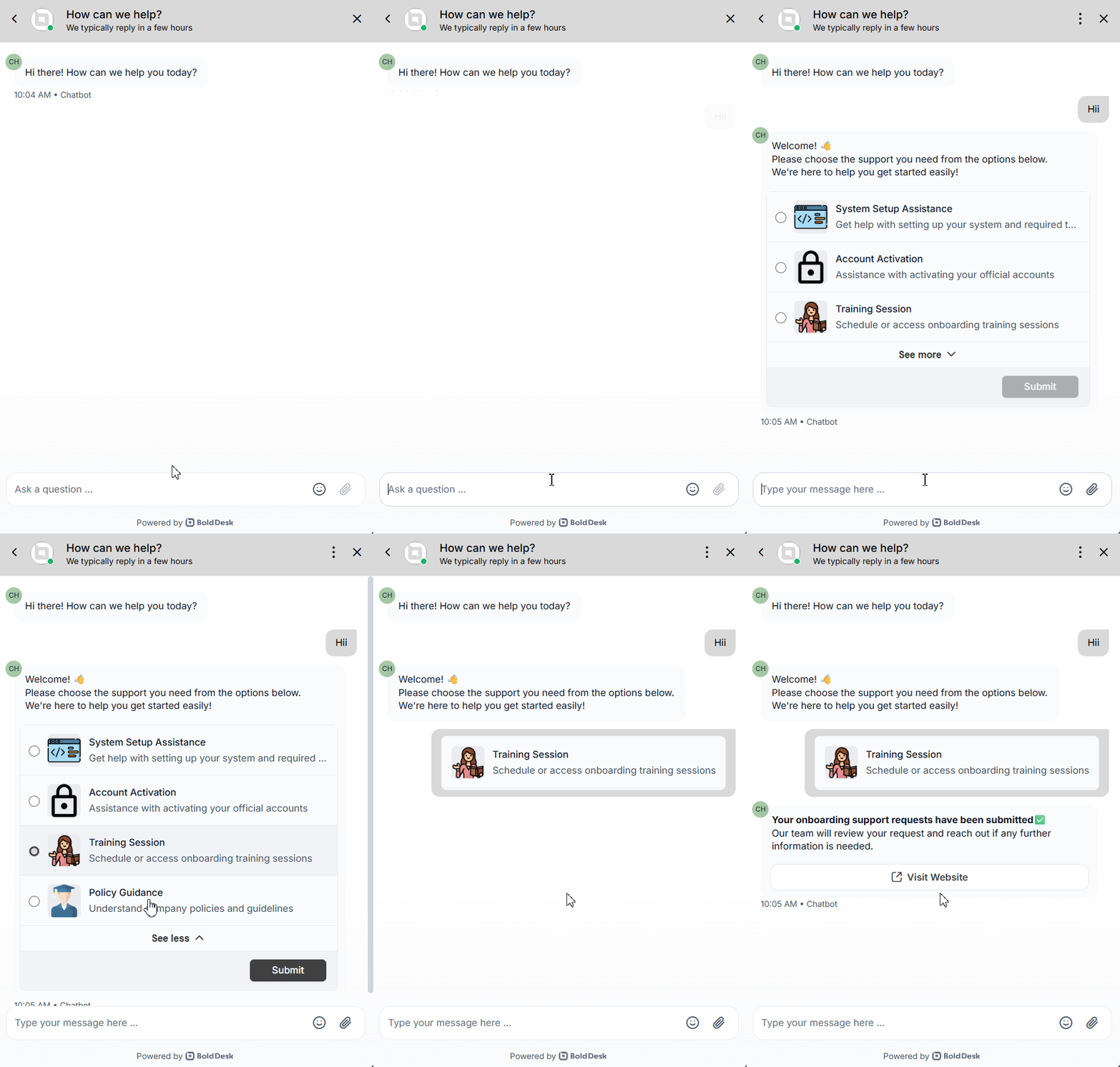
List-based selections can support both single and multiple-choice responses depending on the workflow.
These structured, interactive inputs reduce friction, improve decision-making, and create a smoother, more user-friendly chat experience.
Knowledge base enhancements for a better self-service experience
Make it easier for customers to find the right answers at the right time.
These updates improve how content is surfaced and organized, helping users navigate your knowledge base more effectively and reducing the need for direct support.
Highlight important content with featured articles
Customers often contact support even when answers already exist in the knowledge base.
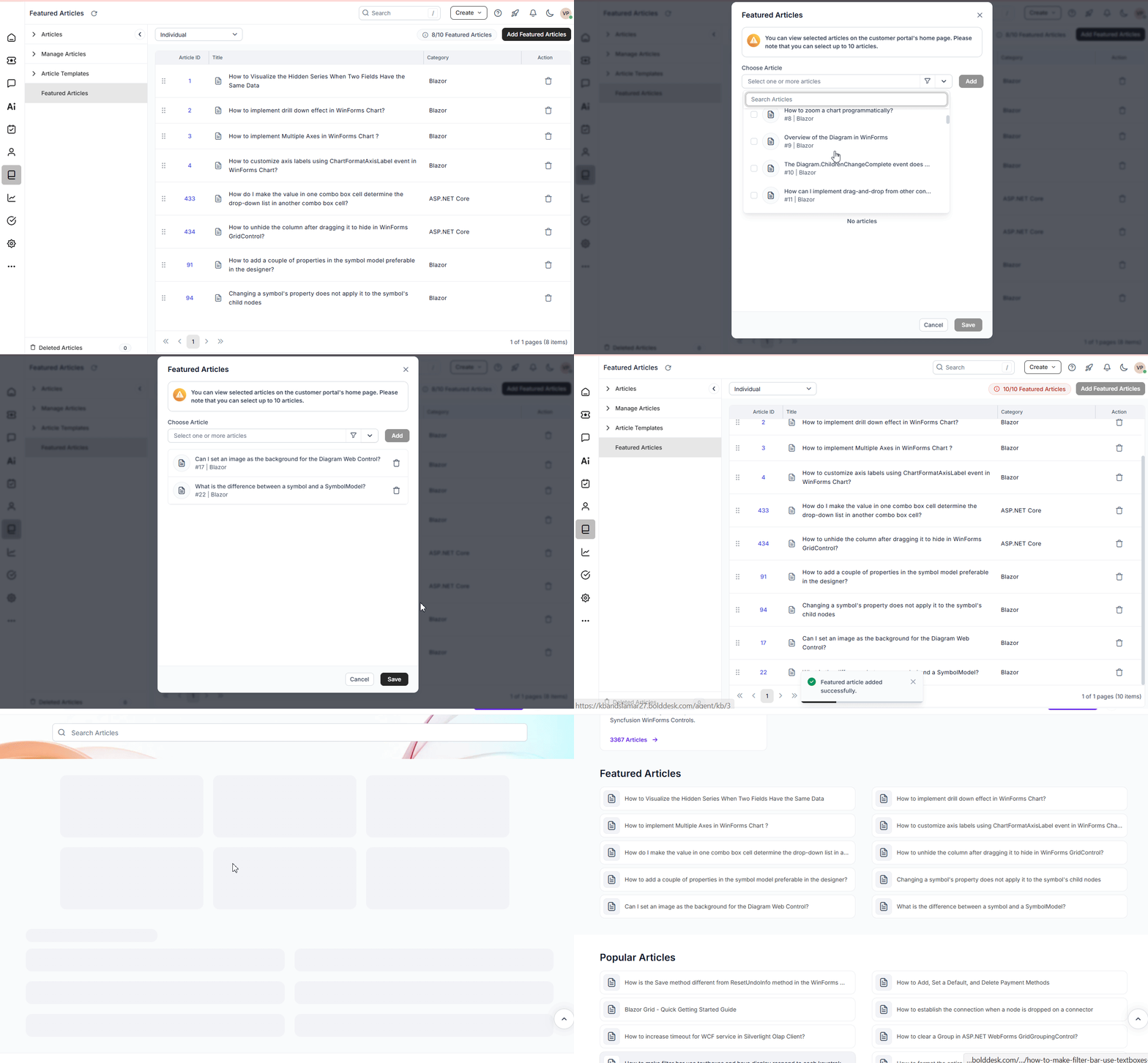
Featured Articles let you showcase important knowledge base content directly on the customer portal homepage, so users can access key information instantly, without having to search for it manually.
By surfacing resources like onboarding guides, FAQs, or announcements, teams can reduce the effort required to find answers while improving article discoverability and delivering a more effective self-service experience.
Real-world scenario: Reduce Repetitive Support Queries
Challenge: An e-commerce company launches a new returns policy ahead of the holiday shopping season and wants customers to easily find information about returns, refunds, and shipping timelines.
BoldDesk solution: The support team marks key knowledge base articles, such as “Holiday Returns Policy,” “How to Request a Refund,” and “Shipping FAQs,” as Featured Articles. These articles appear prominently on the customer portal homepage, making important information easy to find. The team can also disable the Featured Articles section when it is no longer needed.
Impact: Customers quickly access answers without creating support tickets, improving self-service adoption, reducing repetitive inquiries, and helping support agents focus on more complex issues.
Create a branded experience with customer portal homepage customization
Give your knowledge base customer portal a more refined and user-friendly design, making it easier for customers to navigate content and find answers quickly.
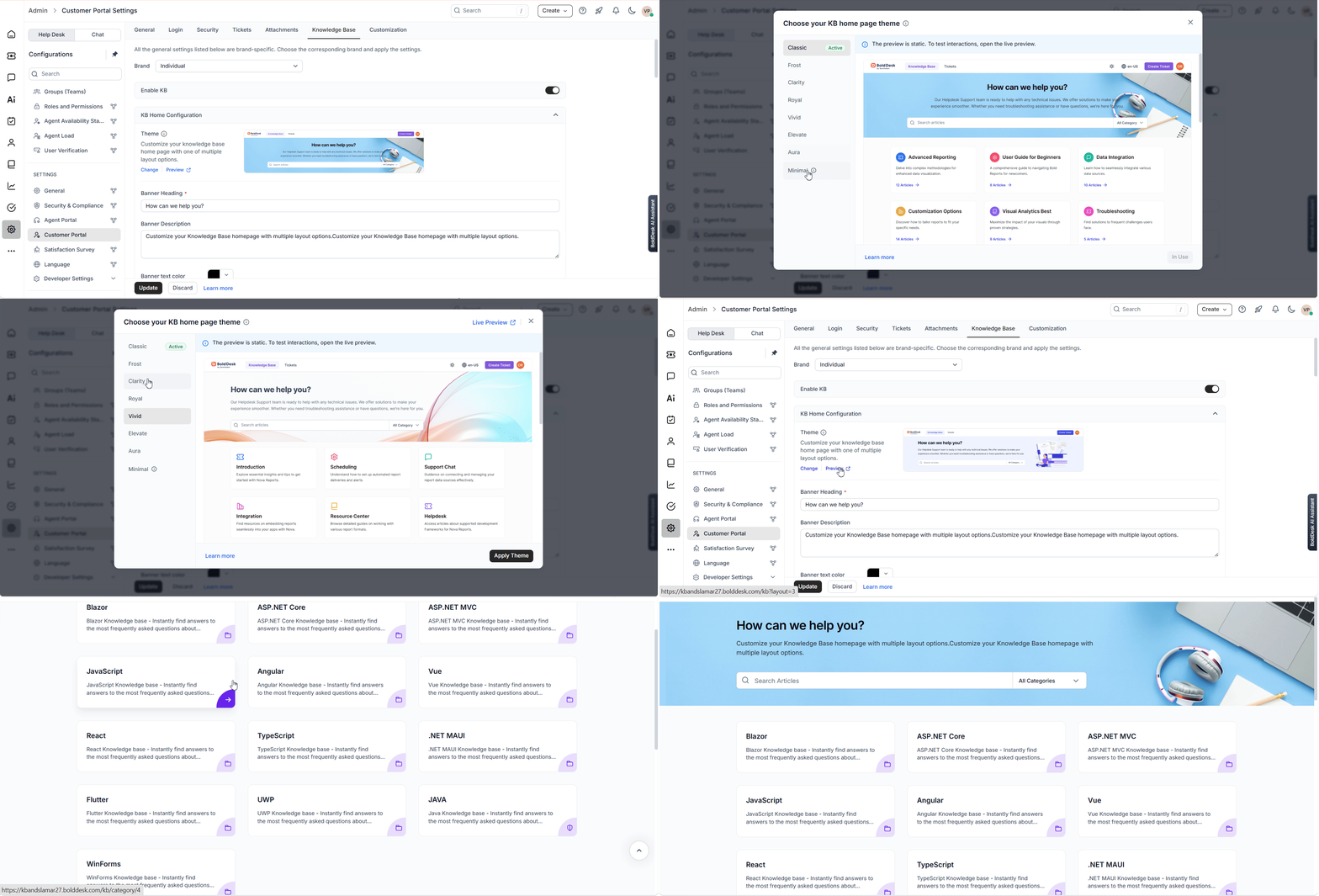
With knowledge base homepage customization, you can now control the look and layout of your portal using predefined themes, making it easy to align the design with your brand.
From banners and search bars to categories and article layouts, a branded and well-organized portal can improve content discoverability, increase self-service adoption, and reduce repetitive support requests.
Dashboard and reporting updates for clear, actionable insights
Support leaders rely on reporting to identify bottlenecks, measure team performance, and improve service quality.
These reporting and analytics enhancements make it easier to spot trends, measure performance, and uncover opportunities for improvement across your support operations.
Understand data instantly with data labels in chart widgets
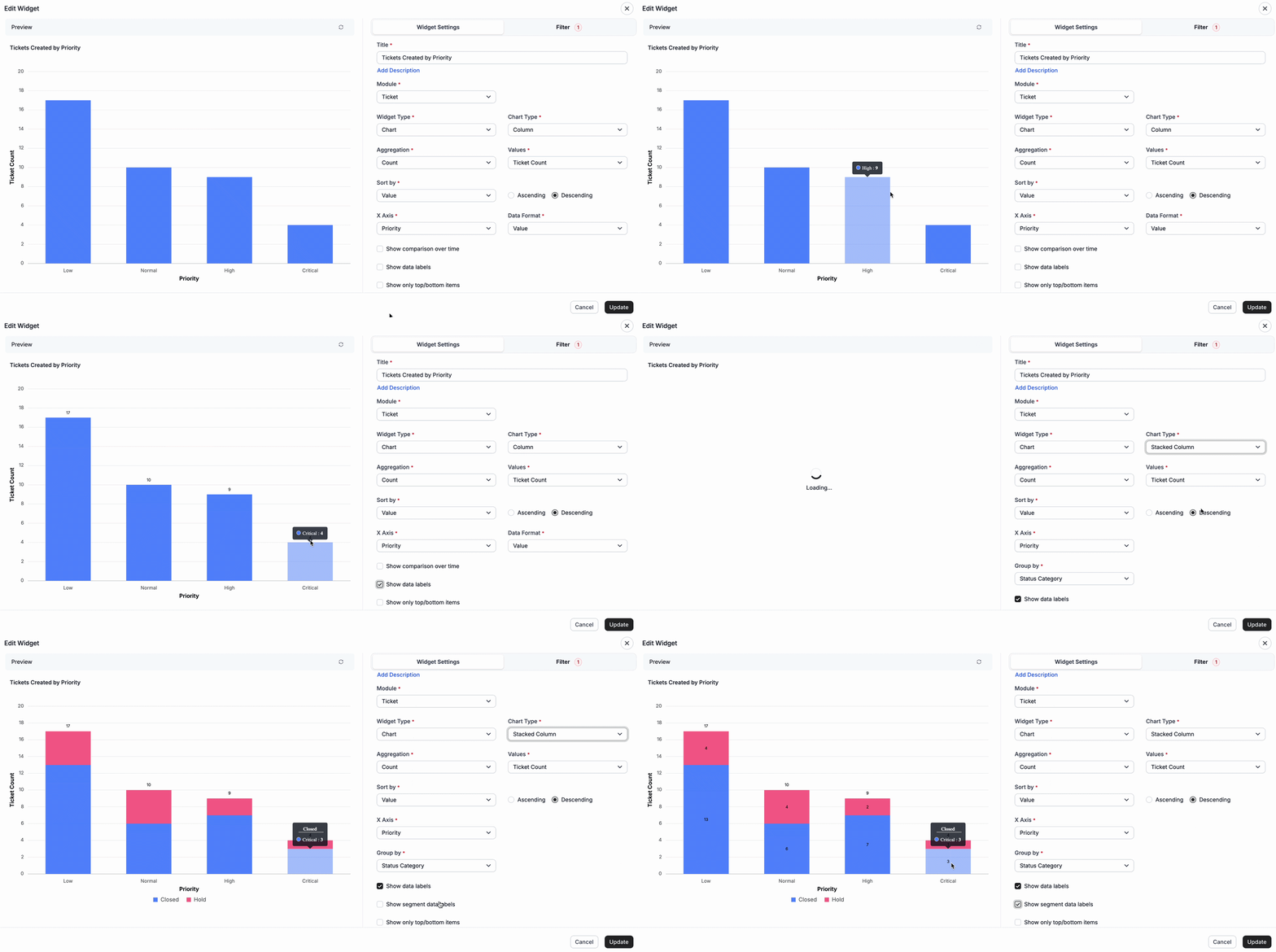
Key values are now displayed directly on charts, eliminating the need for extra steps.
With Data Labels enabled, you can quickly interpret performance, compare data points, and understand trends without hovering over individual elements.
Instant visibility into data speeds up analysis, improves clarity, and helps teams make quicker, more confident decisions.
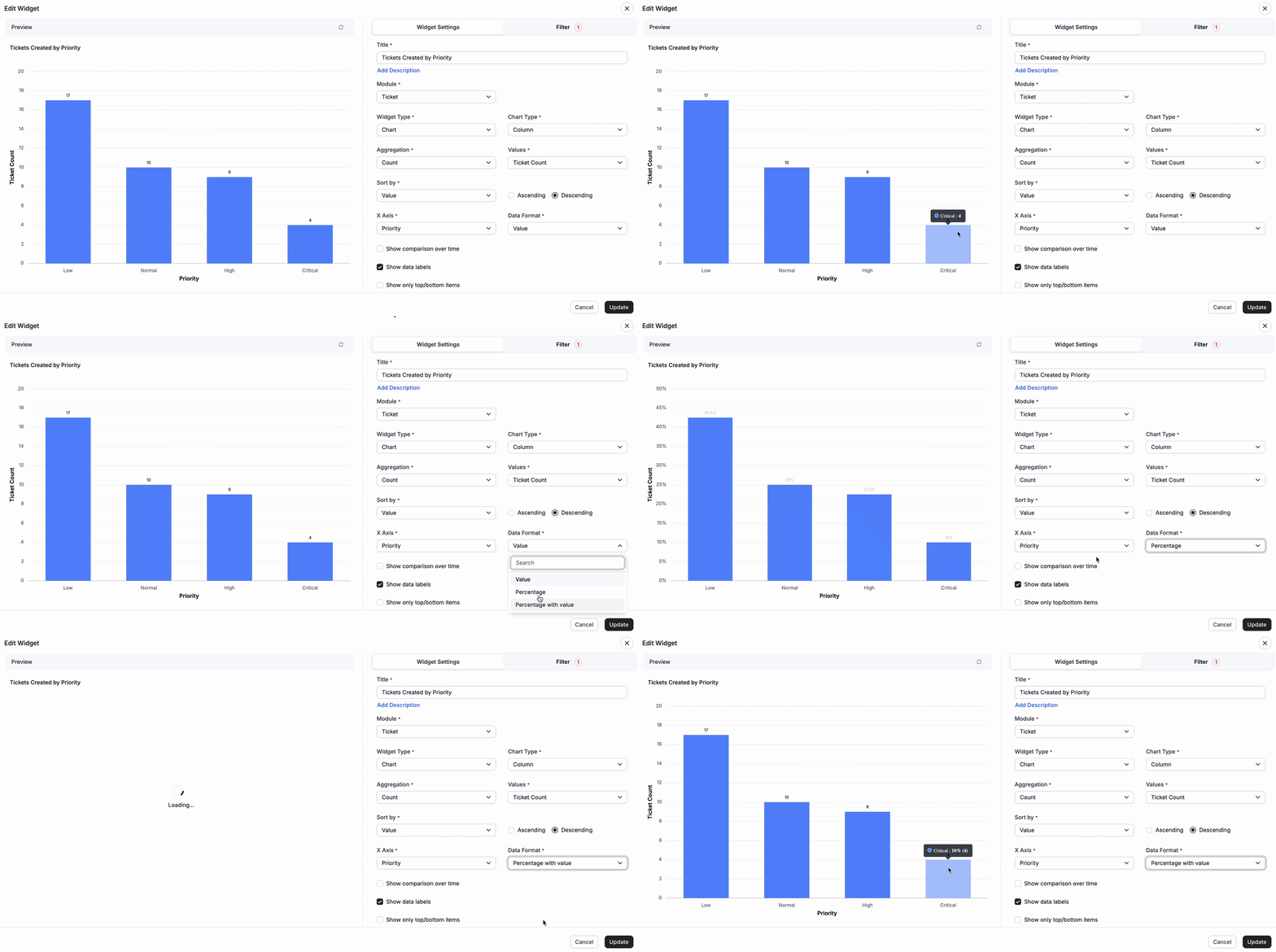
View data clearly with value and percentage metrics
You can now view data as Values, Percentages, or a combination of both, making it easier to visualize and interpret data based on your reporting needs.
This enhancement helps you quickly analyze trends, compare distributions, and gain clearer insights using either actual values, percentage-based representation, or both.
The feature is supported across chart and pivot widgets, providing greater flexibility in how dashboard data is presented and consumed.
Note: This enhancement is not supported for Stacked Bar, Stacked Column, 100% Stacked Bar, and 100% Stacked Column chart types.
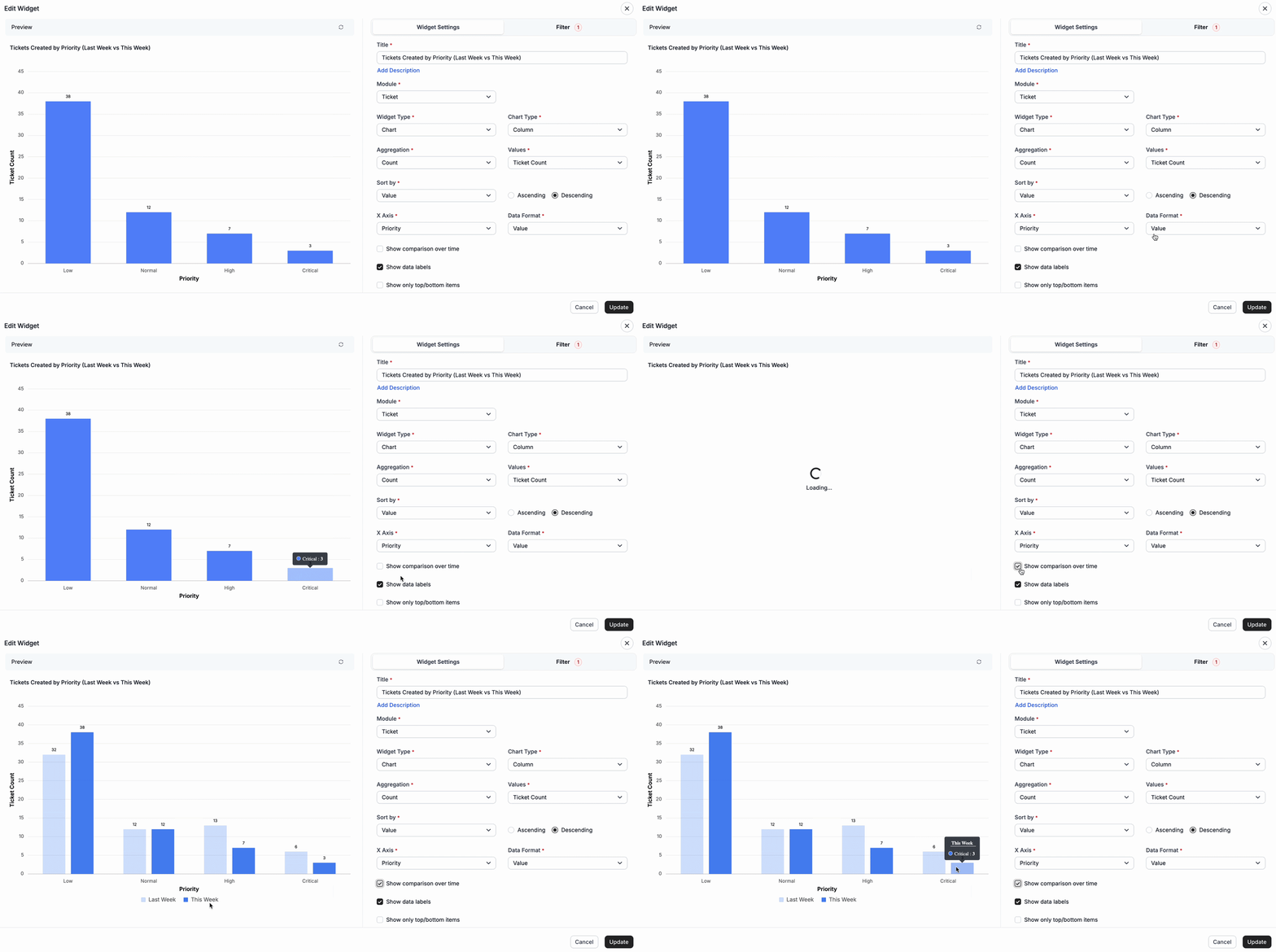
Compare KPI data with grouped chart widgets
Analyzing trends across different segments is now easier with grouped KPI comparisons in chart widgets.
You can group KPI data by fields such as categories or time periods to compare performance, making it easier to spot patterns, track changes, and evaluate how different segments perform over time.
Grouped views make trends easier to interpret, helping teams uncover insights quickly and make more confident, data-driven decisions.
Compare ticket volume by grouping category across time periods
Compare ticket volumes across time periods using grouping fields such as Category, Priority, Status, Status Category, Agent, and more.
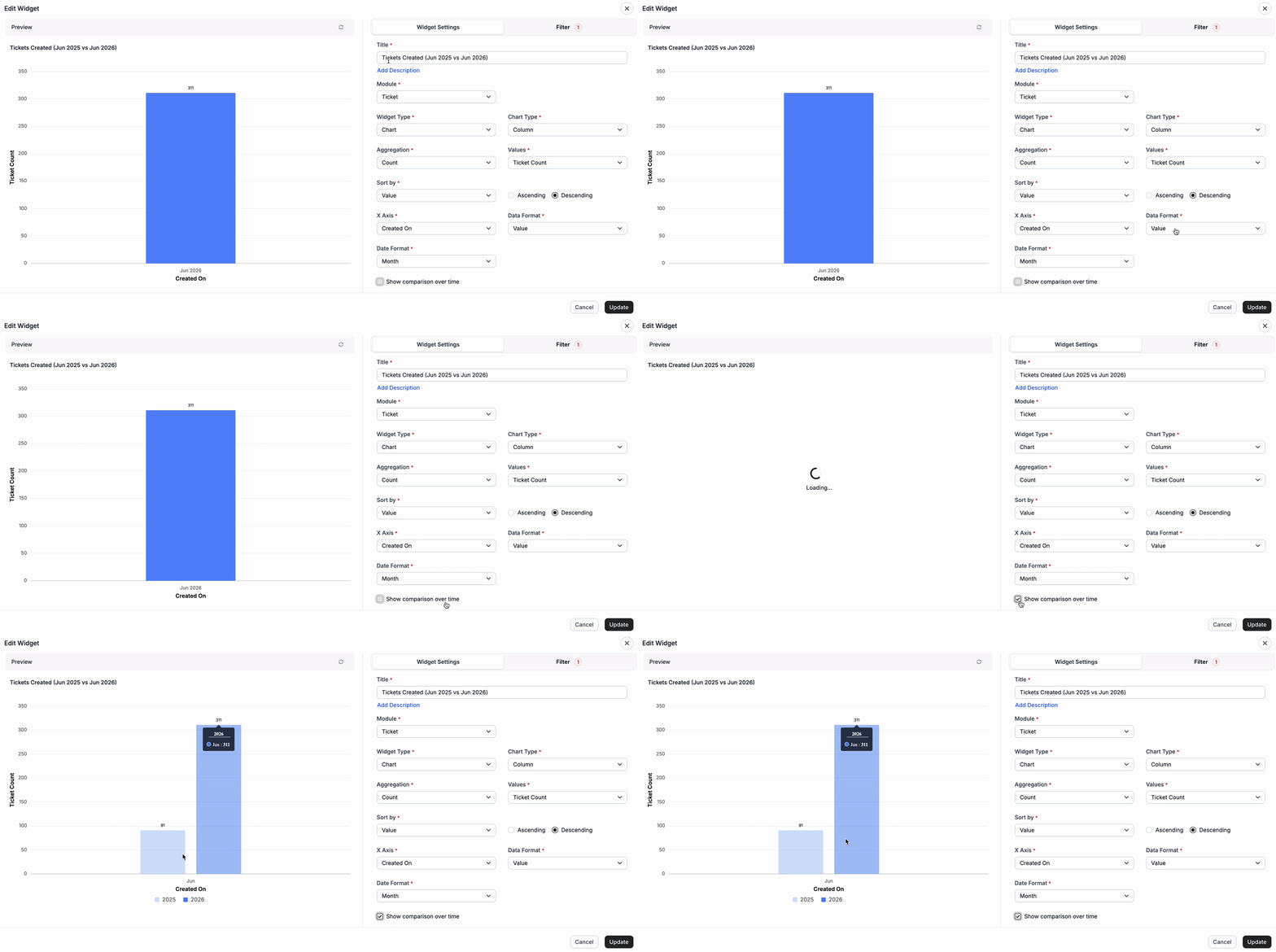
Compare ticket volume trends year-over-year
Compare ticket volumes across equivalent monthly or yearly periods to identify long-term performance trends.
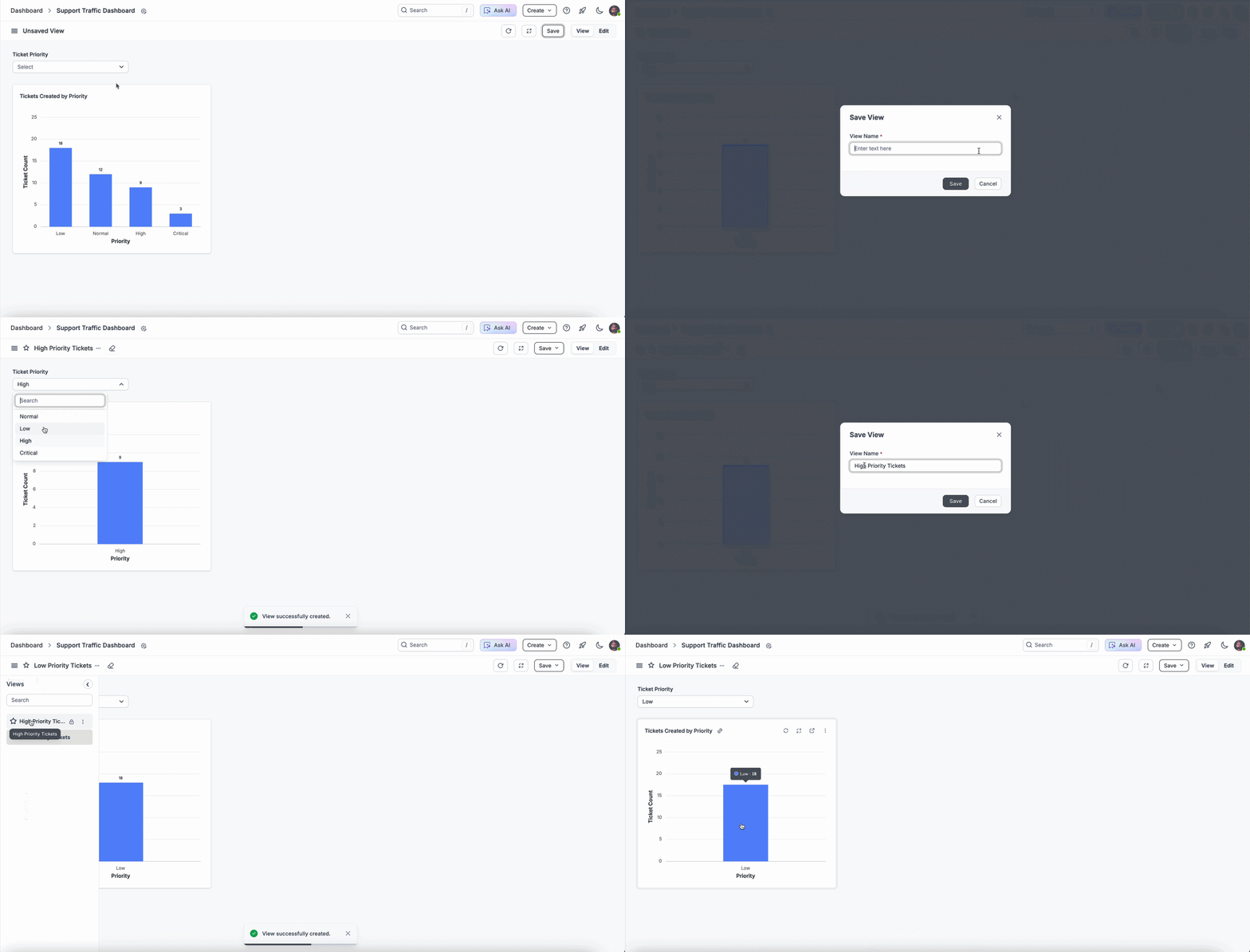
Save time with reusable views in custom dashboards
BoldDesk makes it easier to revisit frequently used data views without repeating manual steps.
You can now save custom dashboard views with predefined filter combinations, allowing you to reload your preferred setup instantly instead of reapplying filters each time.
These reusable views reduce repetitive effort and help teams switch between reports quickly.
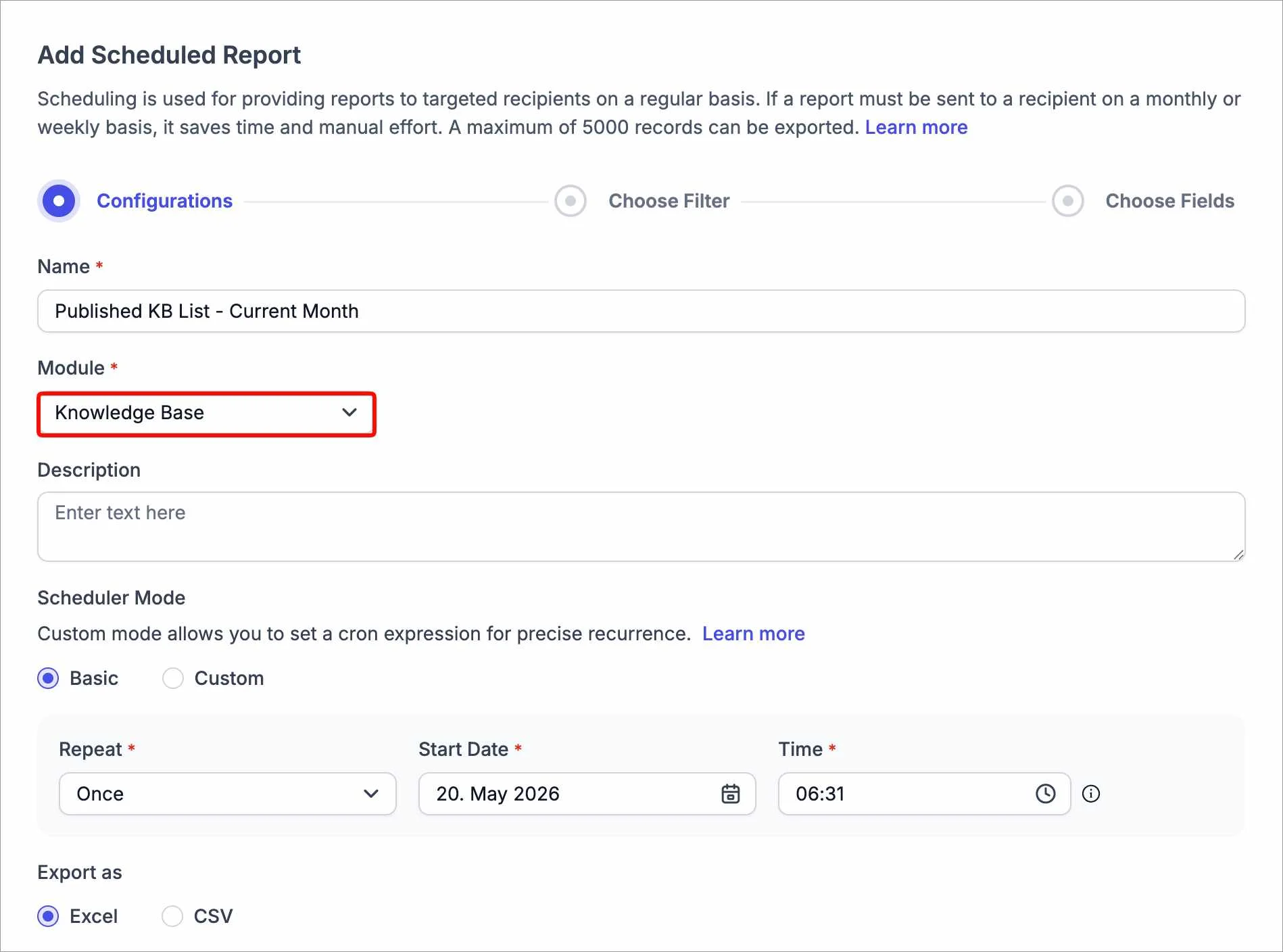
Track knowledge base performance with scheduled reports
You can now include knowledge base data in Scheduled Reports to gain better visibility into content performance.
Reports can be generated automatically with KB-related insights, customized using your preferred filters and columns, making it easier to stay informed without manual effort.
With consistent access to these insights, teams can identify gaps and make smarter decisions to improve customer support resources.
Gain deeper insights with advanced filtering and grouping
BoldDesk has expanded advanced filtering and grouping capabilities in custom dashboards, giving you more control over how data is refined and analyzed.
You can now work with additional fields across modules, including:
- Ticket module: Track changes with fields like “Last Status Changed On”
- SLA module: Filter based on SLA ticket status
- Chat module: Analyze AI involvement and assignment
- Worklog module: Access all activity-related fields
- Knowledge base module: Filter using article ID and language
- All modules: Use new date operators like Last and Next for more flexible time-based analysis
More granular filtering and grouping enable highly targeted analysis, helping teams uncover deeper insights and improve reporting accuracy.
Integrations that keep support tools connected
Customer service teams rely on multiple tools for monitoring, collaboration, communication, and workflow automation.
These integration updates bring your tools together, making it easier to sync data, automate processes, and manage workflows across your support ecosystem.
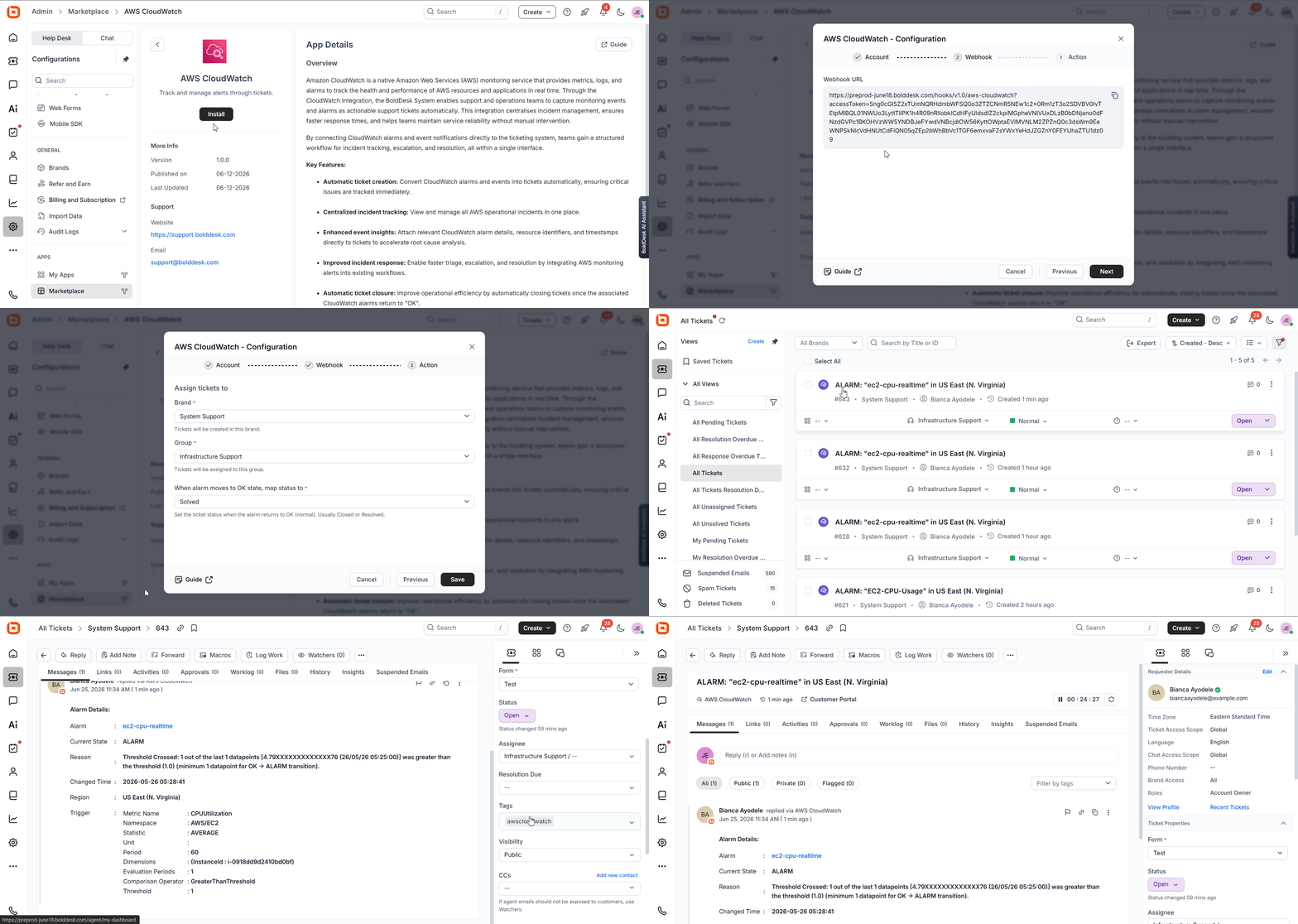
AWS CloudWatch integration: Automate incident response workflows
Amazon CloudWatch integration connects monitoring alerts directly to your support workflows while providing real-time metrics, logs, and alarms.
Tickets can be updated or automatically closed when associated CloudWatch alarms return to a healthy state.
With detailed alert information included in each ticket, teams gain a structured workflow for incident tracking, escalation, and resolution, all within a single interface.
Make integration: Automate workflows across connected apps
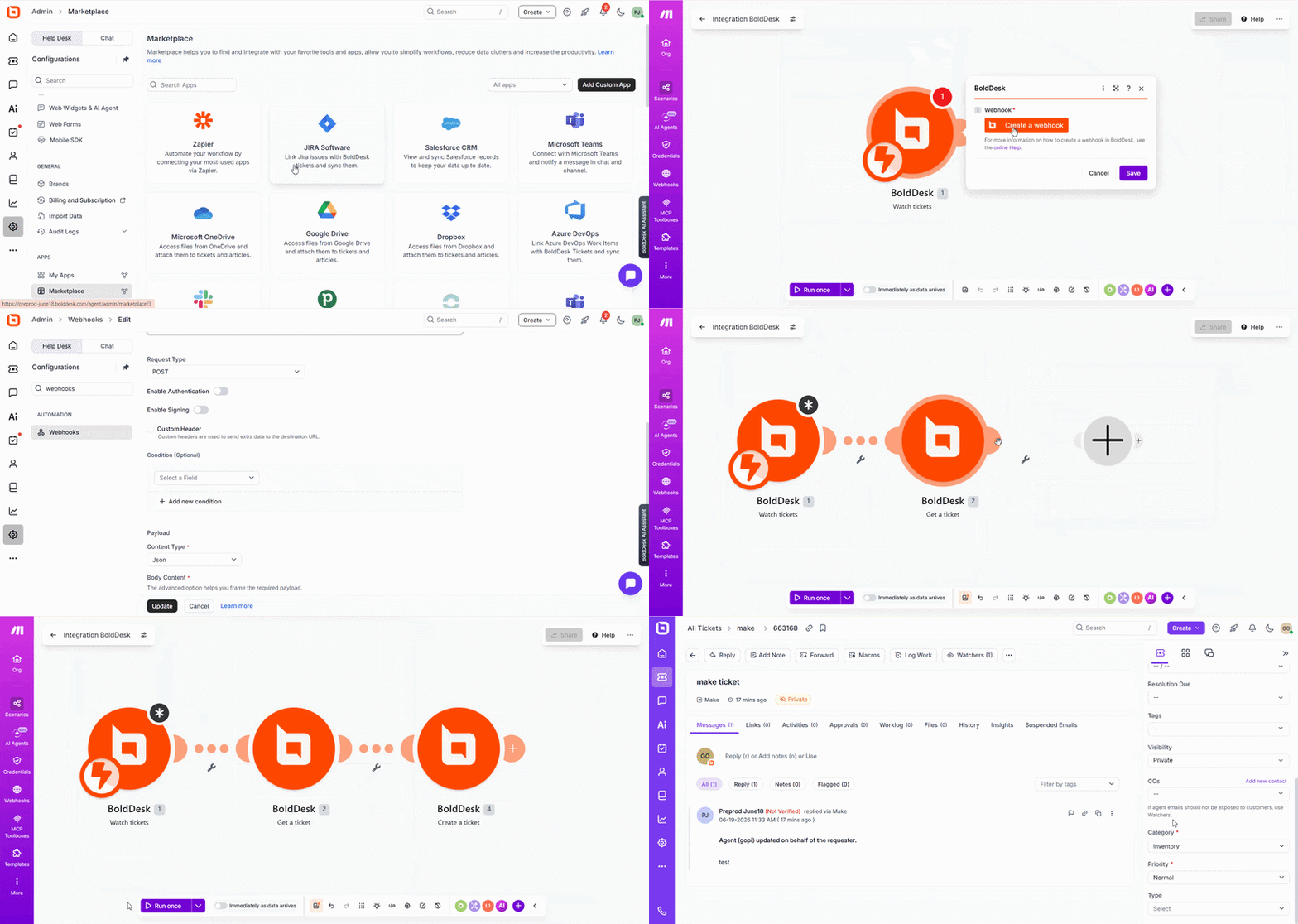
We’re excited to introduce the BoldDesk integration with Make to enable teams to connect their tools and automate workflows across multiple applications.
With this integration, you can create trigger-based workflows that automate repetitive tasks, synchronize data in real time, and execute actions across connected systems, without manual effort.
Automating workflows reduces repetitive work, improves data consistency, and helps teams operate more effectively by connecting all their tools into a single, unified process.
Slack and Microsoft Teams integrations: Get SLA alerts in real time
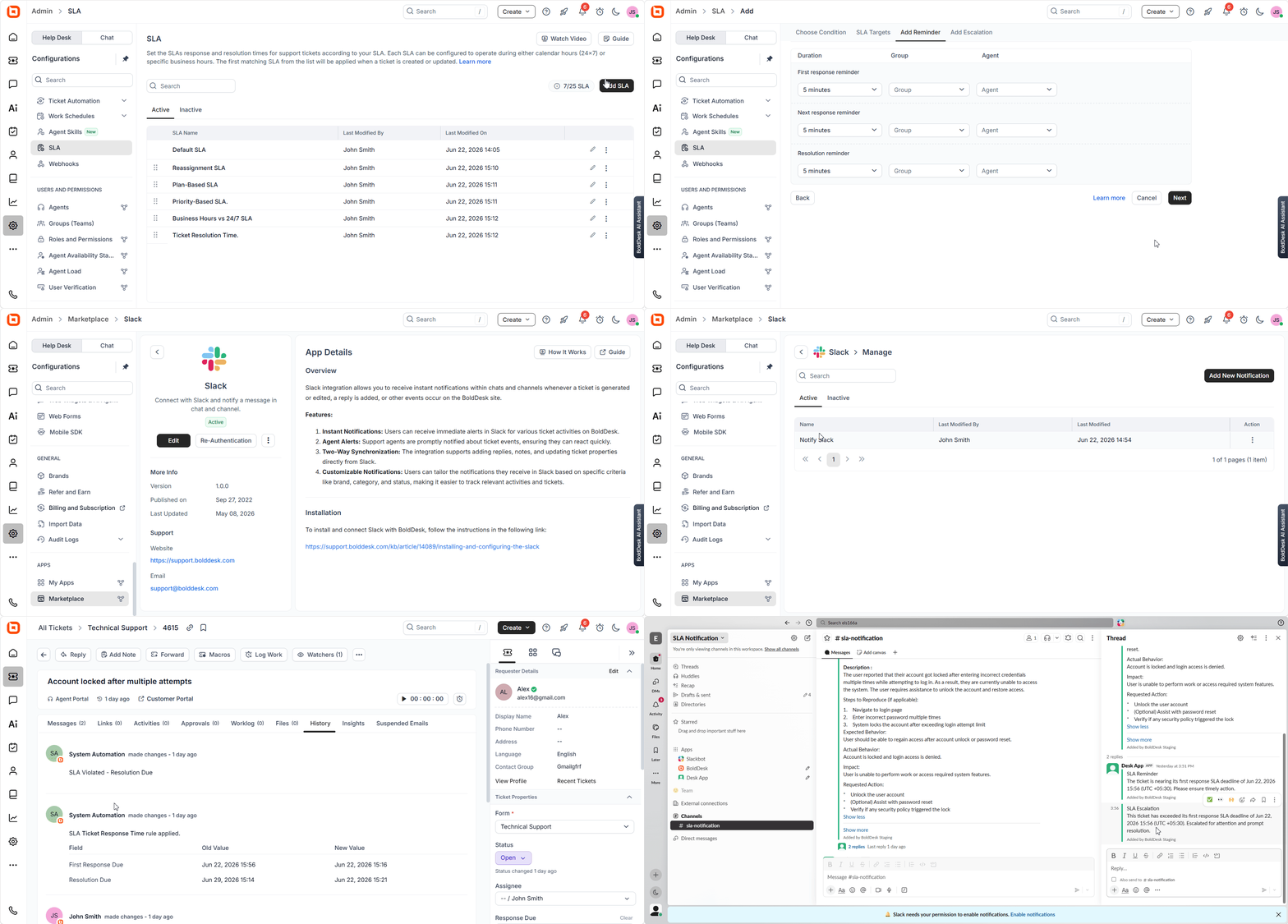
We’ve enhanced the Slack and Microsoft Teams integrations with real-time SLA reminders and support for ticket form fields as workflow conditions, making it easier to build targeted automations and notifications.
Agents can now receive real-time SLA reminders and escalation alerts directly within Slack and Teams, helping them take timely action on approaching or breached SLAs.
Teams can also use ticket form fields as workflow conditions to create more targeted automation and notifications.
Real-time alerts and flexible workflow conditions keep teams informed, reduce delays, and ensure more consistent responses to critical tickets.
Twilio voicemail support: Capture missed calls within the system
We have introduced voicemail support to our Twilio integration, enabling callers to leave messages when agents are unavailable.
Capturing missed calls improves responsiveness, ensures no customer inquiry is lost, and helps deliver a more reliable experience.
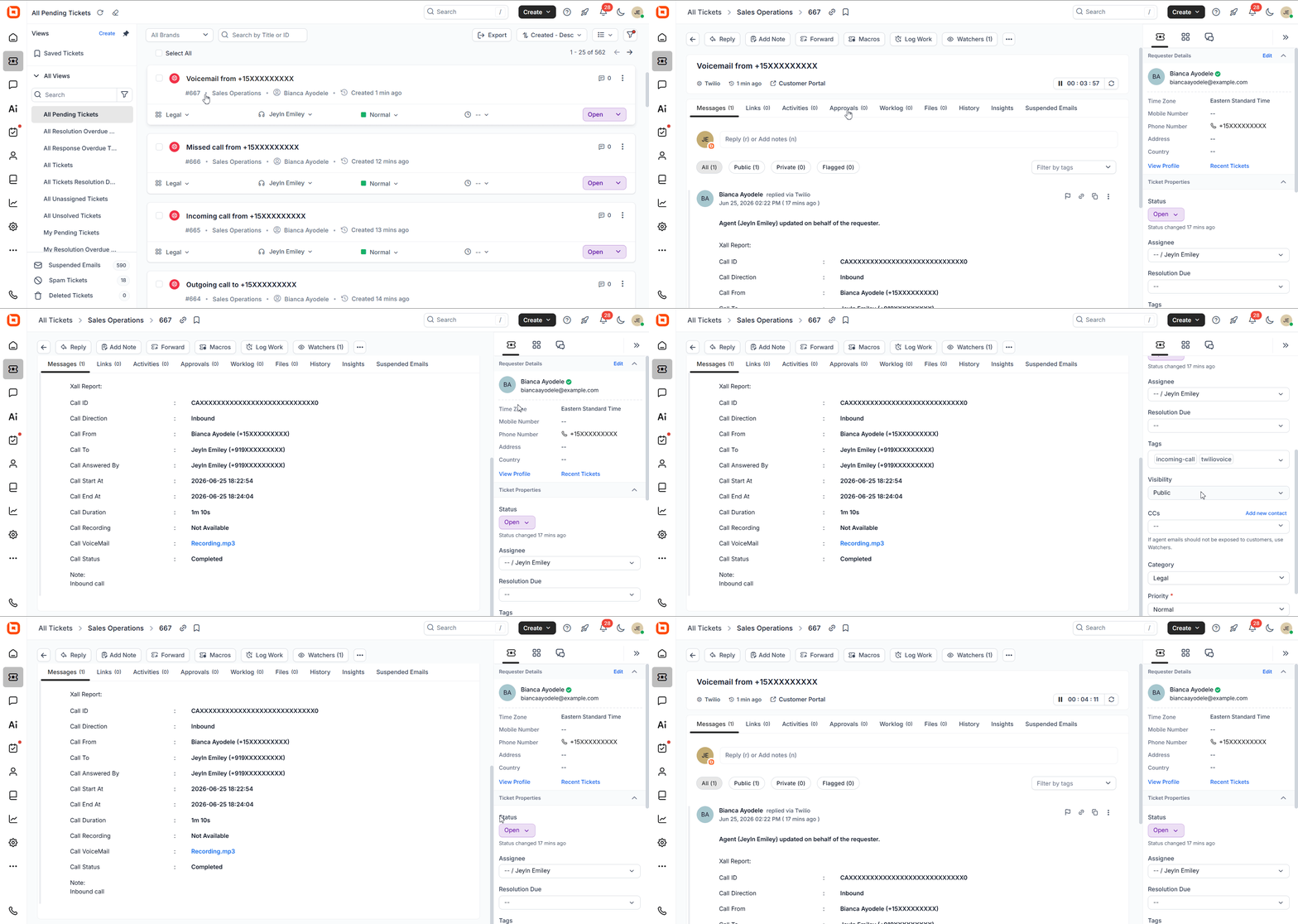
Real-world scenario: Capture Missed Calls and Follow Up Efficiently
Challenge: A property management company receives frequent inquiries from tenants about maintenance requests, rent payments, and lease details. During peak hours or after business hours, some calls are missed, leading to delayed responses and frustrated tenants.
BoldDesk solution: With Twilio voicemail support, callers can leave messages when agents are unavailable. These messages are captured within the system, allowing teams to review and follow up promptly.
Impact: No requests go unnoticed, follow-ups become more organized, and tenants receive timely responses. This improves overall communication.
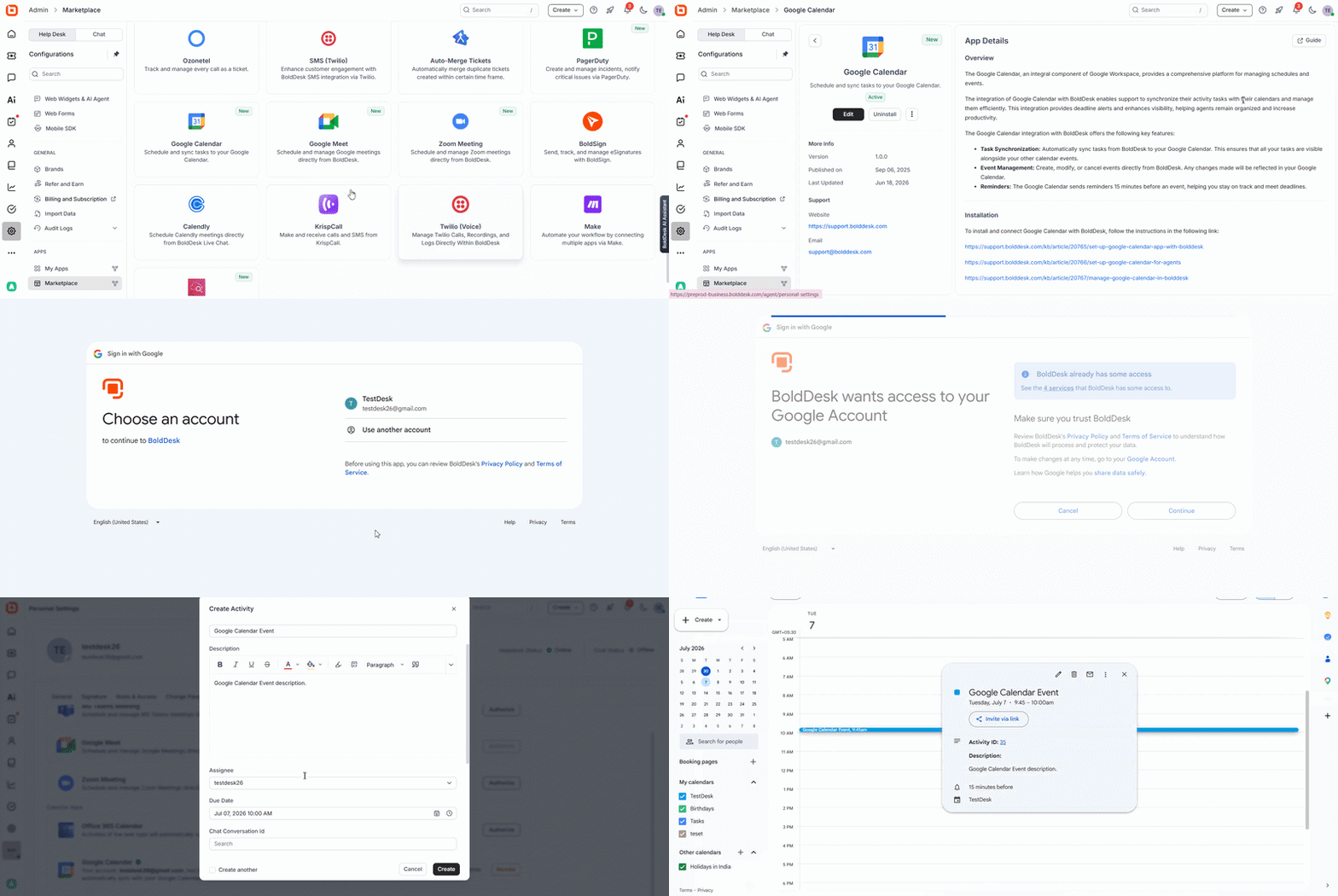
Google Calendar integration: Sync tasks and schedules seamlessly
Managing tasks alongside meetings and deadlines often requires switching between multiple tools, making it harder to stay organized.
With the new Google Calendar integration, you can keep your tasks and schedules aligned effortlessly.
Tickets and tasks can be synced with calendar events, allowing you to create, update, or manage schedules directly from BoldDesk while staying aware of upcoming commitments with timely reminders.
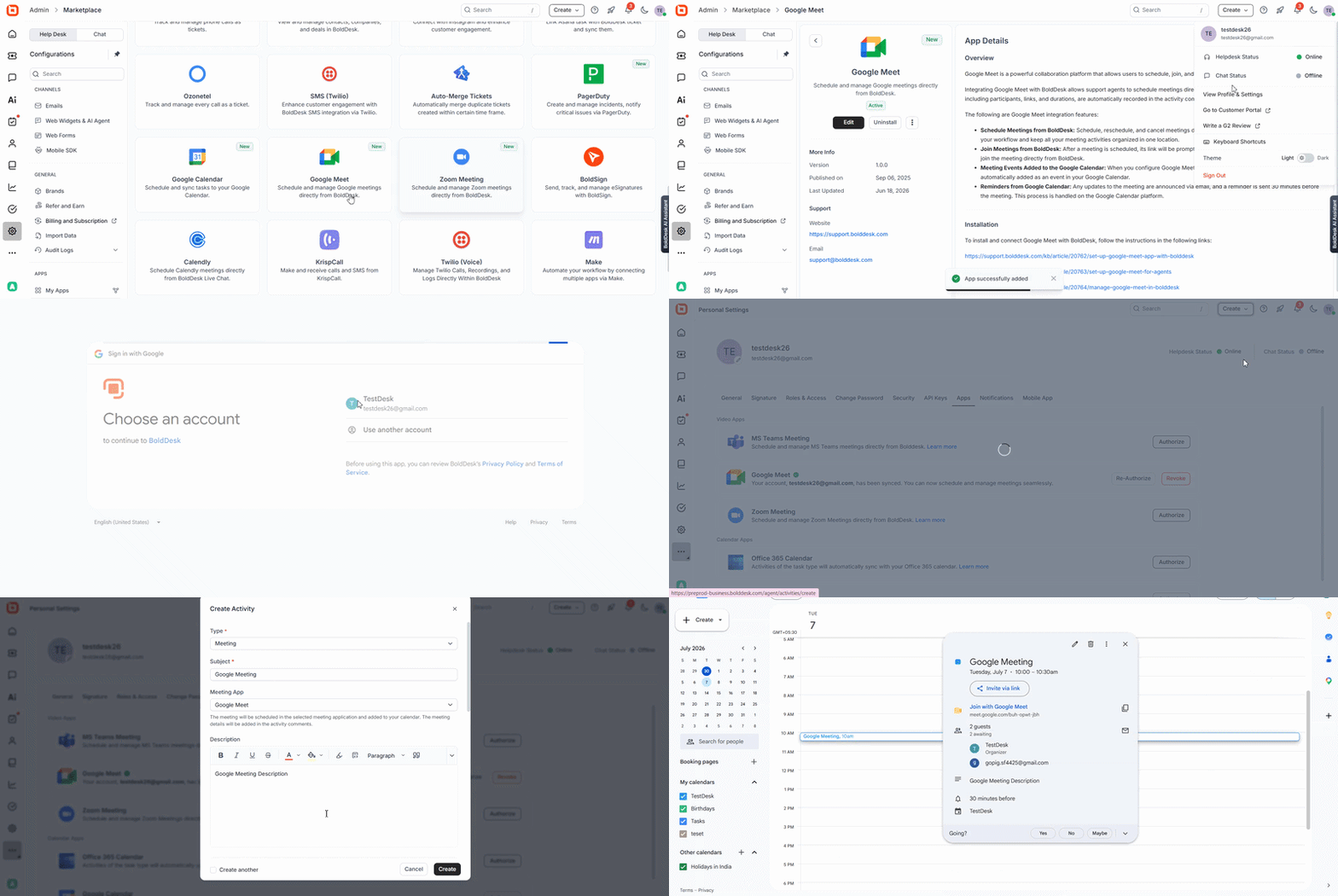
Google Meet integration: Simplify meeting coordination
Coordinating meetings alongside support tasks often means switching between tools and manually managing schedules.
With the new Google Meet integration, meetings can be created instantly, synced with your calendar, and accessed with a single click, helping teams stay on track without extra steps.
By combining scheduling, reminders, and quick meeting access, teams can stay organized, reduce context switching, and collaborate more efficiently throughout the day.
Mobile app updates that keep support on the go
Support teams aren’t always at their desks. These mobile help desk updates help agents stay productive, informed, and responsive wherever work happens.
Understand conversations faster with AI summaries in tickets and chat
Support agents often need to respond to customers while traveling, working remotely, or moving between locations. In these situations, reviewing long conversations on a mobile device can slow resolution times.
With AI Summaries, agents can quickly access full ticket conversation summaries, individual ticket response summaries, and complete chat conversation summaries directly from the mobile app.
This enables faster responses, better continuity, and more efficient support from anywhere.
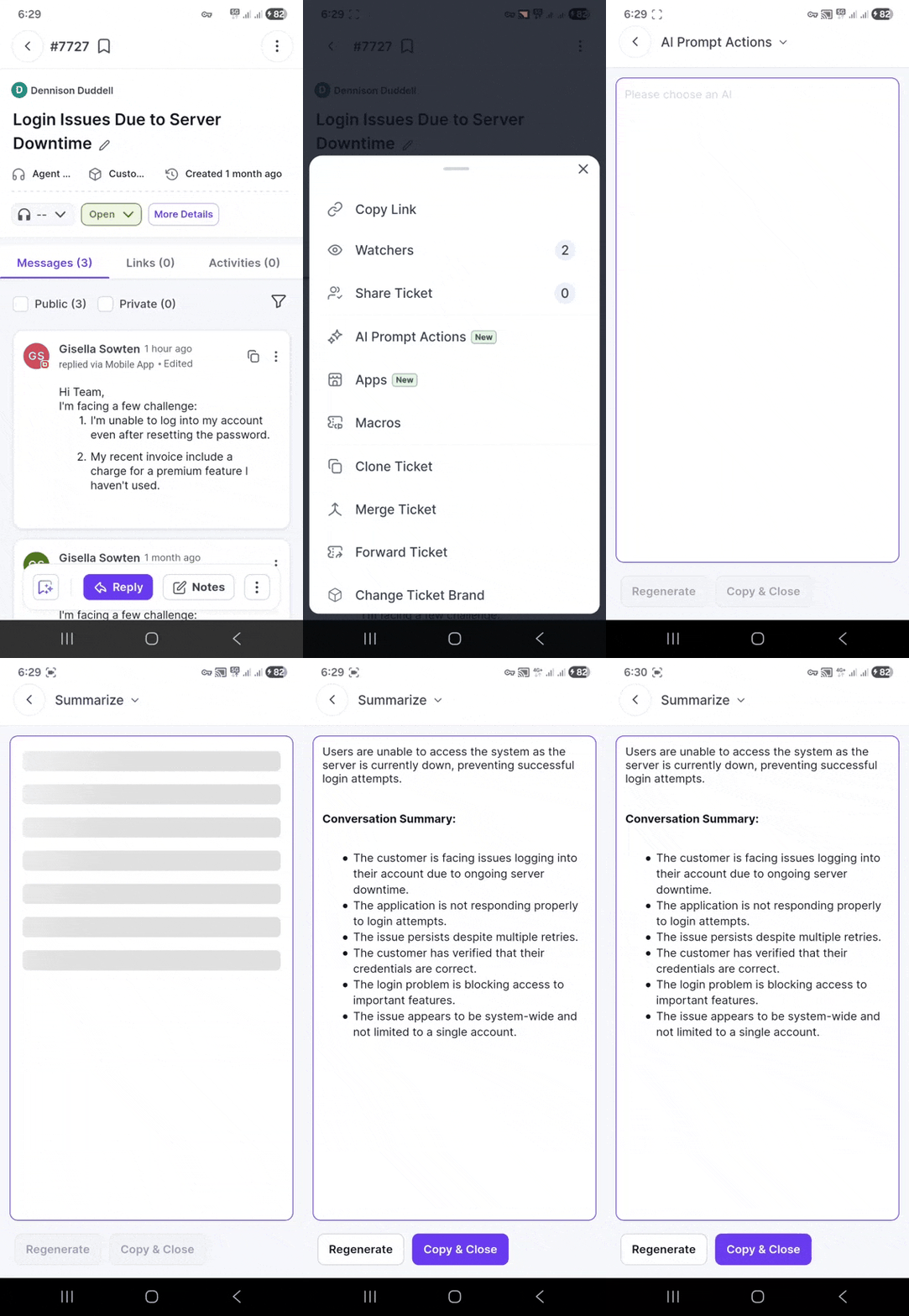
Real-world scenario: Handle Support Issues on the Go
Challenge: A multi-location service company has agents handling requests across different branches, and long ticket threads make it difficult to quickly understand issues on mobile.
BoldDesk solution: With the mobile app and AI summaries, agents can instantly view concise conversation summaries, capturing key details without scrolling through entire threads.
Impact: Agents can respond faster with the right context, reduce back-and-forth, and provide consistent support across all locations, no matter where they are working from.
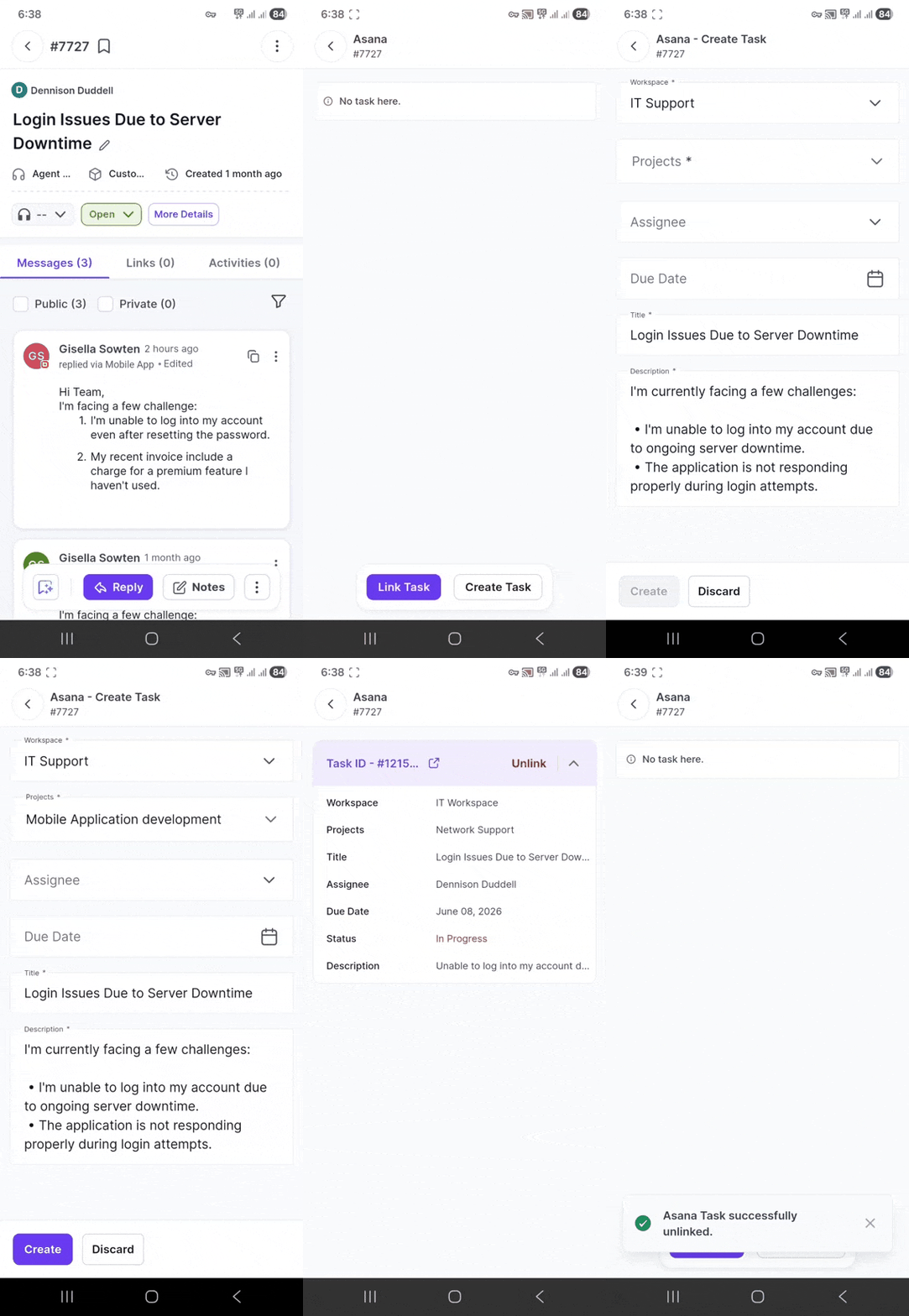
Connect tickets from your device with Asana integration
When support issues require product, engineering, or operations involvement, agents often need to switch tools and manually coordinate follow-ups.
The Asana integration keeps support and project workflows connected, helping teams move requests from support to execution without losing context.
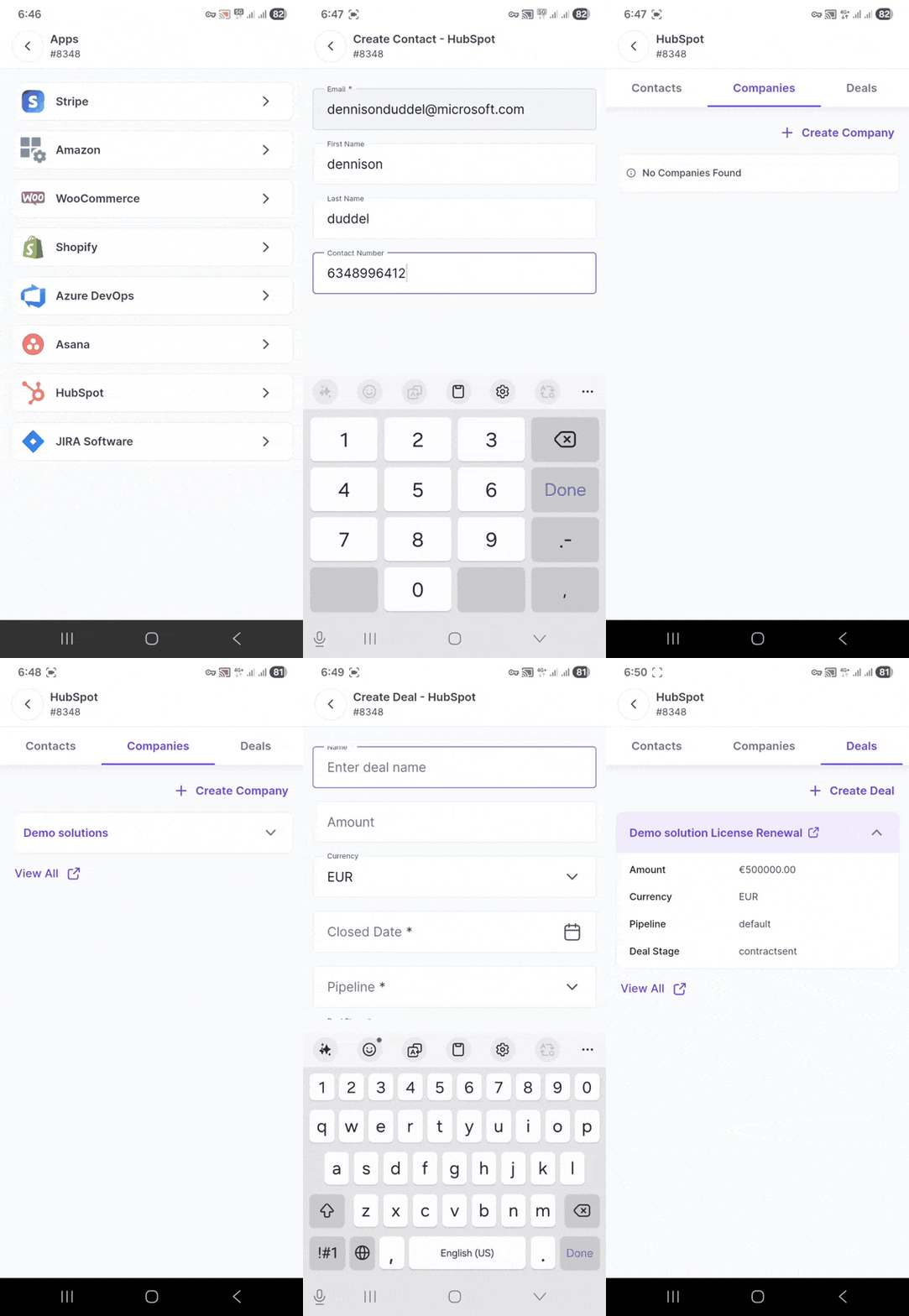
Access ticket details from your mobile app with HubSpot CRM integration
With HubSpot CRM integration, agents no longer need to switch between systems to access customer history, account details, or deal information from their mobile device.
They can create new HubSpot records and automatically log newly created and resolved ticket activities, helping keep customer records current, reducing manual effort, and enabling more personalized support.
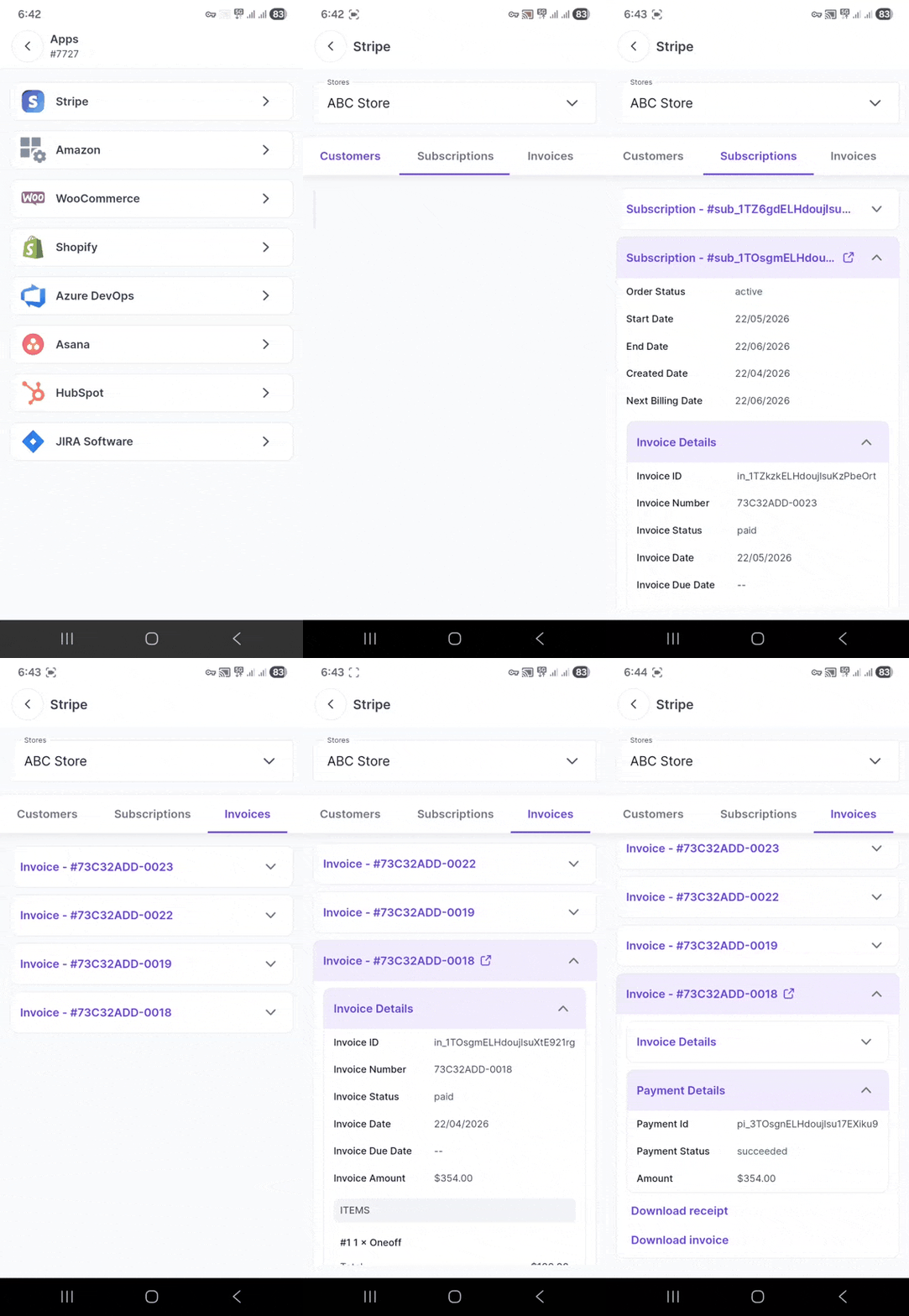
Manage billing details from the mobile app with Stripe integration
Billing-related questions are often time-sensitive and require quick resolution.
Stripe integration gives agents access to review subscription changes, cancellations, refunds, and payment history directly from their mobile device, enabling faster responses without needing to involve other teams.
See what’s coming next for BoldDesk
We’re continuously investing in new capabilities to help support teams work more efficiently, stay connected, and deliver exceptional customer experiences.
Soon, we will launch the following features:
- Ticket history enhancements
- X(Twitter) integration
- Team Viewer integration
Explore the BoldDesk roadmap to discover more upcoming features.
Deliver more connected support with BoldDesk’s latest updates
Great customer service is built on the right tools, clear insights, and structured workflows.
The BoldDesk July 2026 release is designed to help your team reduce manual work, stay organized, and deliver better customer experiences.
Whether your team is managing tickets, improving self-service, tracking SLA performance, or connecting tools across your support stack, these updates are built to keep your work organized and conversations seamless.
Ready to explore what’s new? Try BoldDesk or connect with our support team to see these updates in action.
Start your 15-day free trial today and experience seamless support with BoldDesk.
We’d love to hear your thoughts. Share your feedback in the comments below!
Related articles