
TL;DR: Evaluating an AI agent platform requires focusing on accuracy, integration, scalability, and real-world performance. This checklist helps buyers evaluate and choose the right platform, one that is cost-efficient, avoids common pitfalls, and scales efficiently with support operations.
With the rise of AI agent platforms, choosing the wrong solution can increase support complexity, frustrate customers, and create costly operational bottlenecks. Many platforms perform well in demos but fail under real customer workloads, leading to incorrect responses, broken workflows, and higher escalations.
Without a structured evaluation approach, teams risk investing in tools that look promising up front but fail to deliver long-term value or align with their support workflows.
This checklist helps you compare AI agent platforms based on factors that directly impact real support performance. It’s built for customer support leaders, CX managers, and operations teams making data-driven purchasing decisions.
Research by IBM indicates that 83% of respondents expect AI agents to enhance process efficiency and output by 2026.
What are AI agent platforms, and how do they work in support?
An AI agent platform enables systems to understand, respond to, and act on customer inquiries. It enhances customer support operations by automating repetitive tasks, reducing ticket volume, and agent workload.
AI agent solutions analyze user input, interpret intent, and generate context-aware responses. Unlike rule-based chatbots, they also execute tasks across support systems.
They work in support operations by:
- Understanding customer intent: Use natural language processing to interpret queries across channels like chat, email, and voice
- Generating accurate responses: Retrieve relevant information from knowledge bases and support data to deliver contextual answers
- Assisting agents: Provide real-time suggestions, context, and guidance to agents to improve response quality and speed
- Executing actions: Automate workflows like ticket routing, updates, and task execution, allowing AI to manage routine queries while your team focuses on complex issues
Why AI agents are essential for businesses today
As customer expectations and support demands increase, AI agents for customer support have become essential for businesses looking to scale support efficiently.
According to an NNGroup study, agents using AI tools handled 13.8% more inquiries per hour compared to those without AI assistance.
Here’s how AI agents impact your business:
- Handle high-volume repetitive queries without increasing team size.
- Delivering faster responses and 24/7 support across channels.
- Improving agent productivity through real-time assistance and automation.
- Reducing support costs while maintaining consistent service quality.
- Providing insights into customer needs and support performance.
These outcomes highlight the importance of a structured approach when selecting an AI agent platform. Evaluate platforms based on how well they support your workflows, scale with demand, and deliver measurable operational impact.
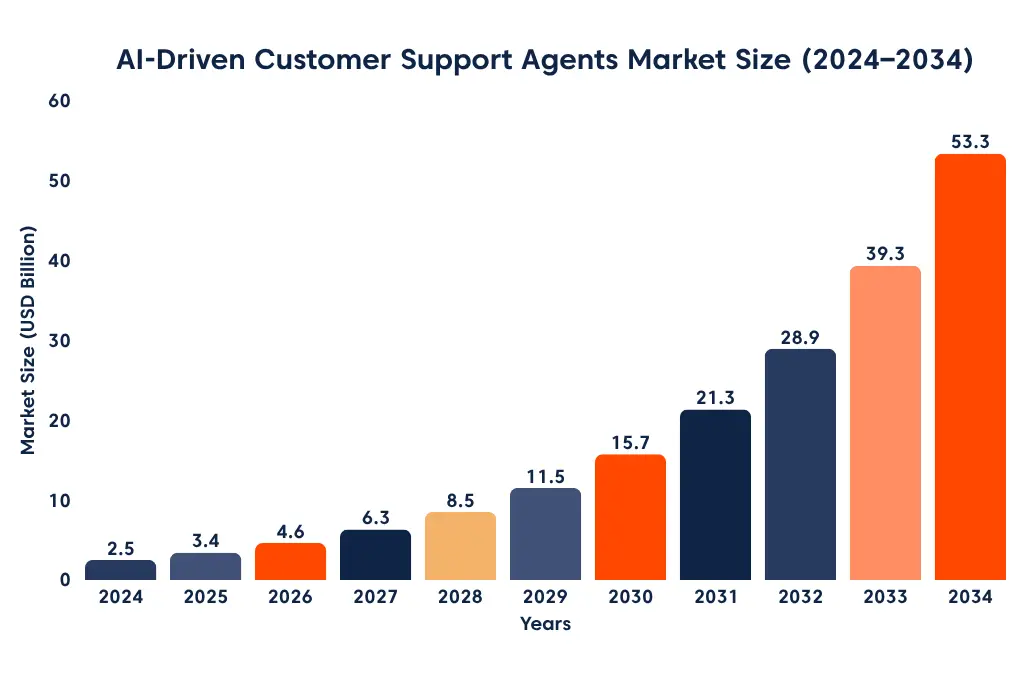
The chart above highlights the rapid growth of AI-driven support solutions, reflecting why businesses are prioritizing AI adoption in customer service.
12 key factors to evaluate AI agent platforms for customer support
Selecting an AI agent platform is a strategic decision because it affects automation accuracy, escalation quality, support costs, and customer experience.
Choosing the wrong system can introduce operational complexity, increase costs, and limit long-term scalability.
According to a DemandSage report, companies using AI agents can see up to a 61% improvement in employee efficiency.
The following checklist outlines what to review and clarifies the specific operational impact of each factor in real support environments.
Note: The key is not just identifying features but understanding how each platform performs across criteria that impact support operations.
1. Support goals alignment
Look for solutions that align with how your support team defines success, whether that is reducing workload, improving resolution speed, or controlling costs.
What to consider
- Can the platform be configured to prioritize your primary support objective (e.g., ticket deflection vs. resolution speed) without custom development?
- Does it allow different goal configurations across channels (e.g., chat vs. email)?
- Can you segment AI behavior by customer type, region, or support use case (billing vs. technical issues)?
- Does the platform track how AI actions impact KPIs like SLA adherence, first response time, or repeat ticket rates?
- Can goals be updated without requiring a major workflow redesign?
Why this matters
When platform capabilities are disconnected from your KPIs, it becomes difficult to measure impact, prioritize automation, or demonstrate clear ROI.
Build Smarter Support with the Right AI Platform
BoldDesk empowers teams to automate workflows, improve accuracy, and scale effortlessly.
2. Workflow design and logic
The workflow system determines whether the platform can handle your actual support workflow end-to-end, including both decision-making and task execution.
What to analyze
- Can workflows handle multiple inputs—such as CRM data, order history, subscription status, and SLA priority—in a single flow?
- Can the AI take actions, such as updating records or triggering APIs, directly within workflows?
- Can the platform handle uncommon situations without giving vague or generic answers?
- Can workflow updates be deployed without disrupting existing support operations?
- Can multiple steps or agents work together within a single workflow?
Why this matters
The strength of the workflow system directly affects how much work the AI can complete on its own versus how often it needs human intervention.
3. AI reasoning and support intelligence
Support intelligence determines how reliably the AI can understand requests and handle different types of queries without breaking down.
What to examine
- Can the AI remember context across multiple messages without losing track of the conversation?
- How does the system handle vague or incomplete queries without making wrong assumptions?
- Can the AI handle follow-up questions within the same context, or does it treat them as new issues?
- Can the AI agent prioritize and adapt responses based on signals like urgency, issue type, or escalation risk?
- Does the AI handle uncertain situations smoothly without creating a poor experience?
Why this matters:
When AI struggles to interpret intent or maintain context, decision quality drops, resulting in more errors, escalations, and user frustration.
4. Omnichannel support
Ensure the solution can unify customer conversations across channels, enabling support teams to manage interactions without losing context.
What to evaluate
- Can a conversation continue across channels without losing context?
- Are responses consistent across entry points (chat, email, social, voice)?
- Does the platform support channels natively, or does it depend heavily on third-party connectors?
- Can the AI agent access unified interaction history across all channels in one view?
Why this matters
Without unified context, a customer who starts a conversation in chat may have to repeat the same issue over email, increasing frustration in customer experiences.
5. Human handoff and collaboration
A reliable system should allow AI and human agents to work together smoothly, especially when automation cannot complete a task.
What to analyze
- Can you set rules for when conversations should be escalated based on confidence or failure?
- Does the full conversation, including actions taken, carry over during handoff?
- Are AI-generated summaries clear, accurate, and ready for agents to use?
- Can agents take over or intervene without restarting the interaction?
- Are internal collaboration features embedded within the same workflow environment?
Why this matters
In many systems, agents receive escalated tickets without full context, forcing them to re-ask questions the customer has already answered.
6. Knowledge management and training
Choose a system that stays aligned with your internal knowledge base and allows updates without heavy technical effort.
What to validate
- Can the AI use both structured (KB articles) and unstructured data (tickets, documents) as sources?
- How quickly do knowledge base updates show up in AI responses?
- Can knowledge content be updated without disrupting existing AI responses?
- Are approval workflows, versioning, and rollback controls available for knowledge updates?
Why this matters
If knowledge updates take time to reflect, customers may receive outdated answers even after internal policies have changed.
7. Integration ecosystem
Focus on platforms that connect directly with your existing tools so they can access data and perform actions within your workflows.
What to analyze
- Does the system offer prebuilt integrations with popular business tools (CRM, help desk, ERP, collaboration apps, etc.)?
- Can the platform pull real-time data like account status, order updates, and subscription changes from connected systems?
- Do integrations allow two-way updates, or only read customer data?
- Does the system support low-code or no-code integration builders?
- Can the platform be customized for specific business integrations or workflows?
Why this matters
Without real-time integrations, AI responses may rely on outdated data, leading to incorrect answers about orders, subscriptions, or account status.
8. Analytics and reporting
The system must provide clear insight into how AI is performing across different workflows and tasks.
What to evaluate
- Can you clearly track which issues the AI resolved, assisted with, or failed?
- Is deflection measured based on reduced workload, not just the number of sessions?
- Are insights available at the level of workflows, intents, and automation steps?
- Can reporting be customized for operational vs. leadership needs?
- Does the system automatically highlight performance issues or declines?
Why this matters
A team may see high AI resolution rates in dashboards, but still receive complaints because issues were not fully resolved.
9. Security, privacy, and compliance
Make sure the platform can enforce strong controls over data access, storage, and usage based on required standards.
What to examine
- Does the platform meet required regulatory and industry standards (e.g., GDPR, SOC 2), with verifiable certifications or audit reports?
- Is data securely encrypted both in transit and at rest across all system components?
- Are access permissions easy and configurable across users, roles, teams, and environments?
- Are all actions logged clearly for auditing and compliance checks?
- Can you control how data is stored, masked, and deleted to meet compliance needs?
Why this matters
Weak security and compliance controls increase the risk of compliance failures, audits, and penalties.
10. Pricing and total cost of ownership
Your evaluation should cover how pricing is structured and how costs scale with usage.
What to consider
- Is the pricing model clear (per interaction, per agent, or resolution-based)?
- Are set-up, onboarding, and integration costs included or charged separately?
- Will costs rise as usage grows, and how predictable are those increases?
- Are key features like automation, APIs, and integrations included or charged extra?
- Are there any hidden or unexpected charges as you scale?
Why this matters
When pricing lacks transparency, it becomes challenging to forecast costs accurately or plan for long-term scalability.
11. Vendor reliability
Evaluation should assess how dependable the vendor is in supporting your team over time.
What to compare
- How responsive is the vendor when issues arise, and are escalation paths clearly defined?
- Is documentation consistently updated and detailed enough for troubleshooting?
- Does the vendor provide ongoing support beyond initial onboarding?
- Can the vendor demonstrate consistent performance across real customer deployments?
- Does the vendor have a track record of supporting teams with similar scale or complexity?
Why this matters
Without reliable vendor support and proven consistency, even strong platforms can become difficult to operate and scale effectively.
12. Implementation readiness and operational scalability
Your evaluation should focus on how easily your team can implement, manage, and scale the platform within day-to-day support operations.
What to evaluate
- How complex is the initial setup, and does it require developer involvement?
- How quickly can teams configure and launch workflows using templates or prebuilt components?
- How are AI agents monitored, retrained, and optimized over time?
- Can the platform scale across teams, regions, or growing ticket volumes without significant reconfiguration?
- Is operational ownership clearly defined with appropriate governance controls?
Why this matters
Complex implementation processes can increase internal effort, delay rollout, and make long-term scaling harder to manage.
Choose the right AI agent platform with this structured, criteria-driven checklist for real operational impact:
Buyer tips to evaluate AI agent solutions effectively
Evaluating AI agent platforms goes beyond feature lists. A structured approach helps you compare vendors objectively, identify risks, and understand real business impact.
Use the following tips to make a confident buying decision.
Match the platform to your business stage
Choose a solution that fits your current needs while supporting growth.
- Startup: Lightweight tools for quick deployment and basic automation.
- Mid-market: Workflow automation with omnichannel capabilities and expanding integrations.
- Enterprise: Advanced orchestration, deep integrations, and governance controls.
Test platforms using use cases
Evaluate platforms by comparing AI agents using your actual support scenarios. A strong demo does not always reflect real-world performance, especially when handling edge cases, complex workflows, or integrations.
Score vendors using structured criteria
Use a simple scoring model to evaluate each platform across key areas like accuracy, automation, integrations, security, and analytics. Rate each category from 1 to 5 and apply weights based on your priorities.
Example scoring
| Vendor | Accuracy | Automation | Integrations | Security | Analytics | Total score |
|---|---|---|---|---|---|---|
| Vendor A | 5 | 4 | 4 | 5 | 4 | 4.5/5 |
| Vendor B | 4 | 3 | 5 | 4 | 3 | 3.9/5 |
| Vendor C | 3 | 5 | 3 | 4 | 5 | 4.0/5 |
This helps you compare vendors objectively and focus on real performance instead of marketing claims.
Spot red flags early
Look for warning signs like weak integrations, inconsistent responses, poor context handling, or limited customization. These issues often become harder to fix after rollout.
Weigh trade-offs, not just features
No platform excels in every area. Some prioritize automation, while others focus on flexibility or scalability. Choose based on what matters most to your operations.
Focus on outcomes, not promises
Estimate ROI using measurable results such as reduced ticket volume, faster resolution times, and improved productivity. Validate claims with real data whenever possible.
Want to compare the top AI agent platforms side by side before choosing one for your support team?
Explore our breakdown of the best AI agent platform for customer support to see how leading solutions stack up.
Common pitfalls to avoid when evaluating AI agent platforms
While a buyer’s checklist helps structure your evaluation, many teams still encounter hidden pitfalls during the decision-making process. AI agent platforms often appear similar at a surface level, but critical differences emerge only after implementation.
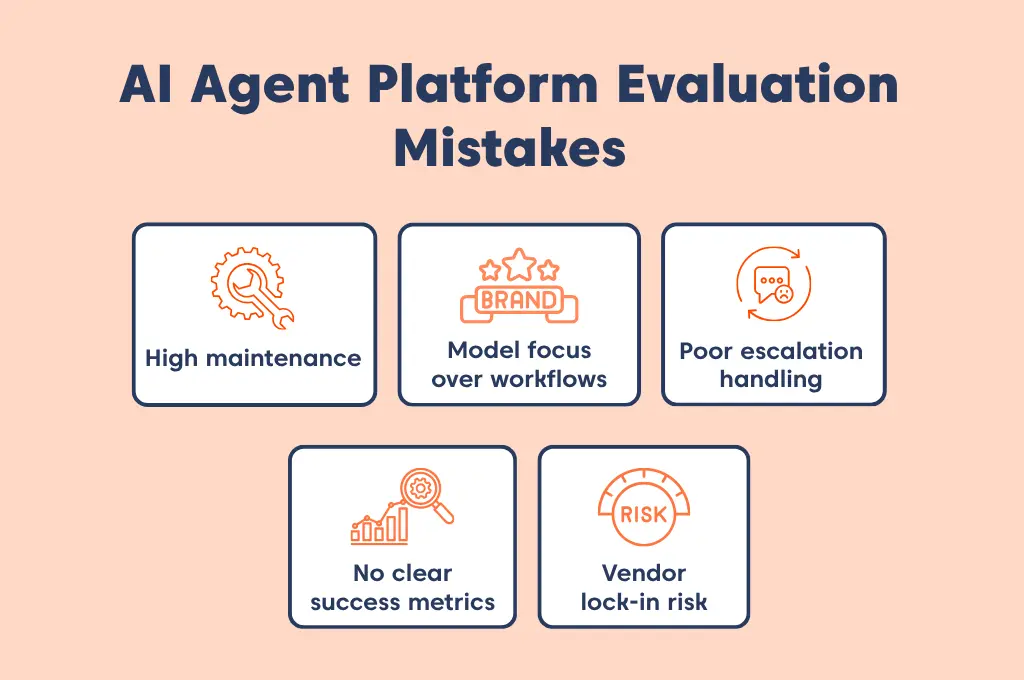
Understanding these common mistakes and how to avoid them can help you make a more informed, future-ready choice for your support operations.
Model focus over workflows
Some platforms emphasize the AI model they use, which can create a perception of superior capability without reflecting real performance in support scenarios.
How to avoid it: Evaluate how effectively the platform handles end-to-end workflows, including multi-step tasks, context retention, and system actions.
High maintenance
AI requires continuous updates and tuning to stay effective, not just initial setup.
How to avoid it: Assess ongoing effort and choose platforms that enable easy updates and continuous improvement.
Poor escalation handling
AI agents cannot handle every query, and weak escalation handling can result in poor user experiences when issues need human intervention.
How to avoid it: Test how the platform manages escalations, including when and how it hands off to human agents. Ensure context is preserved and that fallback paths provide a smooth, consistent experience.
No clear success metrics
Without defined metrics, it’s difficult to measure performance or justify ROI.
How to avoid it: Set clear KPIs (e.g., deflection, resolution time, CSAT) and ensure the platform can track them.
Vendor lock-in risk
Proprietary systems can make switching providers costly and restrict long-term flexibility.
How to avoid it: Check data portability, API openness, and ownership policies before committing.
Once you understand what to evaluate and the common pitfalls to avoid, the next step is identifying platforms that can meet these requirements.
Why BoldDesk is a strong choice for AI-powered support operations
Choosing the right AI agent platform is not just about adding automation. The ideal solution should help your team reduce support workload, because AI only creates real value when it replaces work, not just responds faster.
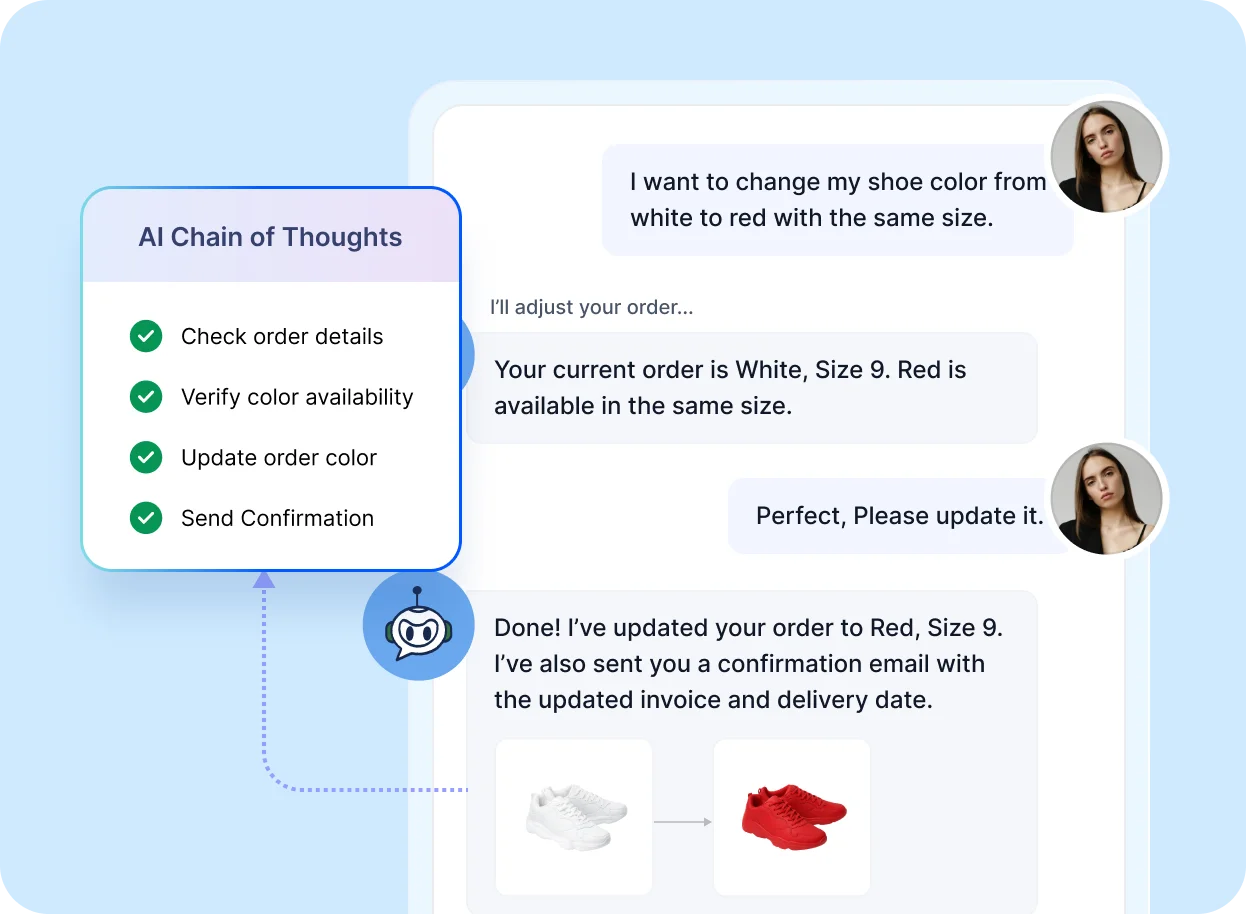
BoldDesk combines AI-powered automation with a scalable customer service platform designed to support real-world operations.
Here’s how BoldDesk helps support teams work smarter:
- Automating repetitive support requests: BoldDesk AI Agents can instantly handle common customer queries such as order updates, account-related questions, FAQs, and routine support requests, reducing ticket volume and agent workload.
- Delivering faster self-service experiences: Customers can quickly find accurate answers through AI-powered self-service backed by a knowledge base, documentation, and connected support resources.
- Executing actions, not just conversations: Beyond answering questions, BoldDesk AI Agents can perform tasks like updating records, retrieving information, triggering workflows, and managing routine support actions automatically.
- Maintaining consistent, on-brand communication: AI-generated responses follow your business tone, policies, and approved content guidelines to ensure reliable and professional customer interactions.
- Support customers across multiple channels: BoldDesk delivers a unified AI-powered support experience across chat, portals, and other customer communication channels.
- Generate smarter, context-aware responses: Its AI uses trusted support content, connected systems, and business data to provide more accurate and relevant answers.
- Keep customer data secure and controlled: BoldDesk gives teams control over what information AI Agents can access, helping maintain security, compliance, and responsible automation.
- Scale 24/7 support without growing support overhead: Customers receive instant assistance anytime while teams improve efficiency without significantly increasing operational costs.
Unlock better support with the right AI agent platform
AI agents deliver real value when they fit seamlessly into your workflows and reduce actual support effort not just respond faster. The difference between a good and a great AI customer service platform comes down to how well it performs under real conditions and supports your team at scale.
The right AI agent platform should reduce operational complexity, improve customer outcomes, and scale alongside your support team, not create more work to manage.
Book a live demo to see how BoldDesk AI agents help teams automate routine requests, assist agents in real time, and deliver faster, more consistent support at scale.
What matters most to you when selecting an AI agent platform? Tell us your perspective, and we’d love to learn from your experience.
Related articles
- AI Agent Examples: 21 Real-World Use Cases Across Industries (2026)
- 7 Biggest AI Support Implementation Mistakes That Cost Businesses (and How to Fix Them)
- How to Create an AI Customer Support Agent for Shopify (No-Code)
Frequently asked questions
Prioritize accuracy, reliability, and seamless integration with your existing customer support systems to ensure consistent, trustworthy customer interactions. Also, focus on scalability, customization, and built-in analytics to continuously improve performance and enhance customer experience and operational efficiency.
Focus on how the platform handles knowledge sources, validation, and low-confidence scenarios. Test whether responses are grounded in your knowledge base or connected systems rather than generated without context. Also assess how the AI behaves when it’s unsure: strong platforms avoid guessing, clearly surface uncertainty, and escalate when needed.
Demos often show ideal outcomes, so it’s important to test the AI on real queries, edge cases, and multi-step interactions. Look at how well it maintains context, handles follow-up questions, and adapts tone based on the situation. You should also review failed or incomplete interactions to understand where the experience breaks down.
This depends on how well the platform can use your domain knowledge and integrate with your systems. Evaluate whether it can understand your terminology, reference internal documentation, and follow workflows specific to your business.
Most AI agent platform deployments can range from a few weeks to longer, depending on integration complexity and business requirements. Faster implementation is possible with prebuilt workflows, native integrations, and low-code setup options.