

TL; DR: Knowledge base software centralizes information, making it easy for customers and teams to find answers quickly. It improves efficiency, deflects support tickets, speeds up onboarding, and preserves critical knowledge. With features like clear structure, powerful search, AI-powered capabilities, and regular updates, it supports effective self-service and improves team productivity.
Imagine your computer freezes and you need to reset it, but the instructions are scattered across old emails, forgotten documents, and previous conversations that are hard to track.
A simple reset turns into a stressful delay because the information isn’t in one clear place.
Knowledge base software solves this by organizing information in one central hub, enabling self‑service, and keeping teams aligned.
According to Harvard Business Review, 81% of customers try to resolve issues on their own before reaching out to customer support.
This shift toward self‑resolution reflects a broader expectation for speed and convenience. Customers want answers immediately, and businesses that invest in clear, accessible self‑service resources are better positioned to meet those expectations without increasing support strain.
In this guide, you’ll learn what a knowledge base is, why it matters, best practices for implementing knowledge base software.
What is knowledge base software?
Knowledge base software is a centralized platform that helps organizations create, organize, manage, and deliver information in a unified searchable system.
It includes FAQs, policies and procedures, troubleshooting articles, best practices and how-to-guides.
A knowledge base allows teams to document answers, processes, tutorials, and other essential knowledge in one place so employees, customers, and users can quickly find the information they need through self‑service.
Types of knowledge bases
Knowledge bases come in different forms depending on who the information is for and how it is used.
There are two main types of knowledge base software, internal knowledge base software and external knowledge base software.
Internal knowledge base software
An internal knowledge base software brings together company policies, HR and onboarding materials, internal procedures, IT guides, workflows, and internal FAQs in one secure place.
Internal knowledge base software helps employees quickly find accurate information, work more efficiently, stay aligned on processes, and avoid relying on emails or frequent questions to colleagues.
External knowledge base software
An external knowledge base software organizes FAQs, how‑to guides, product or service instructions, troubleshooting steps, and account or billing information for customers.
It enables users to find answers on their own, ensures consistent and reliable information, reduces support requests, and improves customer confidence and satisfaction.
Benefits of knowledge base software
A well‑developed knowledge base gives customers and employees quick access to reliable information, reducing support requests and enabling faster, smoother issue resolution.

- Reduces repeated questions: A knowledge base gives customers quick, consistent answers, so they don’t have to keep asking the same questions. This saves time for both employees and customers.
- Speeds up onboarding: New employees can learn faster because they have a central place to find procedures, policies, and best practices without constantly relying on others.
- Preserves institutional knowledge: Important information stays documented even when staff leave, change roles, or forget details protecting the organization from knowledge loss.
- Improves customer experience: Customers can find answers instantly through self-service, reducing waiting times and improving satisfaction.
- Helps teams stay aligned: With one central source of truth, everyone works with the same information, reducing confusion and improving collaboration.
Key features of an effective knowledge base
An effective knowledge base tool is not just a collection of information it’s a well‑structured system designed to make knowledge easy to find, understand, and use.
Below are some of the essential features that make a knowledge base platform truly effective:
- Clear structure and navigation: A well‑organized system uses logical categories and menus to guide users. It helps users quickly understand where to find information. This reduces search time and makes the system simple to explore.
- Search functionality and tagging: It enables users to quickly find accurate information while also discovering related content through structured labels. Together, they improve content organization, relevance, and ease of access across the knowledge base.

- AI‑powered features: AI enhances a knowledge base by delivering context-aware search results and recommending relevant content based on user intent. AI knowledge bases also powers chatbots and automated suggestions to provide instant answers and improve self-service efficiency.

- Feedback and analytics: User ratings, comments, and search data provide insights into content performance. Teams can use knowledge base feedback to identify gaps, update outdated articles, and continuously improve content quality.

- Version control: This tool tracks changes made to each article over time. It helps teams revert mistakes, review past edits, and maintain accuracy. This is essential for compliance, audits, and accountability.
- Access control and permissions: Determines who can view, edit, or publish content. It protects sensitive internal information and prevents unauthorized changes which keeps the self-help center safe, reliable, and well‑governed.
- Multilingual capabilities: Multilingual knowledge base enables content to be delivered in multiple languages, making it accessible to global teams and customers. This enhances inclusivity, improves user experience, and increase customer satisfaction.

- SEO optimization: Optimized titles, URLs, and keywords help articles rank in search engines, increasing visibility and making it easier for users to find answers.
How to build an effective knowledge base
Building a knowledge base does not have to be complicated. With the right approach, you can turn scattered information into a structured, easy-to-use knowledge base platform.

1. Identify your target audience
Define who your knowledge base is for, customers, internal teams, stakeholders, or a combination. Each group has different expectations, so understanding your audience helps you tailor the content, tone, and level of detail for a better user experience.
2. Gather and organize existing knowledge
Collect all current documents, FAQs, guides, and expert insights, then sort them into clear categories.
This ensures information is accurate, easy to find, and ready to be turned into helpful knowledge‑base articles. The goal is to build a structured foundation before creating new content.
3. Choose the right knowledge base tools
Select a platform that is easy to use, scalable, and built for efficient knowledge management. Look for features like strong search, AI capabilities, and simple content updates.
The right tool ensures your knowledge base stays effective as it grows.
4. Create and standardize content
Write content using clear language, consistent formatting, and logical structure. Use headings, short paragraphs, and visuals where needed to improve readability and help users quickly understand information.
5. Launch and promote the knowledge base
Make your knowledge base easily accessible through your website, support channels, and internal tools.
Encourage adoption by guiding users on how to use it and regularly promoting it across key touchpoints.
Best practices for managing a knowledge base platform
Effective knowledge base management keeps information accurate, easy to find, and useful.
The following best practices help ensure your knowledge base stays organized, easy to use, and consistently valuable for both teams and customers.
- Keep content simple and concise: Use clear, everyday language and focus on the essentials. Short, direct articles make it easier for users to find and understand information quickly.
- Use consistent language and formatting: Stick to the same tone, terminology, and structure across articles. Consistency builds familiarity and helps users navigate content with ease.
- Update articles regularly: Review and refresh content often to keep information accurate and relevant. Outdated articles can confuse users and reduce trust.
- Encourage feedback and contribution: Invite team members and users to suggest updates or share insights. Feedback helps identify gaps and improve content quality.
- Monitor usage and improvement based on insights: Track key knowledge base metrics like which articles are viewed, searched, or rated most. Use these insights to refine content and focus on what users need.
Practical use cases of knowledge base software
Knowledge bases support many business needs by giving people quick access to clear, organized information.
From customer self‑service to internal workflows, they help teams work faster and users find answers without delays.
Customer support and self‑service
A knowledge base allows customers to easily find answers on their own by providing clear and helpful FAQs, step‑by‑step how‑to guides, and detailed troubleshooting articles.
This self‑service approach helps users solve common issues quickly without needing to contact support.
As a result, customers save time, gain confidence in using the product, and enjoy a smoother overall experience, while businesses reduce support requests and improve customer satisfaction.
Employee training and onboarding
New employees can quickly learn how the company works by understanding its workflows, tools, and expectations through clear documentation.
At the same time, existing team members can easily find answers when they need them without repeatedly asking colleagues. This saves time, improves productivity, and helps everyone work more confidently.
Managing product information, policies, and procedures
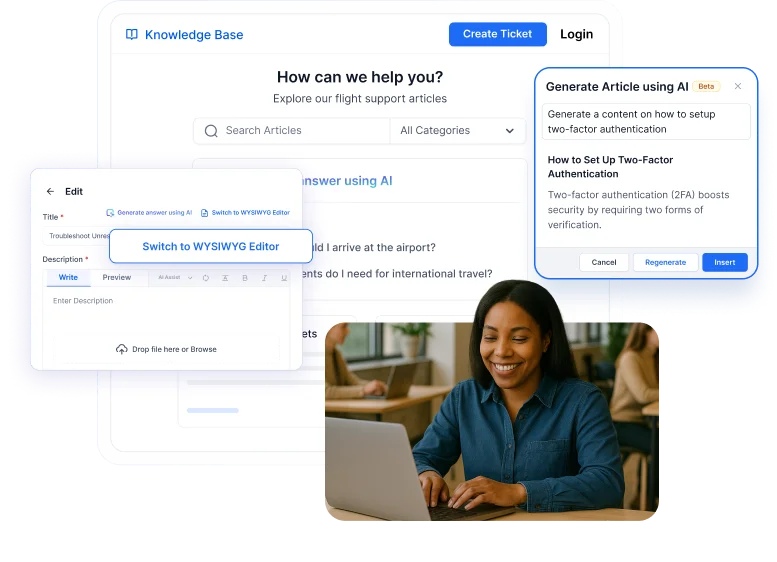
A knowledge base provides a central place for all essential information, including product setup guides, feature explanations, updates, usage instructions, and internal organizational content.
By storing product documentation alongside policies, procedures, and internal guidelines, businesses ensure that everyone accesses consistent, accurate, and up‑to‑date information.
This reduces confusion or misuse, supports transparency, and strengthens compliance across the organization.
Improve your self-service with knowledge base software
A well‑designed knowledge base helps teams work smarter and gives customers faster, more reliable answers. It reduces ticket volumes, boosts productivity, and keeps information easy to access and always up to date.
Modern support teams need tools that make this kind of efficiency possible. Platforms like BoldDesk stand out, offering a streamlined way to centralize information, enable effortless self‑service, and support growing teams with AI‑powered capabilities.
Book a demo today or sign up for a free trial to transform the way your customers and teams find answers.
Related articles
- 20+ Top Knowledge Base Examples to Boost Self-Service Support
- Knowledge Base Architecture: Definition, Best Practices and Examples
Frequently asked questions
Yes. Knowledge base reduces training time, streamline operations, and helps teams work smarter regardless of size.
Organizations can improve employee adoption by offering clear training, reinforcing usage through reminders, and integrating the knowledge base into daily tools and workflows. Making it the default, trusted source of information ensures employees rely on it consistently, which strengthens long term adoption.
An internal knowledge base is used by employees to access company processes and documentation, while an external knowledge base is designed for customers to find answers through self-service.
AI improves a knowledge base by delivering relevant answers faster through intelligent search and recommendations. It also helps teams create consistent content more efficiently and identifies gaps using analytics, enabling better self-service and fewer support requests.