TL;DR: A knowledge base is a centralized, searchable collection of information that helps users find reliable answers without needing direct support. It can be used internally for employee support or externally for customer self-service. Effective knowledge bases are well-organized, easy to search, and regularly updated.
Customers increasingly begin their support journeys with self-service, but access to help content does not guarantee resolution.
According to Gartner, 73% of customers use self-service during their support journey, yet only 14% fully resolve their issues through it.
When users cannot find relevant or understandable guidance, straightforward questions often become avoidable support tickets.
This increases support requests and prevents agents from concentrating on issues that require direct assistance.
A well-managed knowledge base organizes FAQs, troubleshooting guides, product documentation, policies, and how-to articles in one searchable self-service resource.
In this guide, you’ll learn what a knowledge base is, how it works, its main types and features, and the best practices that make it effective.
What is a knowledge base?
A knowledge base is a centralized, searchable repository of information, such as FAQs, how-to guides, troubleshooting steps, policies, and product documentation.
It helps customers and employees answer questions, resolve common issues, and complete tasks without relying on direct assistance.
Customer-facing content supports self-service, while internal resources give employees and support agents a consistent source of truth for faster, more accurate responses.
Modern self-service resources often use natural-language search, AI-generated answers, article recommendations, and content-analysis tools to improve discovery and identify knowledge gaps.
How does a knowledge base work?
A knowledge base works through a continuous knowledge lifecycle that connects content creation, discovery, issue resolution, and improvement.
A typical knowledge base workflow operates in four stages:
- Teams create and organize knowledge: Support, product, IT, and other subject-matter experts document approved answers, procedures, policies, and troubleshooting guidance in a structured repository that is easy to maintain and access.
- Users discover relevant information: Users can search using keywords or natural-language questions, browse categories, or receive article suggestions through help portals, chatbots, ticket forms, or support interactions.
- Content supports resolution or escalation: The articles help users complete tasks or resolve issues. When self-service is not enough, the resource center should provide a clear path to assisted support.
- Usage data drives continuous improvement: Search behavior, article feedback, failed searches, and escalation patterns reveal content that is missing, outdated, unclear, or difficult to find, enabling ongoing improvements.
Together, these stages help organizations deliver accurate information, improve self-service success, reduce repetitive support requests, and keep content relevant as customer needs and business processes evolve.
Types of knowledge bases
Knowledge bases are generally classified into two main types based on their intended audience and the information they provide: internal and external knowledge bases.
Many organizations use both to support employees internally while providing customer self-service.
Internal knowledge base
An internal knowledge base is a private information hub for employees, support agents, IT teams, HR teams, and other internal departments.
It usually includes standard operating procedures (SOPs), employee onboarding resources, troubleshooting guides, and process documentation.
Internal documentation and support resources often form part of a broader knowledge management strategy used to capture, maintain, and share organizational information.
Providing a single source of truth reduces information gaps, supports employee onboarding, and helps teams work more consistently.
External knowledge base
An external knowledge base is a customer-facing self-service resource that helps users find answers, resolve issues, and access product or service information without requiring direct assistance.
Many organizations use it as a knowledge base for customer service, providing customers with continuous access to approved guidance, helping them resolve common issues faster, and reducing repetitive support demand.
Common content includes FAQs, troubleshooting guides, setup instructions, product documentation, billing information, and service policies.
Internal vs. external knowledge bases: A quick comparison
Although both types help users find information quickly, they are designed for different audiences, goals, and business outcomes.
The table below highlights the key differences between internal and external knowledge bases.
| Factor | Internal knowledge base | External knowledge base |
| Audience | Employees, support agents, IT teams, HR teams, and internal stakeholders. | Customers, partners, and end users. |
| Primary goal | Improve operational consistency and employee productivity. | Enable customer self-service and reduce avoidable reliance on assisted support. |
| Typical content | SOPs, runbooks, onboarding resources, internal troubleshooting guides, HR policies, and process documentation. | FAQs, how-to articles, troubleshooting guides, product documentation, billing information, and service policies. |
| Access | Private (role-based). | Public or available to authenticated customers. |
| Business outcome | Faster onboarding, less time spent searching for information, and fewer internal support requests. | Faster customer resolutions, fewer repetitive tickets, lower cost to serve, and more scalable self-service. |
| Success metrics | Time to find information, employee onboarding time, knowledge reuse, repeat internal requests, and employee satisfaction. | Search success rate, self-service resolution rate, article feedback, post-article escalation rate, customer satisfaction, and support ticket reduction. |
Although they serve different audiences, both types support self-service, improve access to information, and help organizations work more efficiently.
Key features of a modern knowledge base
A knowledge base is not just a collection of articles. It is a structured support system that helps users find, understand, and act on information quickly.
These core capabilities make it easier to organize support content, guide users to the right answers, and maintain accuracy over time.
- Search and AI-assisted discovery: Keyword search, autocomplete, filters, natural-language queries, related articles, and AI-generated answers help users find relevant information with less effort.
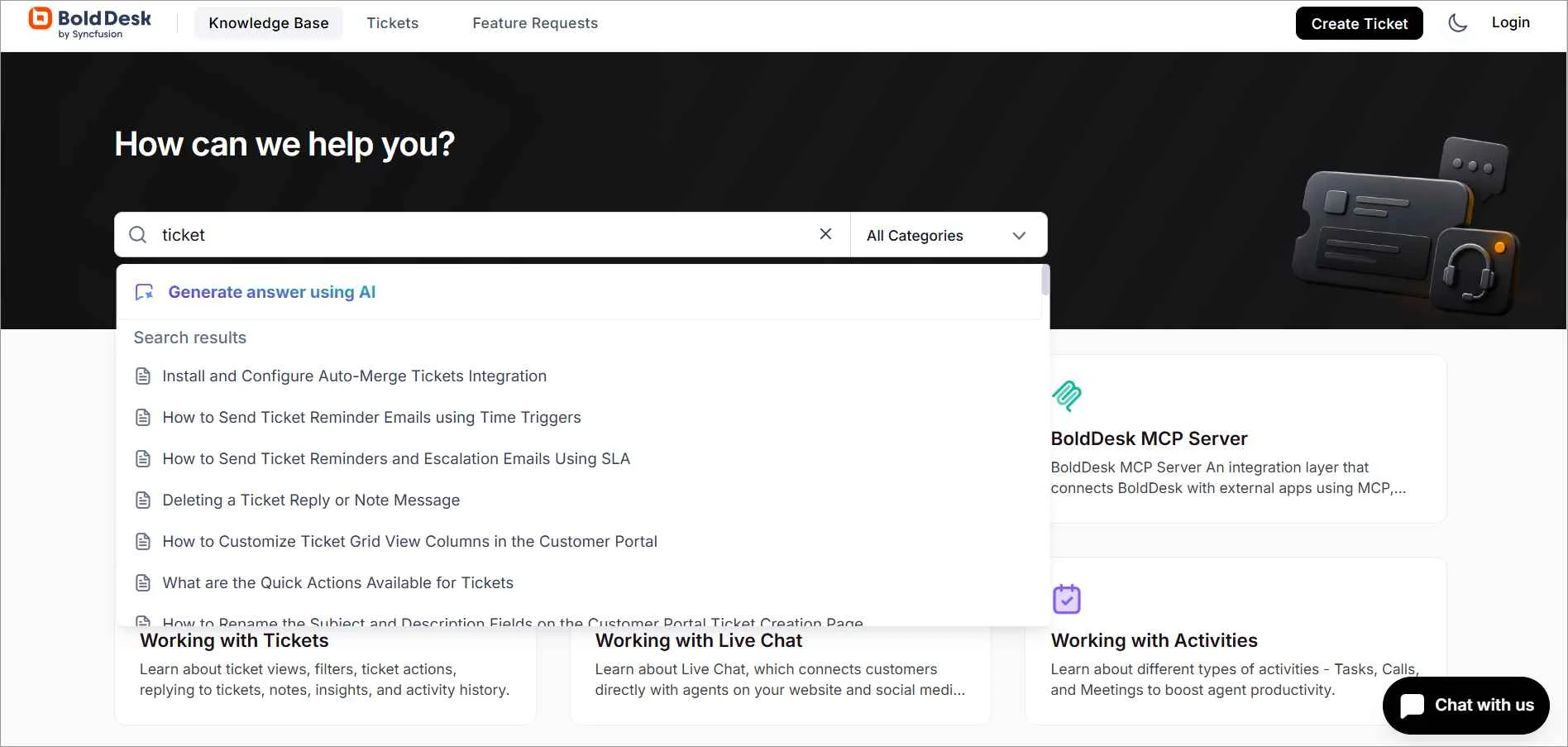
- Structure and navigation: Categories, sections, tags, descriptive titles, and related articles help users browse logically when they do not know exactly what to search for.
- Content creation and maintenance: Rich-text editing, images, videos, tables, screenshots, links, and code snippets help teams create clear content, while review controls support ongoing maintenance.
- Help-desk and channel integration: Connections with ticket forms, chat, help widgets, customer portals, and agent workspaces make relevant knowledge available within existing support journeys.
- Governance and access controls: Roles, permissions, review workflows, ownership, version history, and expiration dates help protect sensitive information and keep content reliable.
- Multilingual support: A multilingual knowledge base enables users to access help content in their preferred language, making self-service more accessible and consistent for global audiences.
- Branding and responsive design: Organizations can align colors, logos, navigation, and layouts with their brand while ensuring the content works effectively across devices.
- Analytics and feedback: Performance data helps teams understand how customers use support content, identify search gaps, and prioritize improvements.
Understanding these features can help you evaluate the best knowledge base software and choose a solution that meets your organization’s support, content management, and self-service needs.
Benefits of having a knowledge base for customers and support teams
A strong knowledge base makes accurate information easy to find, use, and maintain.
Supporting both customer self-service and internal knowledge sharing helps organizations improve efficiency, consistency, and support quality.
Research highlighted by Knowmax found that 91% of users would use a knowledge base if it met their needs, highlighting the demand for effective self-service support.
When implemented effectively, the help article can deliver the following benefits:
- Reduces repetitive support requests: Self-service resources let customers resolve common issues, reducing ticket volume and allowing agents to focus on more complex requests.
- Provides 24/7 access to guidance: Customers expect answers at any time. A searchable help center enables users to find answers anytime, regardless of business hours or location.
- Boosts agent productivity: Agents can quickly access approved answers in a centralized support library. With less time spent searching through scattered documents, they can respond more quickly and accurately, helping improve agent productivity.
- Speeds up onboarding and training: New team members can learn products, processes, and workflows faster. This shortens ramp-up time and helps them become productive more quickly.
- Preserves organizational knowledge: Documenting processes, solutions, and best practices helps retain critical knowledge, ensuring teams can access reliable information even as roles, products, and personnel change.
- Supports continuous content improvement: Analytics, article ratings, failed-search reports, and customer feedback help teams identify content gaps, improve article quality, and increase self-service success over time.
Customer success story: How AdmissionPros improved self-service support
AdmissionPros used BoldDesk to create a centralized, searchable help center that gives customers on-demand access to product information. By enabling users to find answers independently, the organization reduced reliance on support agents for routine questions and freed the team to focus on more complex customer needs.
Best practices for building and managing a knowledge base
Creating a knowledge base is not just about publishing help articles.
To be effective, it needs to answer real user questions, make information easy to find, and evolve as customer needs and business processes change.
The following best practices summarize what makes a knowledge base useful and maintainable.
1. Define the purpose, audience, and success criteria
A knowledge base works best when it’s built for a clearly defined audience.
Determine whether it will serve customers, employees, or both, and define what it should help them accomplish.
Establish clear objectives, such as reducing repetitive inquiries, improving customer self-service, supporting employee onboarding, accelerating agent responses, or achieving another measurable outcome.
2. Prioritize high-impact information
Not all content delivers the same value. Focus on topics that combine high request frequency with significant user or business impact.
Review support tickets, chat logs, search queries, and feedback to prioritize topics that have the greatest impact on customers and internal teams.
3. Use the right knowledge base software
Choose knowledge base software that provides the core features your organization needs, including search, content management, permissions, integrations, and reporting.
Consider factors such as pricing, scalability, usability, and maintenance requirements to ensure the platform can support your needs as they evolve.
It should make content easy to manage while helping users locate relevant information quickly.
4. Involve subject-matter experts (SMEs)
The most useful content comes from the people closest to the work.
Subject-matter experts can validate technical accuracy, while writers or content owners structure the information for clarity and consistency.
Involve support agents so they can contribute real customer language, recurring questions, and edge cases.
5. Organize content for fast discovery
Structure the content around the tasks users want to complete rather than the teams that own the information.
Use clear categories, consistent terminology, descriptive article titles, tags, and related links to help users navigate and find relevant information more easily.
An effective knowledge base design further improves usability through descriptive headings, short paragraphs, mobile-friendly layouts, keyboard-accessible navigation, and sufficient color contrast.
Make relevant articles available through search, help widgets, ticket forms, chat, product interfaces, and agent workspaces rather than expecting every user to visit the knowledge-base homepage.
6. Establish content standards and ownership
Users should have a consistent experience regardless of which article they read.
Use knowledge base article templates and writing guidelines so content follows a consistent structure and terminology.
Assign an owner and review schedule to every article, and update content whenever related products, policies, or processes change.
7. Provide a clear escalation path
Self-service should simplify support, not create dead ends.
When self-service cannot resolve an issue, make the next step obvious through live chat, ticket forms, community support, or another appropriate channel.
Where possible, preserve the user’s search terms, articles viewed, and steps attempted so they do not have to repeat the journey after escalation.
8. Measure and improve continuously
Periodically review knowledge base metrics such as search success, search behavior, repeated searches, failed searches, article feedback, self-service resolution, post-article escalations, and ticket trends to identify gaps.
Use the findings to revise unclear content, create missing articles, and retire information that is no longer relevant.
Common knowledge-base use cases
Knowledge bases are used across industries and departments to centralize information, support self-service, and improve operational efficiency.
While the content varies by audience and use case, the goal remains the same: helping users quickly find accurate information and complete tasks independently.
| Business function | Use case | Primary audience | Typical content |
| SaaS and technology | Customer self-service | Customers and end users | FAQs, troubleshooting steps, billing guidance, policies, and product instructions |
| Customer service and support teams | Agent enablement | Support agents or technical-support teams | Approved answers, known issues, escalation guidance, troubleshooting procedures, and reusable response content |
| HR and internal operations | Employee self-service | Employees | HR policies, onboarding material, IT setup, benefits information, SOPs, and internal processes |
| Product onboarding and adoption | Product education | Customers, administrators, and partners | Setup guides, feature instructions, integrations, release notes, and adoption guidance |
| Developer platforms | Developer or partner support | Developers, implementation teams, and partners | API documentation, SDK guidance, code examples, integration requirements, and technical troubleshooting |
Although the audience and content vary, effective knowledge bases share the same fundamentals: well-organized information, intuitive navigation, reliable search, and regular maintenance.
Deliver better self-service experiences with effective knowledge bases
A knowledge base is most effective when users can quickly find accurate information and resolve issues with minimal effort.
Clear organization, reliable search, defined ownership, and continuous improvement help keep content relevant as customer needs evolve.
BoldDesk helps teams create, organize, and maintain searchable self-service content with AI-powered search, multilingual support, collaboration tools, and analytics to deliver better self-service experiences.
Start your free trial or book a live demo to see how BoldDesk can help you create, manage, and scale self-service content as your organization grows.
Have questions or suggestions? We’d love to hear from you. Share them in the comments section.
Related articles
- 20+ Top Knowledge Base Examples to Boost Self-Service Support
- SaaS Knowledge Base: Key Features, Best Practices, and Examples
- Knowledge Base Architecture: Definition, Best Practices and Examples
Frequently Asked Questions
Knowledge base software is a platform that helps organizations create, organize, manage, and publish a searchable collection of information, such as FAQs and troubleshooting guides.
The software provides the tools to maintain and deliver that content effectively.
An FAQ page answers a limited set of common questions, usually in a short question-and-answer format.
A knowledge base is a broader, searchable collection that may include FAQs, guides, troubleshooting resources, and product documentation.
Update an article whenever the related product, policy, or process changes.
Assign review schedules based on content risk and change frequency, for example, more frequent reviews for rapidly changing or high-impact guidance and less frequent reviews for stable documentation.
A knowledge base can reduce repetitive tickets when customers can find and successfully apply accurate guidance before contacting support.
Search performance, article feedback, and escalation trends help teams verify whether the content is resolving issues.
AI can improve search, recommend relevant articles, assist with tagging and translation, and help teams identify missing or outdated content.
Many organizations adopt an AI knowledge base to enhance self-service experiences while maintaining human oversight for accuracy and governance.
When a knowledge base is integrated with help desk software, customers can see relevant articles before submitting a ticket, while agents can search and share approved content during a conversation.
This supports faster, more consistent resolutions across self-service and assisted-support channels.
Measure knowledge-base success using search success, failed searches, self-service resolution, article feedback, post-article escalation, content freshness, and ticket trends for documented issues.
These indicators help teams evaluate content effectiveness, identify improvement opportunities, and demonstrate the business impact of self-service support.