
TL;DR: Overloaded support queues are rarely caused by slow teams, but rather by inefficient manual systems. Automation resolves this by instantly handling routing and updates, eliminating administrative chaos and freeing agents to focus on complex, high-value customer interactions.
Every time a payment fails at checkout, a loan approval gets stuck, or a customer spends minutes navigating automated menus, the promise of seamless digital finance starts to unravel.
Customer service leaders often face a difficult paradox: the team is working harder than ever, yet the ticket volumes keep growing.
It’s not because your team is slow. It is because the system is manual. When skilled agents are stuck manually routing tickets, copy-pasting status updates, or hunting for order details, they aren’t solving problems. They are managing administrative chaos.
To break this cycle, you need automated customer service, which transforms your daily support operations into intelligent, scalable workflows.
This article explains how automated customer service reduces delays, eases support workload, and helps teams focus on meaningful customer issues instead of manual tasks.
What is automated customer service?
Automated customer service acts like an invisible assistant that handles the heavy lifting before a ticket ever reaches a human agent.
It starts with auto-triage and categorization tools that instantly route incoming emails to the correct team, while customer self-service portals and AI agents answer simple inquiries to prevent ticket creation.
When a ticket is generated, the system maintains momentum using trigger-based responses and SLA monitoring to ensure no deadline is missed.
Ultimately, this automation clears the path for agents by handling repetitive admin tasks, allowing them to resolve complex issues with a single click instead of multiple manual steps.
Why does productivity break down in customer support?
Reducing support queues starts with identifying the factors that cause them to grow. In a manual support environment, team productivity breaks down not because agents are slow, but because the system is inefficient.
If your team is struggling to keep up, you likely recognize these friction points:
Shared inbox chaos
Without automation, emails arrive in a central list where no specific agent has clear responsibility.
This creates two significant operational issues:
- Duplication of effort: Two agents may accidentally open and work on the same ticket simultaneously, doubling the effort for one result.
- Task avoidance: Agents may naturally select simpler tickets to resolve quickly, causing complex issues to remain at the bottom of the list until they become urgent.
Manual tagging and routing
In a manual setup, an agent must act as a dispatcher rather than a problem solver.
They are required to open a support ticket, read it, determine the category, and manually assign it to the correct department.
Even if this process takes only two minutes per ticket, a queue of 1,000 tickets results in 33 hours of time spent solely on moving data before a single customer receives a response.
Overload of repetitive status update tickets
Support queues are often filled with high-volume, repetitive inquiries, such as “Where is my order?” or “Has my refund been processed?”
These questions are easy to answer but massive in volume. Critical technical issues such as system outages get buried in a mountain of routine tasks.
By the time an agent finds the urgent issue, the customer has waited too long and is already frustrated.
Missed SLA deadlines
In a standard inbox, there is no visual indicator to alert an agent when a customer has been waiting too long.
Tickets may sit unnoticed until a customer follows up with a complaint. This forces the team to rush to resolve the escalated issue, disrupting their workflow and compromising the quality of support.
The reactionary trap
Without automated prioritization, agents typically address tickets in the order they arrive, regardless of their importance.
The support team may spend time solving a simple password reset, while a high-value enterprise client with a critical system failure waits in line simply because their email arrived five minutes later.
Why are traditional productivity tools not enough for support teams?
You cannot solve a ticket volume problem simply by organizing it better.
Many teams rely on spreadsheets or generic task boards to manage the chaos. While these are good for planning projects, they are too slow for the nonstop pace of customer support operations.
Productivity tools organize work. Automation eliminates unnecessary work all together.
Here is the critical difference:
| Feature | Generic productivity tools | Automated customer service |
| Task management | Tasks are created manually and updated every time a customer replies. | Tickets automatically re-open and move to the top when a reply arrives. |
| Prioritization | Agents guess what is urgent based on the subject line. | Urgent tickets are instantly flagged to ensure strict service deadlines are met. |
| Context and data | Agents waste time switching tabs to check separate CRMs or order dashboards. | Customer history and order details are displayed directly within the ticket interface. |
| Team collaboration | Multiple agents may unknowingly work on the same issue simultaneously, leading to duplication. | Collision detection alerts staff if someone else is already viewing or editing a ticket. |
| Metrics | Reports only show the volume of completed tasks. | Analytics track critical metrics like response speed, resolution time, and customer satisfaction. |
To truly reduce ticket volumes, teams need a customer support automation platform that understands the lifecycle of a ticket, rather than just a simple to-do list app.
How does automation reduce support queries?
To clear the queue and keep it clear, you need to deploy automation strategically. Here are the core use cases that directly impact your ticket volume and resolution speed.
Auto-assign tickets by issue type
You don’t need a manager to hand out tickets one by one. Automation scans the email subject and text to figure out what the problem is.
This stops your team from wasting time reading messages just to decide who should answer them. Support automation removes this bottleneck by using keyword rules to route tickets instantly.
For example:
A ticket containing “Installation Error” is instantly assigned to Tier 2 Technical Support, while “Password Reset” goes to the general support queue, eliminating any potential delays.
Priority escalation before SLA breaches
Accumulated support requests often lead to missed Service Level Agreements (SLAs), creating avoidable escalations and reactive firefighting.
Customer support automation acts as a safeguard by continuously tracking SLA timers and surfacing at-risk tickets early.
For example:
If a high-priority ticket hasn’t received a first response within 3 hours, the system automatically escalates it to a team lead and flags it as at risk, helping teams prioritize and address the issue before the SLA is breached
Auto-replies for repeat FAQs
For common questions, static autoresponders aren’t enough. Smart triggers can immediately send helpful resources related to inquiry, often resolving the issue without an agent.
For example:
When a customer asks about return policy, the system should detect the intent and instantly reply with the returns guide and a link to the portal. If the customer is satisfied, the ticket closes automatically.
Workflow rules for approvals and follow-ups
Agents lose hours chasing internal approvals or waiting for customer replies. Rule-based workflows automate follow-ups and ticket status management in the background.
For example:
An agent marks a ticket as “Waiting on Customer.” If the customer doesn’t reply in 48 hours, an automated workflow sends a gentle reminder email. If there is still no reply after 5 days, the system automatically closes the ticket to keep the queue clean.
Self-service portals deflecting tickets
The most effective way to reduce support workload overflow is to prevent tickets from being created in the first place. A self-service portal empowers customers to find their own answers.
For example:
A customer starts typing a password issue into the support portal. As they type “reset password,” the system automatically suggests a relevant how-to article. The customer follows the steps, resolves the issue, and never submits a ticket.
What are the benefits of customer service automation?
Customer service is evolving, and automation is leading the charge. By integrating smart technologies into support workflows, businesses are reshaping how they connect with customers and deliver service at scale.
According to McKinsey, implementing an AI-enabled customer service transformation can lead to a more than 20% reduction in cost-to-serve.
The following are advantages of automated customer service:
- Faster first response time (FRT): Automated routing instantly assigns tickets to the right agent so they start solving problems immediately instead of waiting for a manager to hand out work.
- Lower ticket volume: Self-service portals and smart auto-responses resolve common inquiries and reduce unnecessary ticket volume.
- Improved SLA compliance: Real-time monitoring automatically tracks deadlines and flags at-risk tickets, ensuring urgent issues are resolved before service promises are broken.
- Predictable support operations: Built-in reports and analytics tools track every interaction, helping you spot trends and bottlenecks so you can make decisions based on facts rather than guesses.
- Lower cost of service delivery: By minimizing manual work and optimizing resource allocation, businesses can handle higher ticket volumes without the need to hire additional staff.
- Higher agent productivity and satisfaction: Removing repetitive administrative tasks reduces employee burnout, freeing agents to focus entirely on complex issues that require human empathy.
- 24/7 customer support: AI-powered chatbots and knowledge base provide round-the-clock assistance, ensuring customers receive immediate answers even when live agents are offline.
Turn automation into impact. Explore an automated ticketing system built to resolve more tickets without increasing headcount.
How to automate customer service
Customer service automation focuses on delivering consistent, accurate support at scale. As ticket volumes increase and customer expectations rise, manual handling quickly becomes a bottleneck.
The following steps show how teams typically implement customer service automation:
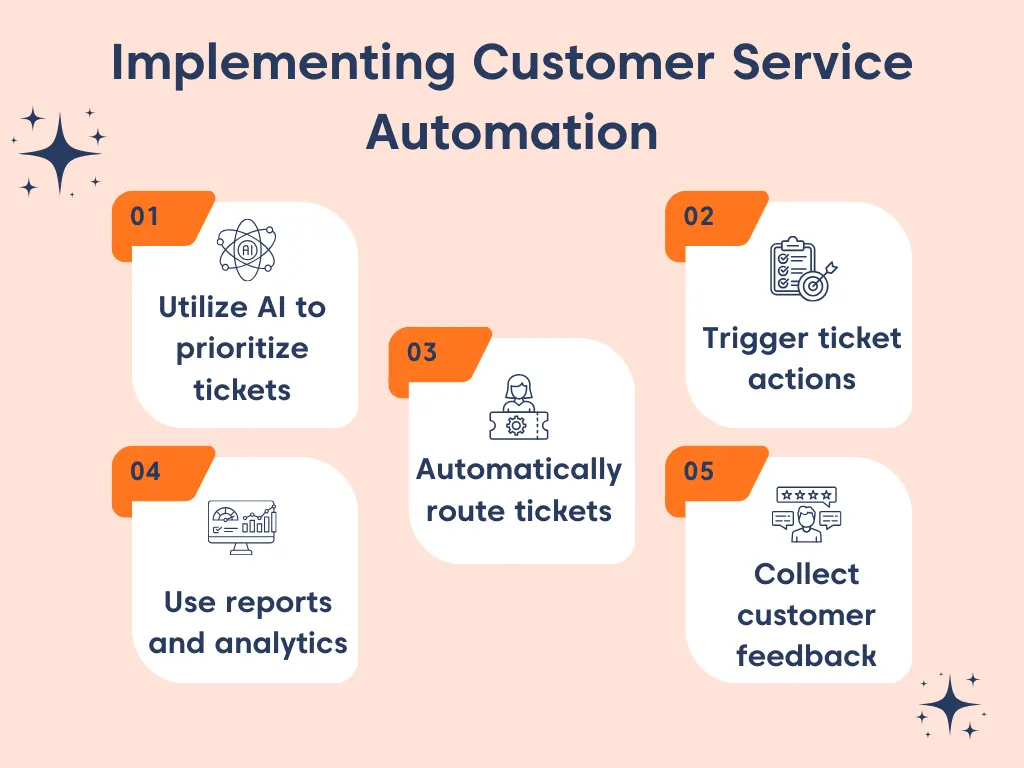
Leverage AI to understand and prioritize tickets
Effective automation starts with understanding. Use artificial intelligence to analyze ticket subject lines and descriptions to identify intent, urgency, and context. This allows tickets to be automatically categorized, prioritized, and tagged without manual triage.
When tickets are understood correctly from the start, teams respond faster and avoid misrouting or unnecessary escalations.
For example:
During a service outage, tickets containing terms such as “down,” “not working,” or “urgent” are automatically categorized as outage-related and marked high priority, ensuring they surface immediately in the queue.
Trigger the right actions at ticket creation
Once a ticket is understood, support automation should apply the necessary actions immediately. This includes:
- Setting priority levels
- Applying tags
- Updating ticket fields
- Sending notifications
- Triggering acknowledgment messages
Standardize these actions at ticket creation to ensure consistency across all tickets and reduce reliance on individual agent judgment.
Route tickets to the right team using automation rules
With context and actions in place, tickets should be routed automatically to the appropriate team based on predefined rules such as issue type, product area, customer tier, or region. Load-based and round-robin assignments help distribute work evenly and prevent delays.
Accurate routing reduces handoffs, speeds up resolution, and improves agent productivity.
Automatically collect customer feedback
Set up post-resolution surveys, such as CSAT, to trigger automatically when a ticket is closed. This captures customer sentiment without adding manual work for agents.
By linking feedback directly to tickets, teams can track service quality, identify recurring issues, and continuously refine support workflows to improve the overall customer experience.
Use reports and analytics to continuously improve performance
Utilize real-time dashboards to continuously monitor the health of your customer service.
Reports and analytics tools provide visibility into ticket volume, response times, resolution performance, SLA compliance, and agent workload as they change throughout the day.
With live insights, team leads can spot bottlenecks early, rebalance workloads, and adjust processes to maintain consistent service performance and efficiency.
For example:
If reports show that high-priority tickets are consistently breaching SLAs, support leaders can identify whether automation rules need adjustment, such as increasing priority thresholds, refining AI categorization, or routing those tickets to a specialized team.
Smarter Support with AI Assistance!
Automate replies and streamline support with BoldDesk AI. Deliver instant, accurate answers—no more long wait times!

Automated customer service examples
The examples below illustrate how modern help desk platforms, such as BoldDesk implement these support automation workflows to streamline daily tasks.
AI agents
AI agents handle customer inquiries as the first line of support by answering common questions, guiding basic troubleshooting, and retrieving accurate information from knowledge bases or connected systems.
Gartner predicts that AI agents will autonomously resolve up to 80% of common customer service issues without human intervention by 2029.
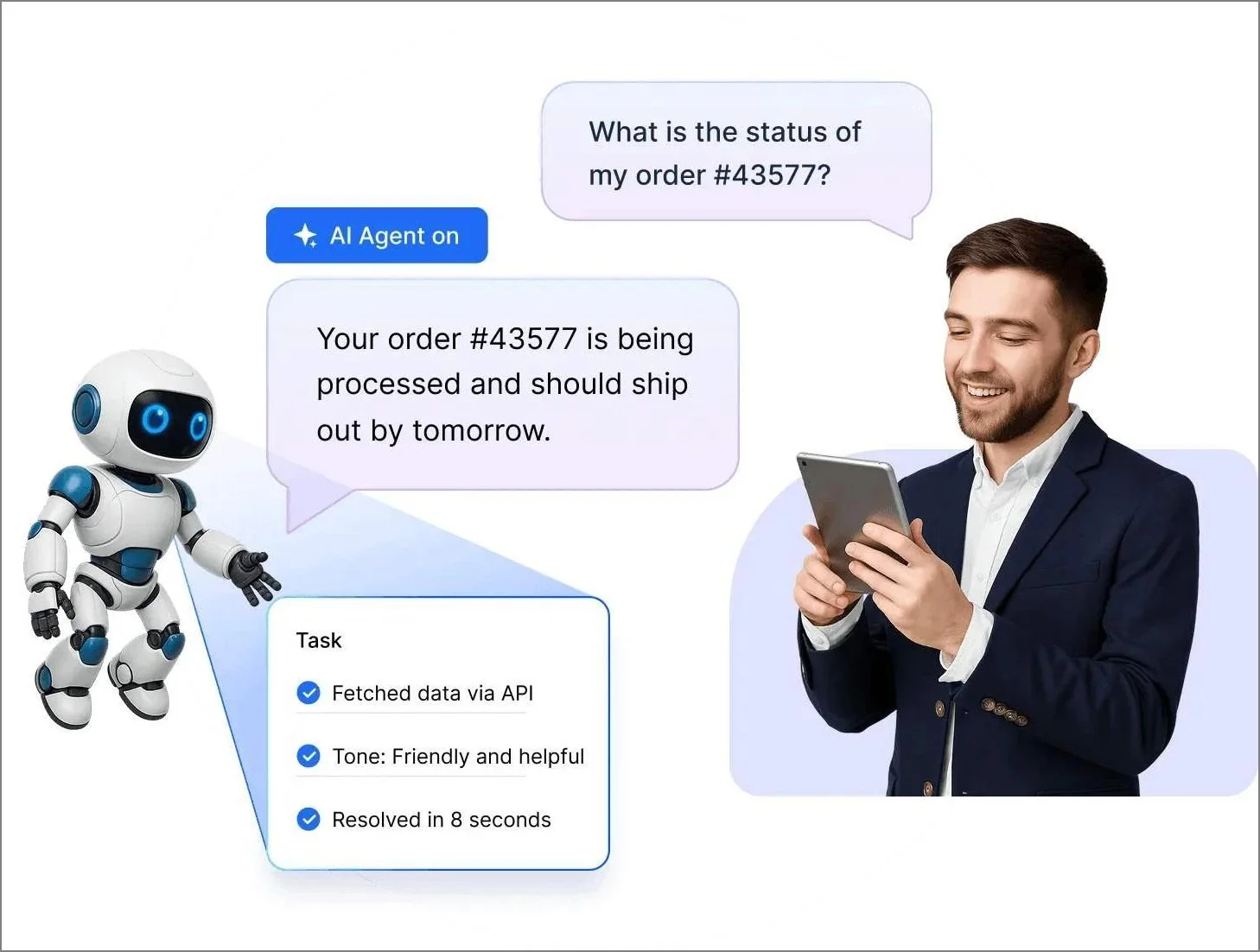
When human support is needed, the AI agent escalates the ticket with full context.
This approach reduces initial response times while maintaining a smooth handoff between automation and human support.
Email ticketing and smart responses
Automated email ticketing systems instantly convert incoming emails into support tickets and assign them to agents to keep workloads balanced.
When an email is received, the system sends an immediate autoreply to confirm the ticket creation and provide tracking instructions.
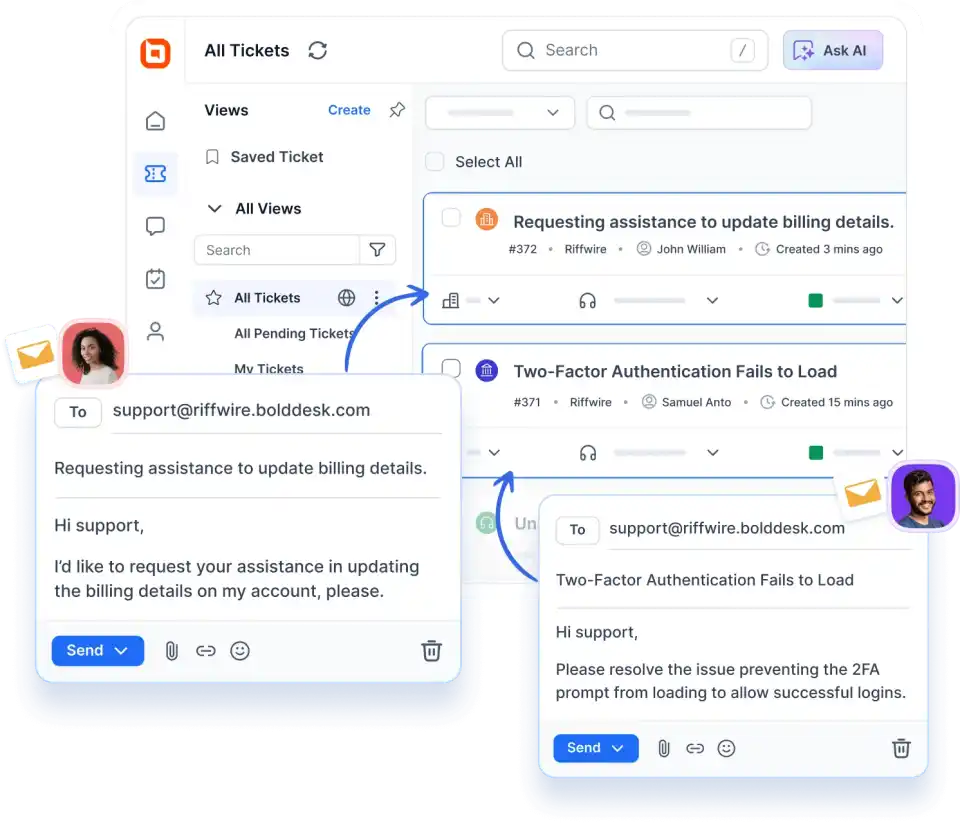
This ensures the customer knows their issue is being handled without an agent needing to manually type a confirmation.
Finally, when the ticket is closed, a feedback survey is automatically sent to measure satisfaction with the support experience.
Knowledge base
Knowledge base software supports automated customer support by enabling customers to resolve common issues without agent involvement.
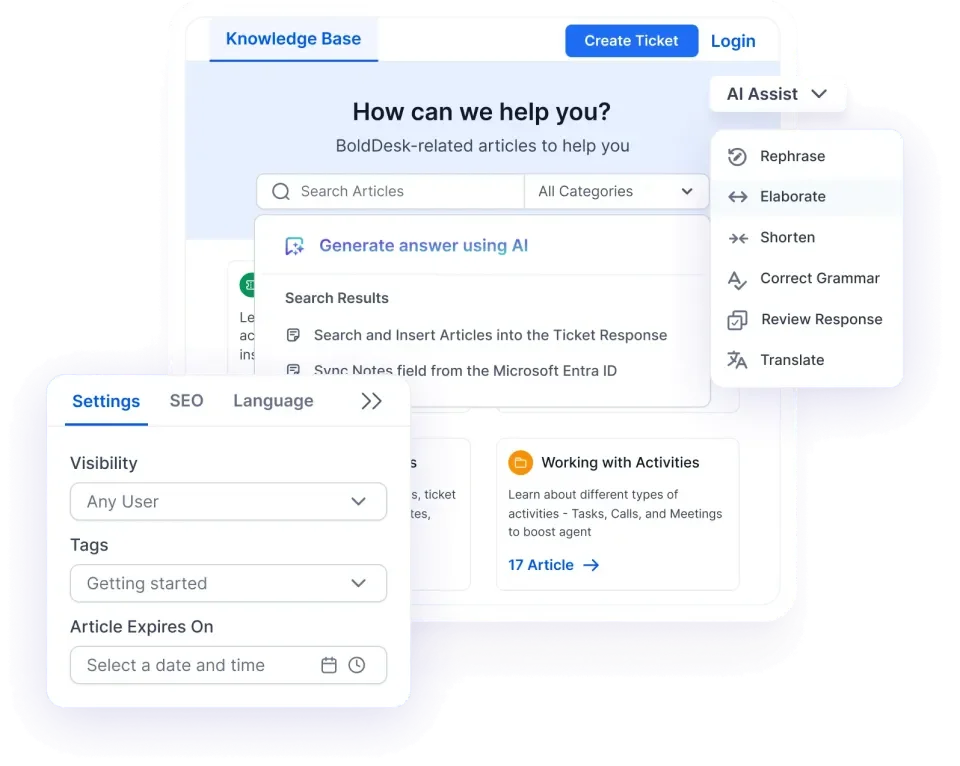
When customers search for help, knowledge-based AI surfaces relevant knowledge base articles based on keywords, intent, and context.
This allows customers to find accurate answers quickly, reduces repetitive tickets, and ensures support remains available at all times—without increasing agent workload.
Customer service automation: A long-term solution for growing teams
Customer experience automation is an ideal solution for businesses looking to offer more efficient customer service.
As one of the best productivity tools for support teams, automation allows companies to save on response and resolution time, increase customer satisfaction, and streamline support operations.
The most effective customer service combines the efficiency of automation with the empathy and problem-solving skills of support agents.
BoldDesk provides excellent customer service automation tools, featuring AI-powered ticket routing, smart auto-responses, and a self-service knowledge base to help take your support operations to the next level.
Schedule a live demo or start a free trial to see how automation can help you provide efficient customer service. You can also take a product tour to explore these automation features in action.
Have questions or feedback? Contact the BoldDesk support team for any requests or inquiries or leave a comment below to share your thoughts.
Related articles
- 7 Best Help Desk Workflow Automation Ideas
- 10 Help Desk Automation Ideas to Improve Productivity
- Autonomous AI Agents: A Smart Way to Deliver Excellent Support
Frequently Asked Questions
To measure success of support automation tools, track key customer service metrics like response time and CSAT scores, while also analyzing customer feedback and workflow abandonment points to spot areas that need improvement.