


TL;DR: ChatGPT for customer service works best as an assistive AI that improves response speed, consistency, and agent productivity. When grounded in approved knowledge, integrated into help desk workflows, and guided by clear guardrails, it enhances efficiency without compromising trust, security, or the human element.
As customers demand faster responses, consistent communication, and personalized support across channels, many businesses are adopting AI‑powered tools to assist customer service workflows.
ChatGPT for customer service enables support teams to meet rising customer expectations without overwhelming human agents.
When used correctly, the AI model helps agents handle higher conversation volumes and maintain consistent messaging, while humans remain responsible for judgment, empathy, and relationship management.
In this guide, you’ll learn how ChatGPT is used in customer support, its key benefits, practical prompt examples, and the limitations and safeguards organizations should consider before deploying AI in real‑world support environments.
What is ChatGPT?
ChatGPT is a generative AI assistant from OpenAI that can understand customer messages and generate helpful text responses.
In customer service, teams use it to draft and refine replies, summarize tickets and chat transcripts, categorize requests, and suggest troubleshooting steps based on approved knowledge, helping agents respond faster and more consistently.
Since ChatGPT can occasionally produce confident but incorrect or policy‑inaccurate answers, it should be grounded in approved support content and paired with human review and clear escalation rules.
How can you use ChatGPT for customer service?
ChatGPT in customer service works best as an assistive layer inside your help desk software, paired with clear human review and escalation rules.
Below are the most common and effective ways support teams use the AI assistant in real‑world customer service environments.
Respond to customer complaints and feedback faster
Handling customer complaints quickly is a daily challenge for support teams, especially when the same issues come up repeatedly.
ChatGPT can help agents draft timely, empathetic responses to common problems like product issues, shipping delays, and billing questions.
In practice, ChatGPT can assist in reviewing the incoming message, recommending the classification of the ticket, and suggesting a response that acknowledges the concern and outlines appropriate next steps.

Agents can then fine‑tune the tone or length depending on whether the reply is going out via email, social media customer service, or a review platform.
This reduces writing time, shortens response cycles, and helps teams maintain a consistent voice across channels, without removing human judgment from the interaction.
Summarize customer queries and conversation history
Understanding a customer’s full history is essential for effective support, but reviewing long threads and past interactions is time‑consuming.
ChatGPT can summarize customer queries and previous interactions, extracting key points, unresolved issues, and relevant context.
Instead of reading through dozens of replies, agents get a clear snapshot of what has already happened and what still needs attention, leading to:
- Faster handling times
- Fewer redundant questions
- Smoother handoffs between agents
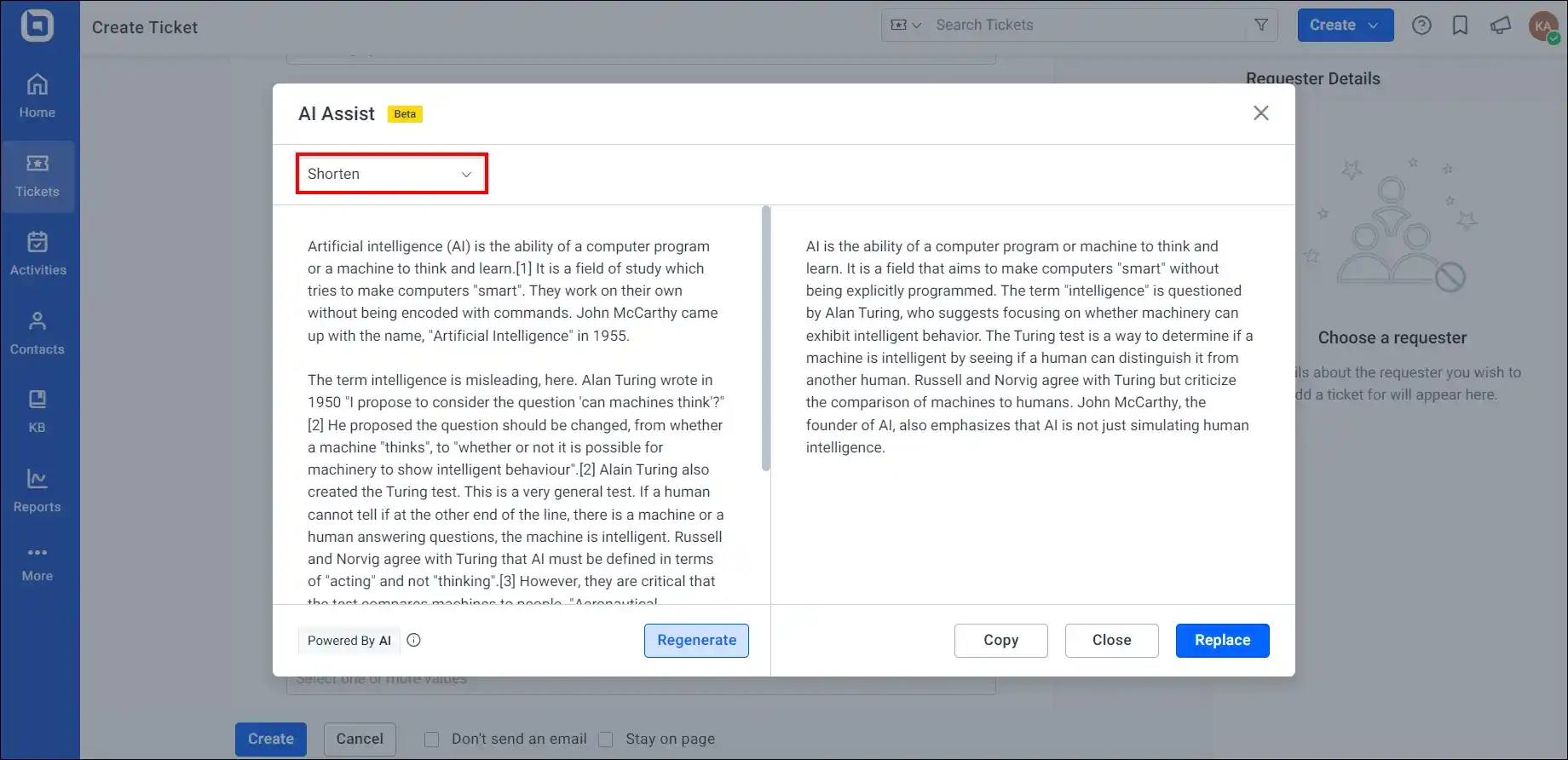
Categorize and prioritize conversations automatically
Deciding which tickets need immediate attention is not always straightforward, especially during high‑volume periods.
When integrated into help desk workflows, ChatGPT can assist by categorizing and prioritizing conversations based on topic, urgency, or sentiment.
This helps ensure time‑sensitive or emotionally charged issues are addressed promptly, while lower‑priority requests are routed appropriately.
Monitor and improve support quality
Maintaining consistent support quality across teams and channels is difficult to do manually at scale.
According to a study by Salesforce, 96% of customers say excellent customer service fosters trust.
ChatGPT can analyze past interactions to highlight patterns related to tone, clarity, responsiveness, and resolution quality.
With these customer insights, support leaders can identify coaching opportunities, while agents receive guidance during live chats, creating a feedback loop that supports continuous improvement without relying solely on manual reviews.
Provide multilingual support and translation
Supporting customers in multiple languages often requires significant staffing and coordination.
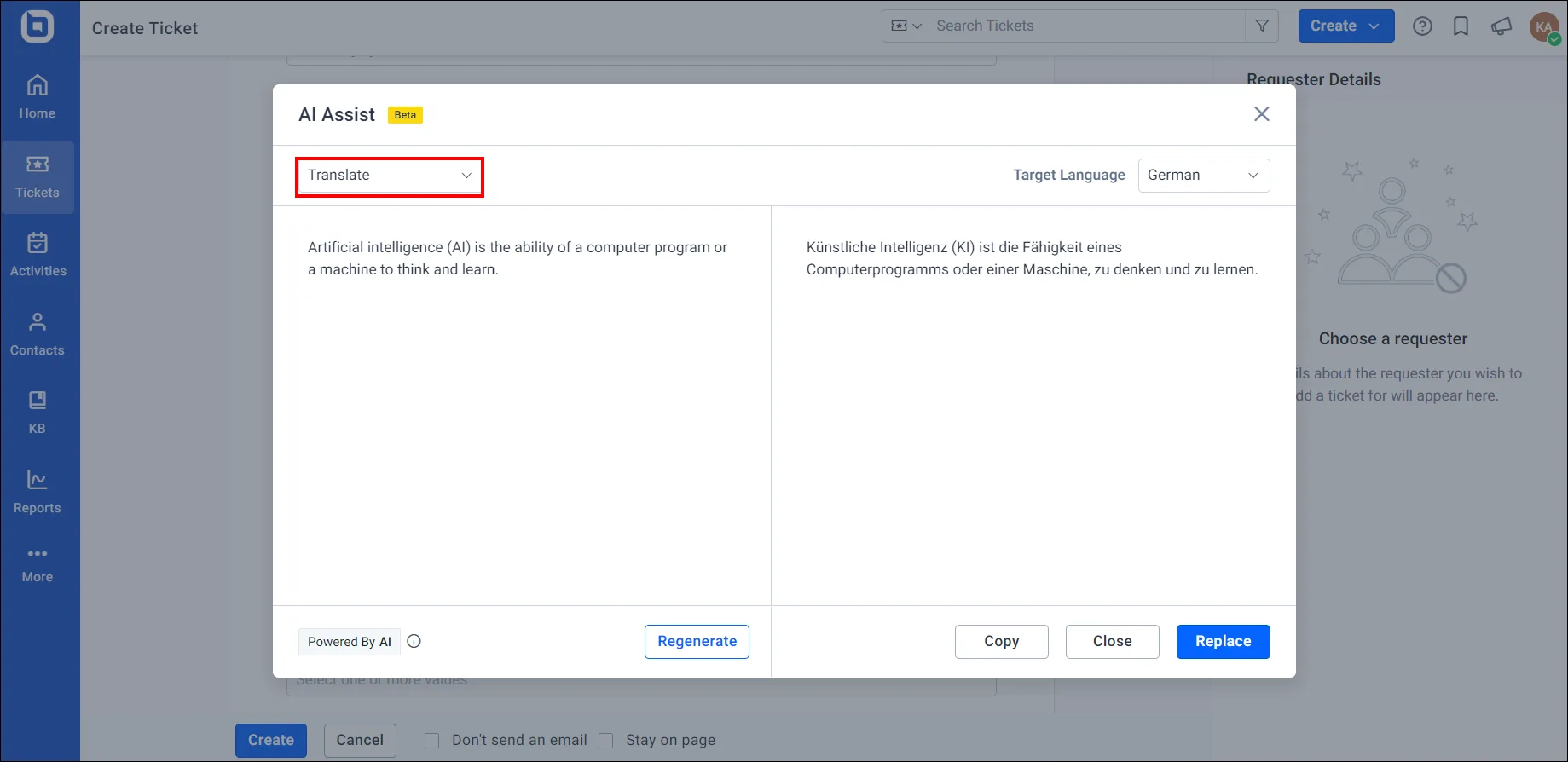
ChatGPT’s multilingual capabilities allow teams to translate incoming messages and generate responses in different languages when connected to customer support systems.
Agents can still review translations before sending responses, helping teams support a global customer base while maintaining consistent tone and messaging.
Analyze customer sentiment
Knowing how a customer feels is often just as important as understanding what they’re asking.
ChatGPT can analyze message tone to indicate whether a customer is frustrated, neutral, or satisfied.
By surfacing customer sentiment early, agents can adjust their approach, prioritize conversations that need extra care, and prevent issues from escalating, ultimately improving customer satisfaction.
Key benefits of using ChatGPT in customer service
Using AI for customer support provides a multitude of benefits that not only make operations more efficient but also improve the overall customer experience.
Here are the key benefits:

Assists with routine support tasks
ChatGPT can take over repetitive, low complexity tasks, such as:
- Responding to frequently asked questions.
- Providing solutions for common customer problems.
- Handling straightforward customer inquiries.
By streamlining routine interactions, support agents can focus on complex cases that require human judgment, empathy, and problem-solving.
This increases productivity while helping reduce manual mistakes and missed steps.
Accelerates response times
Speed is a critical driver of customer satisfaction.
According to Forrester, 66% of customers say valuing their time is the most important element of a good customer service experience.
ChatGPT helps teams respond faster by generating draft replies instantly, allowing agents to review and send accurate responses in less time, without compromising quality or tone.
Reduces operational costs
Hiring and training customer service representatives requires significant time and investment.
ChatGPT can scale instantly to support higher ticket volumes without requiring proportional increases in staff or infrastructure.
When applied responsibly, ChatGPT enables organizations to grow their support operations more efficiently while keeping costs under control.
Maintains consistent and on-brand communication
By grounding ChatGPT in approved support content, tone guidelines, and policies, teams can ensure responses remain aligned with brand standards even as volume scales.
This reduces conflicting answers, keeps messaging consistent across email, chat, and social media, and helps agents deliver reliable information without having to rewrite responses from scratch.
Challenges of using ChatGPT for customer service
While ChatGPT for customer service can improve efficiency and consistency, it also comes with important drawbacks.
Understanding these challenges and applying the right safeguards helps organizations use AI responsibly. These include:
Limited empathy and human judgment
ChatGPT can generate polite, professional language, but it doesn’t genuinely understand emotions or context the way a human does.
As a result, responses may feel generic or fail to address a customer’s underlying concern.
Solution:
- Use ChatGPT to draft responses, not send them autonomously.
- Route negative‑sentiment or high‑impact cases to human agents.
- Define clear escalation rules for sensitive customer interactions.
Accuracy risks (hallucinations)
ChatGPT may provide confident-sounding responses that are incomplete or incorrect, especially when questions involve edge cases, exceptions, or frequently changing policies.
Solution:
- Connect ChatGPT to approved knowledge base software, FAQs, and policies.
- Regularly audit and update support content.
- Use the AI tool for assistance and drafting, not final authority.
- Implement customer feedback loops to flag and correct incorrect outputs.
Limited business context without system integration
On its own, ChatGPT doesn’t know a customer’s order status, account history, entitlements, or previous resolutions.
Without controlled system access, responses may lack relevance or accuracy.
Solution:
- Integrate ChatGPT with your help desk or CRM using controlled permissions.
- Apply strict “use only this data” constraints.
- Limit AI access to read‑only or context‑specific information.
Privacy, security, and compliance concerns
Customer support interactions often involve sensitive data, such as personal, financial, health, or legal information.
Improper AI usage can introduce compliance and security risks.
Solution
- Avoid sending sensitive or personally identifiable information (PII) to the model.
- Apply data masking, role‑based access, and permission controls.
- Ensure AI usage complies with internal policies and data‑protection regulations.
- Clearly define what data ChatGPT can and cannot access.
Limited multimodal understanding in many setups
Many ChatGPT deployments are primarily text-based. When support cases depend on screenshots, photos, attachments, or audio, additional tooling or a human review is required.
Solution:
- Pair ChatGPT with tools that support screenshots, file uploads, and attachments.
- Route visually dependent or media-heavy issues to human agents.
- Use the AI-assisted tool to summarize text while humans interpret visual or audio inputs.
Difficulty handling multiple conversations
ChatGPT can respond quickly, but without proper setup, it may struggle to handle multiple issues raised in the same conversation.
When customers ask several questions at once, responses can be incomplete or focus on only part of the request unless the workflow guides the AI clearly.
Solution:
- Break complex customer messages into separate, structured tasks or tickets.
- Use your help desk system to queue, route, and prioritize conversations.
- Apply prompts that instruct ChatGPT to identify and address all issues step by step.
Best ChatGPT prompts for customer service with examples
A ChatGPT prompt is a structured input that guides the AI on what to do, how to respond, and what tone or details to include.
The following are example ChatGPT prompts for customer service agents to learn from during training and day-to-day support interactions.
1. Prompts for general customer service
These are scripted ChatGPT customer support prompts designed to help agents respond clearly to common support questions and guide customers through basic troubleshooting steps in a structured, easy‑to‑follow way.
Prompt:
A customer is having trouble logging in to their account. Write a clear and concise response explaining possible reasons and step‑by‑step troubleshooting instructions.
Example response:

2. Prompts to acknowledge customer concerns with empathy
These prompts can assist customer service agents when a response needs to recognize frustration or dissatisfaction while maintaining a professional tone.
Prompt:
Please provide five empathetic phrases a customer service representative can use to acknowledge a customer’s frustration and show understanding.
Example response:

3. Prompt to handle product or service-related inquiries
This can be used when customers request explanations of features, policies, or service terms.
Prompt:
A customer asks what a service level agreement (SLA) is and how it benefits their business. As a customer service agent, write a clear and easy‑to‑understand explanation.
Example response:

4. Prompt to draft knowledge base or help center content
These prompts are useful for turning common support situations into reusable documentation that customers and agents can reference later.
Prompt:
Please write a knowledge base article on “How to apologize to an angry customer as a customer service agent.”
Example response:

5. Prompts to resolve customer complaints and issues
These prompts are crafted to assist service agents in diagnosing problems, asking the right follow‑up questions, and guiding customers toward appropriate solutions.
Prompt:
A customer reports an issue with a specific product feature. Generate questions to identify the root cause and suggest appropriate next steps.
Example response:

6. Prompts to address shipping and delivery questions
These kinds of prompts aim to assist customer service agents in responding consistently to common shipping issues while reassuring customers and explaining resolution steps.
Prompt:
A customer received their order, yet one item is missing. As a customer service agent, draft a response that acknowledges the issue and explains the next steps.
Example response:

7. Prompts to assist with billing and payment concerns
Billing‑related prompts help agents gather missing information, clarify billing details, and provide accurate updates without exposing sensitive data.
Prompt:
A customer wants to check on their order, but doesn’t have their order number or payment details. Draft questions to help locate the order and provide an update.
Example response:

8. Prompts to manage cancellations and refunds
These prompts support agents in handling cancellations professionally while exploring alternatives and clearly explaining refund procedures.
Prompt:
A customer is interested in returning a product. As a support team member, ask for the reason, suggest an alternative, and explain the return process if they choose to proceed.
Example response:

How to write effective ChatGPT customer service prompts
Well‑structured prompts help ChatGPT generate clearer, more accurate, and safer responses for customer service teams.
Use the framework below to create prompts that are consistent, effective, and easy to review.
- Role: Define who the assistant should act as, for example, a customer support agent, QA coach, or knowledge base writer.
- Context: Specify the product or service, the communication channel (email, chat, or social media), and the customer’s situation or issue.
- Approved sources: Instruct ChatGPT to use only trusted content, such as your help center articles, internal documentation, or policy text, if available.
- Task: Clearly state what you want ChatGPT to produce, such as a draft reply, follow‑up questions, a conversation summary, or a knowledge base article.
- Constraints: Set boundaries for tone, length, reading level, formatting, and any information that should not be included.
- Escalation rules: Define when the conversation should be handed off to a human agent, such as cases involving negative sentiment, account‑specific issues, or complex requests.
- Privacy note: Instruct ChatGPT to redact or avoid sensitive data, including passwords, full payment details, government IDs, or other PII.
Future of ChatGPT and AI in customer service
Customer service has evolved significantly from traditional call centers and long wait times.
Today, tools like ChatGPT and other generative AI in customer service are helping teams respond faster, operate more efficiently, and support customers across channels, without removing humans from the process.
Looking ahead, the role of ChatGPT and conversational AI for customer service is expected to expand in practical, measurable ways. Key areas of development include:
- Seamless integration with support platforms: AI systems will become more deeply integrated with help desks, CRMs, and knowledge bases, enabling more context‑aware assistance within existing workflows.
- Advanced handling of complex scenarios: As AI models improve, ChatGPT will better support agents with complex issue analysis, summaries, and recommendations, while humans continue to make final decisions.
- More reliable and controlled responses: Advances in grounding, validation, and governance will help reduce inaccuracies and improve response consistency across customer interactions.
- Greater personalization with safeguards: AI will use customer context more effectively to tailor responses, while organizations apply strict privacy, security, and compliance controls.
AI will keep improving customer service outcomes, but the winners will be the teams that combine it with strong knowledge management, privacy and security controls, and human-in-the-loop processes.
Applying ChatGPT for customer service effectively
ChatGPT for customer service is reshaping how support teams work by helping them respond faster, stay consistent, and manage growing workloads more effectively.
It delivers the most value when used with the right guardrails, grounded knowledge, and human oversight.
Platforms like BoldDesk make it possible to apply ChatGPT responsibly by connecting AI assistance with tickets, knowledge bases, workflows, and escalation paths, so teams stay in control.
Start a free trial or request a live demo to explore how AI‑assisted support can work for your team.
If you have questions about implementation, governance, or best practices, our support team is available to help.
Have thoughts about ChatGPT for customer service? Share your experience, challenge, or use cases in the comments below.
Related articles
- Great Customer Service Skills Every Support Team Needs in 2026
- Automated Customer Service: Benefits, Tools and Best Practices
- Autonomous AI Agents: A Smart Way to Deliver Excellent Support
Frequently Asked Questions
ChatGPT can understand context and generate human-like text to assist with tasks such as drafting responses, summarizing conversations, categorizing requests, and analyzing sentiment in customer service scenarios.
When connected to approved knowledge and workflows, this tool helps teams work faster and more consistently while humans retain oversight and decision-making.
ChatGPT is a general-purpose large language model that generates natural language responses across a wide range of topics.
AI chatbots, by contrast, are a broader category that includes both rule-based bots and LLM-powered bots.
In customer service, ChatGPT handles more open-ended requests, while rule-based chatbots work best for predictable FAQs and fixed workflows.
You can use ChatGPT safely by limiting it to approved knowledge sources, masking or redacting sensitive fields, and preventing personally identifiable information (PII) from being sent to the model.
In customer service workflows, the AI assistant should operate with role-based access, clear data boundaries, and human review so sensitive customer data remains protected.
Success is measured using operational and customer experience metrics such as response time, agent productivity, first contact resolution, and consistency of replies.
Customer satisfaction scores, agent feedback, and the frequency of human edits or escalations also help assess whether ChatGPT is adding real value.
ChatGPT is usually integrated through APIs or built-in AI features that connect it to tickets, knowledge bases, workflows, and routing rules.
Effective integrations focus on control and context, ensuring the AI uses approved data while agents review responses and handle complex cases.